
You are using an out of date browser. It may not display this or other websites correctly.
You should upgrade or use an alternative browser.
You should upgrade or use an alternative browser.
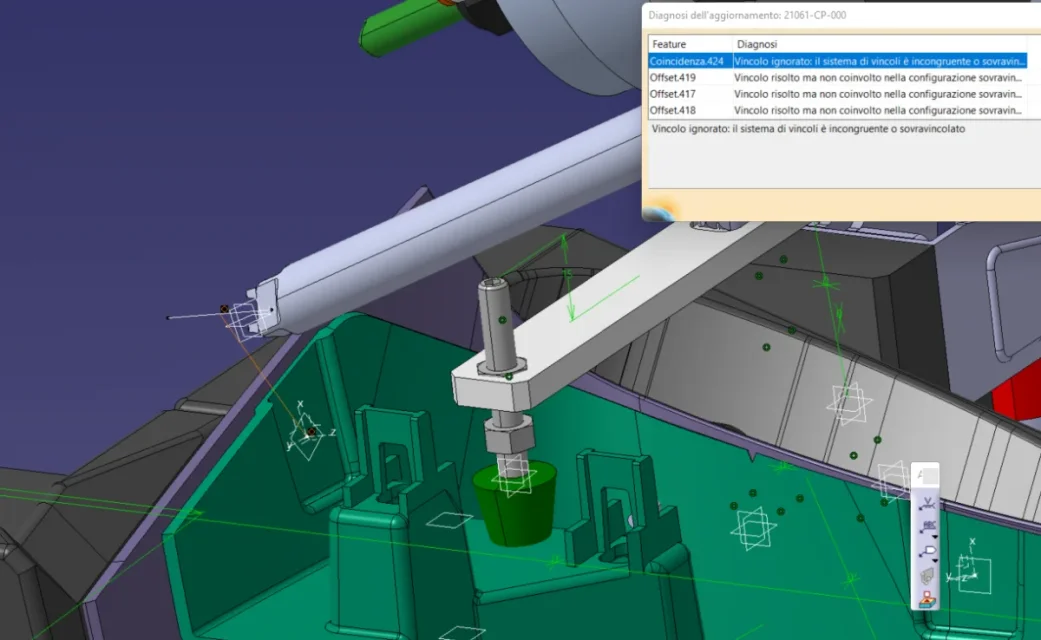
problemoneee with constraints
falonef
Guest
in the image you see in total 4 constraints.
normally 3 should be enough.
normally 3 should be enough.
emanuele grasso
Guest
and no.. I also need the fourth bond
I'll explain. I have a base with a robot and a table on which it flows a piece
I fixed with the command "fix "
-basement
- fixed robot axis (base)
- Yes.
I put all the correct constraints between the axes of the robot and the tool (of course) I put it coincident with the center of the piece. .I don't understand why this coincidence doesn't put it to me while being in the full range of reachability of the robot
I'll explain. I have a base with a robot and a table on which it flows a piece
I fixed with the command "fix "
-basement
- fixed robot axis (base)
- Yes.
I put all the correct constraints between the axes of the robot and the tool (of course) I put it coincident with the center of the piece. .I don't understand why this coincidence doesn't put it to me while being in the full range of reachability of the robot
emanuele grasso
Guest
I solved. There was a boolean operation that gave me problems.. It made me go into an endless loop
another question: I used the "lock together" command to move more parts in the same untied together.. the problem is that if I move a component manually, I don't even move the others while having them stuck together.
another question: I used the "lock together" command to move more parts in the same untied together.. the problem is that if I move a component manually, I don't even move the others while having them stuck together.
mcbramby
Guest
If you try to move an object with the trepod, holding down the keyboard case, if you do not move in any way it means that it is blocked by the constraints...... is a proof that you can do x see if a product or part is sufficiently bound ........... .
emanuele grasso
Guest

mcbramby
Guest
si
falonef
Guest
using the analyze > degree(s) of freedom option will appear a component graphics with arrows indicating which degrees of freedom still exist
falonef
Guest
Here's how it looks

emanuele grasso
Guest
Thank you.
falonef
Guest
I indicated in the post before the photo.
You have to go to the menu.
I know there is no button
You have to go to the menu.
I know there is no button