• This forum is the machine-generated translation of www.cad3d.it/forum1 - the Italian design community. Several terms are not translated correctly.

projecting

  • Thread starter Thread starter marcofa
  • Start date Start date

marcofa

Guest
how do you project the profile of a pocket of a part on another part both of the same together?
Thank you.
Mar
 
I've solved it.
select the part on which you want to project the elements of the other part b (partdesign)
select the part plan on which you want to project and activate sketcher.
select the part b elements that you want to project, holes or pockets, holding the ctrl key.
press the "project 3d elements" button while maintaining or maintaining the connection.
Get out of the sketcher.
in the new sketch created will be all the elements projected, of which you can do what you want.
Mar
 
...
press the button "project 3d elements" maintaining or maintaining the connection.
...
What do you mean by connection? the attachment of the projection to the position of the piece that generated the projection itself?
How do you keep the connection? When I get out of the yellow sketcher, it gets white.
Thank you.
 
for falonef:
on part to no change
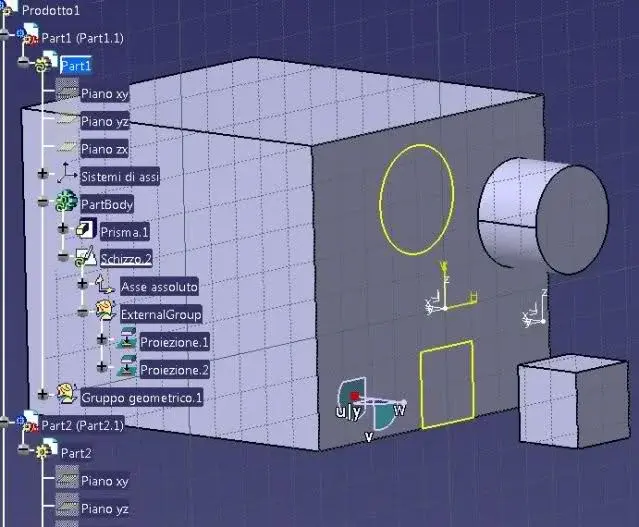
on part b you add an icon to the bottom left only if you keep the connection.

for him
after selecting the project key opens a mask that asks you whether you want to maintain or not the connection with the a part. if you keep the connection, in case you move the projected feature of the part to it will be automatically modified also in part b
Mar
 
for him
after selecting the project key opens a mask that asks you whether you want to maintain or not the connection with the part to
I think I've never seen this window/option.
This is what happens when I click on the button:

2m61wl3.jpg

I then tried to move and rotate on a board part2 and update but it aligns only on the bond of parallelism but the projections as you see remain in the previous state.

av1wqv.jpg

Would you show me how this window is?
Thank you very much.
 

Attachments

  • 2m61wl3.webp
    2m61wl3.webp
    48.6 KB · Views: 8
  • av1wqv.webp
    av1wqv.webp
    12.1 KB · Views: 8
Last edited by a moderator:
Bye.
in addition to letting the parameterity active (command with shaft and lightning disabled i.e. not red) you must enable this option:
options-->infrastructure-->part infrastructure--> under the curtain "general"-->outside references--->conserve the connection with the selected object.
we waved
 
for falonef:
on part to no change
on part b you add an icon to the bottom left only if you keep the connection.

for him
after selecting the project key opens a mask that asks you whether you want to maintain or not the connection with the a part. if you keep the connection, in case you move the projected feature of the part to it will be automatically modified also in part b
Mar
well if you have another "green toothed roote" symbol work in context and are dependent on 1. catpart
 
Bye.
in addition to letting the parameterity active (command with shaft and lightning disabled i.e. not red) you must enable this option:
options-->infrastructure-->part infrastructure--> under the curtain "general"-->outside references--->conserve the connection with the selected object.
we waved
the problem was precisely this (options->...), I do not understand why it was disabled, I also tried to restore the defaults but remained disabled.
Thank you.
 

Forum statistics

Threads
44,997
Messages
339,767
Members
4
Latest member
ibt

Members online

No members online now.
Back
Top
