
You are using an out of date browser. It may not display this or other websites correctly.
You should upgrade or use an alternative browser.
You should upgrade or use an alternative browser.

alpole
Guest
Luca,
If you have projected, the curve must lie on the surface,
Perhaps the projected curve is not closed and for this reason
can prevent the cut of the surface, however the program should give you
an error message....? ? ? ?
you can try to perform a sweept with sform direction, profile
that you projected, with angle imposed by you, create a surface that intersects multisection, and use it for cutting... .
to the
If you have projected, the curve must lie on the surface,
Perhaps the projected curve is not closed and for this reason
can prevent the cut of the surface, however the program should give you
an error message....? ? ? ?
you can try to perform a sweept with sform direction, profile
that you projected, with angle imposed by you, create a surface that intersects multisection, and use it for cutting... .
to the
panormus
Guest

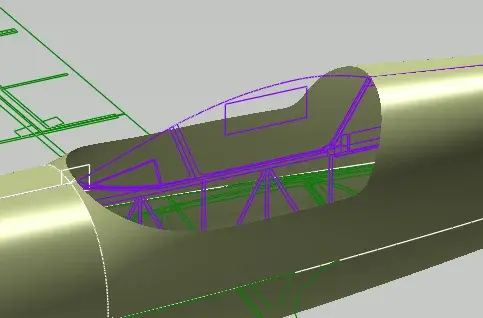
panormus
Guest
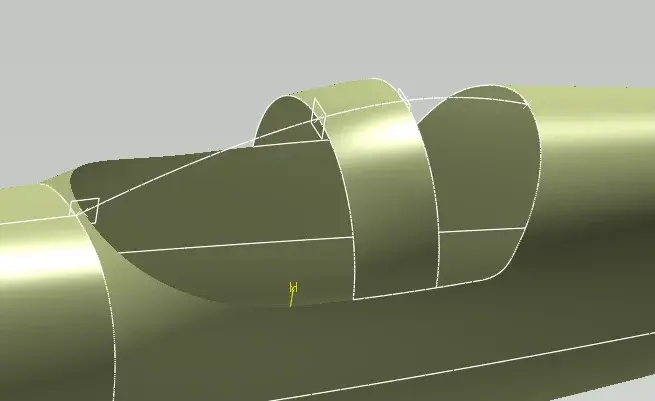
alpole
Guest
♪
you can reuse the initial surface, if you don't unpack a multisection,
by making small offsets in positive or negative , depending on where you want to place the closing cup, compared to the structure (internal or external )-
then, extract the edges of the new surfaces you have created (effettuating the cuts
If this is the case, join them to create two closed contours.
(front and rear) and use them, projecting them, if you can, on the
the surface of which you did the offset, you got the edges on the surface.
At this point you should, with the parallel curve command, make an offset of these edges, on the support and, once created, use it to cut the surf-
then with blend make the fittings, between the edges of the surfaces, that of offset cut
and the original one of which you extracted the edges-
I hope you understand me ... it is not so simple to explain
All the steps... on the other hand I don't have much time to give you an example-
If you want, you can send me one straw of the file, with your area.
interest, I will send you back
to the
you can reuse the initial surface, if you don't unpack a multisection,
by making small offsets in positive or negative , depending on where you want to place the closing cup, compared to the structure (internal or external )-
then, extract the edges of the new surfaces you have created (effettuating the cuts
If this is the case, join them to create two closed contours.
(front and rear) and use them, projecting them, if you can, on the
the surface of which you did the offset, you got the edges on the surface.
At this point you should, with the parallel curve command, make an offset of these edges, on the support and, once created, use it to cut the surf-
then with blend make the fittings, between the edges of the surfaces, that of offset cut
and the original one of which you extracted the edges-
I hope you understand me ... it is not so simple to explain
All the steps... on the other hand I don't have much time to give you an example-
If you want, you can send me one straw of the file, with your area.
interest, I will send you back
to the
panormus
Guest
Thank you, she's gone.
panormus
Guest
place still here not to open posts.. I see too much my name lately:biggrin:
I extrapolated a edge from a surface and when I select the edge to make a multisection tells me that the same is not connected to the surface?
but how is it possible if it is extracted from the surface itself?
bye
I extrapolated a edge from a surface and when I select the edge to make a multisection tells me that the same is not connected to the surface?
but how is it possible if it is extracted from the surface itself?
bye
Attachments

Forum statistics
ciao