• This forum is the machine-generated translation of www.cad3d.it/forum1 - the Italian design community. Several terms are not translated correctly.

publication

  • Thread starter Thread starter marcofa
  • Start date Start date

marcofa

Guest
is trying to focus the publication with subsequent replacement of part without losing constraints.
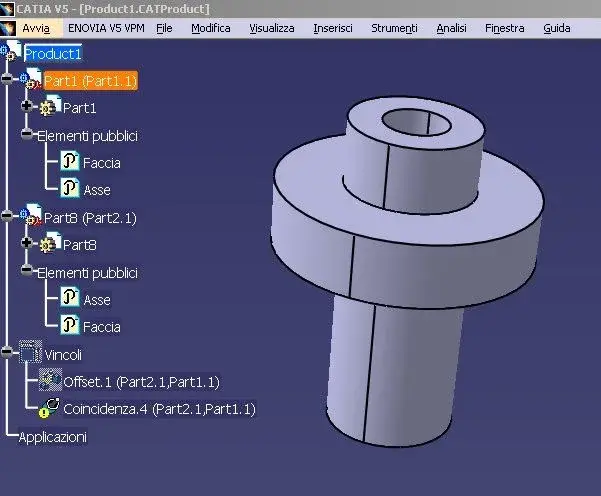
the starting aid is product1.jpg
I then replace short part2 with longer part8.
the result is product1.1.jpg where the coincidence of the axes has been lost
replacing part8 with part2 i.e. returning back you return to product1.jpg where the coincidence is connected again.
I also attach catiar20 files.
Can anyone distract me?
Mar
 

Attachments

  • Product1.webp
    Product1.webp
    31.9 KB · Views: 12
  • Product1.1.webp
    Product1.1.webp
    30.2 KB · Views: 9
  • Pubblicazione.zip
    Pubblicazione.zip
    61.5 KB · Views: 6
check if the name of the published object appears in the constraint definition window.
if this does not happen, the replacement does not go to good end.
when using the constraints published in the execution of the command uses the lebels on the tree of the published parts.

in particular when you are dealing with coaxiality, you find yourself with this mistake of review;
when using the public command, the system publishes the cylindrical face, while when using the coaxial command the axis of the hole and/or tree is used, so the system does not use the published object but another element which by force of things when applying the replacement is lost.

search the forums and find how to publish the axis of a hole.

Hi.
 

Attachments

  • vincolo.webp
    vincolo.webp
    51.2 KB · Views: 12
the publication of the hole or the tree is done correctly:
click dx on the diameter, other selection, click on axis.
However, despite this, the name does not appear in the bond window.

"when you use the constraints published in the execution of the command, use the lebels on the tree of the published parts."

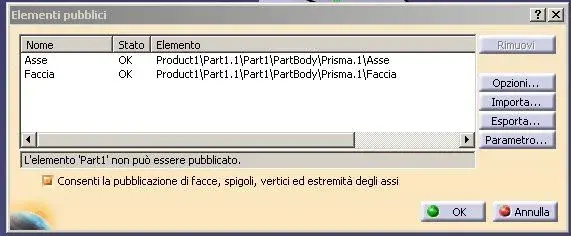
I can't in any way make the name appear in the bond window, despite that in the publishing window appear (see photo)
Mar
 

Attachments

  • Asse.webp
    Asse.webp
    18.5 KB · Views: 15
"when you use the constraints published in the execution of the command, use the lebels on the tree of the published parts."

but this is moooooool antipathetichttp://www-01.ibm.com/support/docview.wss?uid=swg1hd52232in this document it is stated that the problem is solved by r18

it would mean that to create any bond, only for the axes you have to go to search in the tree the label, instead for all the rest you can click the element.

the strange thing is that by lighting the axis of the part with the arrow, the label of the publication is also illuminated, as vice versa. Why then doesn't it work in both ways like the rest of the commands?
Mar
 
the solution is easier than you are looking for.

if you have noticed when you load a part in a set you will notice that the labels of the published are visible regardless of the geometry of the part, so, you then mate the parts independently from the geometries, in particular this happens, when you connect a very large geometry with a very small one (e.g. screw m5 on a drilled plate 5000x3000 mm with a hole that is located on a corner opposite to the plate reference system), sometimes you
so from the tree access more easily to information than directly from the geometry.
My advice is that you have to get used to searching for information about the tree, more than on the geometric part, because beyond everything, sometimes working, you lean on wire-frame geometry that are kept mostly hidden.

Hi.
 
You're right, but it's just as true that in some cases you have to unmask the tree to get down many levels to identify the desired flag.
I found that by replicating the publications wanted at product level (also multiple levels) the flags become accessible immediately without mapping.
What do you say?
Hi.
Mar
 
You're right, but it's just as true that in some cases you have to unmask the tree to get down many levels to identify the desired flag.
I found that by replicating the publications wanted at product level (also multiple levels) the flags become accessible immediately without mapping.
What do you say?
Hi.
Mar
I did some tests, in fact I had never tried to replicate the same published parts in their product and indeed the behavior is interesting, perhaps the only observation I can raise (always that, I followed your own way to replicate the constraints), you do a double job in replicating the published ( once in the parts and once in the product).
Sometimes I do it when some of these published reuse them to place a set in a larger set, just to avoid opening too many branches of the tree.
It's very interesting, I'm still creating some cases. I'll let you know.

Hi.
 
if the publication is made only at product level (i.e. not before in part) automatically dupplicates even in part, then the job is not double.
Mar
 

Forum statistics

Threads
44,997
Messages
339,767
Members
4
Latest member
ibt

Members online

No members online now.
Back
Top