• This forum is the machine-generated translation of www.cad3d.it/forum1 - the Italian design community. Several terms are not translated correctly.

purge work directory creo 1.0

  • Thread starter Thread starter mtvonno
  • Start date Start date

mtvonno

Guest
Hi.
I can't find the command to purge the work directory in creo 1.0.
help!!!:bekle:
Is there a command or should I do anything else?
Thank you.
 
in search commands type window system, click on this the usual system window then write purge.. .

aminati

p.s. you can also insert the "Open System Window" icon in the command bar
 
Okay thank you, I opened the window, but it doesn't accept the command either with purge or with purga... So I have to create the file or copy it?
 
Hi, my name is antonio and I just joined the site. Let's see if I can help you:
from any environment (model, together or table) after you saved the job try with files, manage files, delete previous versions. a bar should appear where it proposes the name of the file to purge the previous truths. by clicking on the green flag should clean everything. I use it "regularly."
soon
 
Hi, my name is antonio and I just joined the site. Let's see if I can help you:
from any environment (model, together or table) after you saved the job try with files, manage files, delete previous versions. a bar should appear where it proposes the name of the file to purge the previous truths. by clicking on the green flag should clean everything. I use it "regularly."
soon
read above.... the solution has already been given.
 
in search commands type window system, click on this the usual system window then write purge.. .

aminati

p.s. you can also insert the "Open System Window" icon in the command bar
Nothing to do. Maybe there's some compatibility problem with w7 or something. that you know there is a spurge version > 3.3 that works with creo parametric 1.0 and 2.0?
Can someone using creo 1.0 do what is described by aminati?
 
Nothing to do. Maybe there's some compatibility problem with w7 or something. that you know there is a spurge
Can someone using creo 1.0 do what is described by aminati?
Yes, no problem.. what error do you have? Can you access the creo system window? When you type "purge" from this window, do you get any error messages?
 
I get this message. . .
but if I try to copy and paste the purge.bat (which I find in the creo1.0\parametric\bin folder) in the directory to be cleaned tells me "impossible to find the specified path"
Perhaps it is precisely to change the purge.bat
 

Attachments

  • 2012-12-04 11 53 51 (2).webp
    2012-12-04 11 53 51 (2).webp
    6.3 KB · Views: 70
I get this message. . .
but if I try to copy and paste the purge.bat (which I find in the creo1.0\parametric\bin folder) in the directory to be cleaned tells me "impossible to find the specified path"
Perhaps it is precisely to change the purge.bat
the system path variable must also contain the "bin" folder where the purge command is present. usually the installation of creo provides to change such variable; if instead your installation was only copied, or run it from the network, here you may have problems.

in order not to touch the variable by hand, you could relaunch the command "ptcsetup" always present in the "bin", among other things should really create the correct environment variable, and after the purge will work

Hi.
 
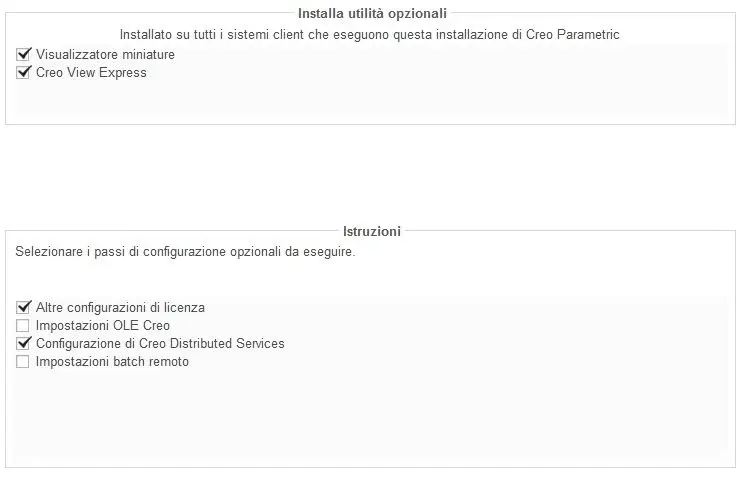
I tried but nothing, it doesn't change the purge.bat. Isn't it that I have to check out other settings here?
 

Attachments

  • 2012-12-04 13 17 46 (2).webp
    2012-12-04 13 17 46 (2).webp
    14.2 KB · Views: 18
I tried but nothing, it doesn't change the purge.bat. Isn't it that I have to check out other settings here?
on the screen before there is a check that is already set on "environment modification system for all users", should be that.

However the purge.bat does not need to touch it. .simplely it will be windows to "find" purge when you launch it, once the ptcsetup will have added the variable to the system path.

but just to check this path... from a command prompt you can write the set path command and tell us what returns you?
 
what returns is this, I can’t see more unfortunately from the prompt window
 

Attachments

  • 2012-12-04 14 04 25 (2).webp
    2012-12-04 14 04 25 (2).webp
    32.1 KB · Views: 14
what returns is this, I can’t see more unfortunately from the prompt window
we miss the path where to find the purge, in fact. the ptcsetup can't put it.. Are you PC administrator?

Anyway, let's cut the bull's head. search the purge by browsing the path where creo is installed, should be in your case:

c:\program files\ptc\creo 1.0\parametric\bin

Once you have found the path, go to "Control Panel\System and Security\System" (or right-click on the computer resource icon), then advanced system settings, environment variables.
search for the variable path and add your path of the bin (an eye that takes the point and comma between one path and the other).

restart everything, turn around and after the purge should go.. :wink:
 
great job!!! beautiful nick!!! as always your contribution, thank you again for availability!

but I wondered, a multipurpose utility like spekan purge version for creo does not exist? would be useful to delete all those .log .idx .out files etc...
verse 3.3 that is here on the forum also works for creo 1 and 2? I tried to install it but in the settings it indicates me until wf3, it seemed useless to continue
 
great job!!! beautiful nick!!! as always your contribution, thank you again for availability!

but I wondered, a multipurpose utility like spekan purge version for creo does not exist? would be useful to delete all those .log .idx .out files etc...
verse 3.3 that is here on the forum also works for creo 1 and 2? I tried to install it but in the settings it indicates me until wf3, it seemed useless to continue
Please!
installed 2.3 always from questo thread of the forum, during installation does not ask you any version of proes; since the proe/creo rescue mechanism is always the same...you should work smoothly
:finger:
 
it works and it's all right, soon and thank you!
Please. I also tried version 3.3, always taken from that thread : when you ask the folder where proe/creo is installed, tell him "c:\temp" or another random folder, as long as it exists..he will proceed and install you the program correctly :wink:
 

Forum statistics

Threads
44,997
Messages
339,767
Members
4
Latest member
ibt

Members online

No members online now.
Back
Top