
• This forum is the machine-generated translation of www.cad3d.it/forum1 - the Italian design community. Several terms are not translated correctly.

push-pull cable/cinematism

  • Thread starter Thread starter mambo1988
  • Start date Start date

mambo1988

Guest
Good evening to all,

Have you ever come across push-pull cable modeling? are cables to push and pull a component.
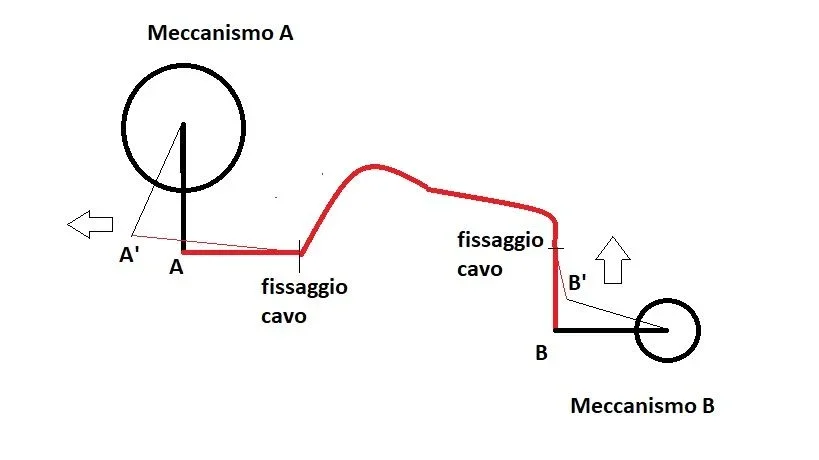
we imagine having a mechanism with a mobile point e un b mechanism with a b mobile point, initially independent among themselves,
these two mechanisms, subsequently, are connected by a cable, whose path in space, can be connected to a spline with the two straight terminal traits which are bound respectively to point a and b.
Is there any way to relate the move of the point to with the move of point b through a cinematic analysis on creo?

practically, what I would like to do is to see the point at which it moves, together with point b, unfortunately until today I can only move the individual mechanisms a and b.

Thank you all.
 
hi, there is a quite simple way, i.e. use double filming rack-ing/ingranaggio-cremagliera.
1: Create a cylindrical component that will be your gear with "pin" connection in this cinematism (if you have the advanced assembly, create a skeleton of cinematism, inside the skeleton create a second cylindrical skeleton with "pin" connection that will be the "engineering" of the system).
2: where you will connect the cable into the a and b mechanisms, the components will have to be assembled with the "course" constraints (and will be the "arms" of the system)
3: Step to the mechanism mode and create a "cremagliera-ingranaggio" connection between the "course" component of the "a" mechanism and the previously created gear, report put 1:1
4: do the same with the mechanism "b" and the gear
5: Check that motion verses are consistent, in case you return in mechanism mode and reverse motion senses.

n.b. the gear component can be inserted anywhere in the set, as long as it is a "pin" connection and you can still use it for high connections if your cable doubles and moves multiple mechanism simultaneously, while if you have other mechanisms with different cables. you will need to create other gears (in assembly, obviously do not overlay the gears, otherwise it becomes difficult to identify them during modification or arrangement).
 
hi 320i, thanks for the celere support.
I will try to follow your indications, even if on the skeleton always use the classic ones (in fact to carry out the handling, then insert cinematic constraints between components, change control on the copy geometry from automatic to manual).

(b) to the Commission;
 
hi 320i, thanks for the celere support.
I will try to follow your indications, even if on the skeleton always use the classic ones (in fact to carry out the handling, then insert cinematic constraints between components, change control on the copy geometry from automatic to manual).

(b) to the Commission;
I forgot that to use the mechanism skeleton, the string must be implemented in the config:

multiple_skeletons_allowed -> yes

we say that the mechanism skeleton makes sense when you need many support elements for similar mechanisms, but as long as you are limited to 1 or 2 elements, you can do without it.
 
[MENTION=69538]320i s[/MENTION] I insert an image to make better what I would like to do.Meccanismo_esempio.webpthe mechanism a and b has cinematic constraints such as to allow the rotation of the biellas, I would like to model the cable to fix it and to bind it punctually in points a and b so as to transmit the motion from a and b according to the runs of the cable and angle of maximum snode.

I would not like to use the mechanism;) because it is all in the definition phase.
 
modeling the cable and binding it is to all effect a mechanism (see the cable at any point of the guides that moves, not even the mechanism is enough), so the kinematic constraints are necessary, you can make a sudium with sketch and bind them, but believe me if I tell you that you understand things a lot and it will be even more difficult to change the system, instead through the mechanism once defined the constraints in "furba" way (not directly with the geometries definition,
 
modeling the cable and binding it is to all effect a mechanism (see the cable at any point of the guides that moves, not even the mechanism is enough), so the kinematic constraints are necessary, you can make a sudium with sketch and bind them, but believe me if I tell you that you understand things a lot and it will be even more difficult to change the system, instead through the mechanism once defined the constraints in "furba" way (not directly with the geometries definition,
hi 320i s, unfortunately I can not easily get what I would like.

I carry this case back to you, I simply modeled the cable made up of a rigid part in grey and two ends, in green, furniture.
with cylinder type constraints I can handle the two ends independently. Unfortunately I cannot find such a bond for which moving end 1 moves end 2 with the same stroke.(see image)cavo.webpI do not see how to do differently the application, moreover @320i do not understand what differs the classic skeleton from motion skeleton, at first glance they look equal.

Thank you! ! ! !
 
we go by order:
-the kinematic constraints can be chained, only if the cascade components are connected together; if they are distant from each other, you have to create a mechanism (grinding-engineering, gear-crewing, endless gear-wheeling, belt etc.), in your case, the parts of the cable, are not directly bound together, but at a distance, you can only solve it with a type mechanism as I explained above.
- motion skeleton is a set of skeletons, thought to be able to design the mechanism in its operation, without having to complicate the final axieme of the project, of the cinematic constraints on the parts, clear that if you have a simple mechanism, it is not necessary, but if you have a very complicated mechanism, it comes back decidedly comfortable; of mine when I already have 2 mechanisms to manage, I prefer motion skeleton; without motion skeleton, even making a set of skeleton, becomes impossible and you should put single skeletons, at the main level of project assembly and seeing them in fact in the model tree (until they are 2 or 3 no problem, when they begin to be 7 or more, see that having them and managing them inside a set with dedicated functions, becomes more comfortable.
 
we go by order:
-the kinematic constraints can be chained, only if the cascade components are connected together; if they are distant from each other, you have to create a mechanism (grinding-engineering, gear-crewing, endless gear-wheeling, belt etc.), in your case, the parts of the cable, are not directly bound together, but at a distance, you can only solve it with a type mechanism as I explained above.
- motion skeleton is a set of skeletons, thought to be able to design the mechanism in its operation, without having to complicate the final axieme of the project, of the cinematic constraints on the parts, clear that if you have a simple mechanism, it is not necessary, but if you have a very complicated mechanism, it comes back decidedly comfortable; of mine when I already have 2 mechanisms to manage, I prefer motion skeleton; without motion skeleton, even making a set of skeleton, becomes impossible and you should put single skeletons, at the main level of project assembly and seeing them in fact in the model tree (until they are 2 or 3 no problem, when they begin to be 7 or more, see that having them and managing them inside a set with dedicated functions, becomes more comfortable.
Thank you. [MENTION=69538]320i s[/MENTION] for the straights, in the end I managed to connect all the mechanisms in the correct way! ! !
I use proe /creo for about 2 years and usually after designing an axieme with all children in default position, using a skeleton, I find myself changing control over copy geometry from automatic to manual to be able to move all the system by inserting cinematic constraints. This allows me to measure shifts and angles in real time without using the mechanism module, but I have the constraint that if you want to change the various components I have to "reposition them" in default configuration and then change the geometry copy, it is a somewhat Moroccan system. ...
 
Thank you. [MENTION=69538]320i s[/MENTION] for the straights, in the end I managed to connect all the mechanisms in the correct way! ! !
I use proe /creo for about 2 years and usually after designing an axieme with all children in default position, using a skeleton, I find myself changing control over copy geometry from automatic to manual to be able to move all the system by inserting cinematic constraints. This allows me to measure shifts and angles in real time without using the mechanism module, but I have the constraint that if you want to change the various components I have to "reposition them" in default configuration and then change the geometry copy, it is a somewhat Moroccan system. ...
personally I also put the updating in manual to copy, but I try to limit them as much as possible, especially in very simple pieces and above all avoided as the plague the concatenations of copy geometry with the skeleton and the parts.
in simple mechanisms you can also use family tables with the skeleton, but now I'm generalizing a lot, everything depends on the mechanism in question.
the mechanism module is by now default in the base package for years in pro-e/creo, I see a possibility not to be discarded, it would be like to design sheets with the solid module and not with the sheet module. . .
 
Thank you. [MENTION=69538]320i s[/MENTION] for the straights, in the end I managed to connect all the mechanisms in the correct way! ! !
I use proe /creo for about 2 years and usually after designing an axieme with all children in default position, using a skeleton, I find myself changing control over copy geometry from automatic to manual to be able to move all the system by inserting cinematic constraints. This allows me to measure shifts and angles in real time without using the mechanism module, but I have the constraint that if you want to change the various components I have to "reposition them" in default configuration and then change the geometry copy, it is a somewhat Moroccan system. ...
Good evening. [MENTION=69538]320i s[/MENTION], I managed through the gear command in "mechanism" to bind the two ends of a cable, i.e. moving, along the axis, one end the other moves according to the transmission ratio imposed.
Unfortunately in my case I have an extra complication, in addition to having to translate, in one end there is also a ball-type bond as the cable must also have the possibility to rotate around its working axis, never faced a similar case?
the problem arises from the moment when I go to insert a gear connection, the spherical bond is suppressed as if there was an inconsistency between the two types of bond.
How could I solve this problem?

thanks and good evening
 
Good evening. [MENTION=69538]320i s[/MENTION], I managed through the gear command in "mechanism" to bind the two ends of a cable, i.e. moving, along the axis, one end the other moves according to the transmission ratio imposed.
Unfortunately in my case I have an extra complication, in addition to having to translate, in one end there is also a ball-type bond as the cable must also have the possibility to rotate around its working axis, never faced a similar case?
the problem arises from the moment when I go to insert a gear connection, the spherical bond is suppressed as if there was an inconsistency between the two types of bond.
How could I solve this problem?

thanks and good evening
You should take a picture.
In general, if I have understood correctly, you on one side of the cable, have a spherical snout to which you will connect a lever with its spherical seat, correct?, the gear mechanism remains the same, but on the "crimined" side, instead of having a "course" system, you should set it as "cylinder", so you have a degree of extra freedom.
but perhaps the most efficient solution, is to separate the two parts, that is:
-the cable mechanism, remains with 2 end loops
- On the side where there is the spherical joint, enter a reference point where the center of the sphere will be, on which you will then assemble the next component with spherical connection.
In this way you would create a chain of mechanisms/film connections, much easier to sort and/or change.
 
You should take a picture.
In general, if I have understood correctly, you on one side of the cable, have a spherical snout to which you will connect a lever with its spherical seat, correct?, the gear mechanism remains the same, but on the "crimined" side, instead of having a "course" system, you should set it as "cylinder", so you have a degree of extra freedom.
but perhaps the most efficient solution, is to separate the two parts, that is:
-the cable mechanism, remains with 2 end loops
- On the side where there is the spherical joint, enter a reference point where the center of the sphere will be, on which you will then assemble the next component with spherical connection.
In this way you would create a chain of mechanisms/film connections, much easier to sort and/or change.
thanks for the prompt response.
I attach image to make you understand bettercavi.webpI repeat the problem arises when I insert the bond of gear between the two parts, going to select the translation, so I get the movement of one end compared to the other but I go to lose the possibility of having the rotation of the spherical joint. Do you understand?

thanks in advance;)
 
as I said above, at this point really it is advisable to handle the cable with separate mechanism (2 course constraints and mechanism to concatenate them), where there are ball joints then assemble the components with ball constraint that already by itself can rotate, you do not care that they are the cables that can rotate, but the components connected to them yes.

Do you have to concatenate the components connected to the cables so that if you roote one, you roote his omologist across the cable?
 
as I said above, at this point really it is advisable to handle the cable with separate mechanism (2 course constraints and mechanism to concatenate them), where there are ball joints then assemble the components with ball constraint that already by itself can rotate, you do not care that they are the cables that can rotate, but the components connected to them yes.

Do you have to concatenate the components connected to the cables so that if you roote one, you roote his omologist across the cable?

no [MENTION=69538]320i s[/MENTION] I just have to chain the ends of the cables for what is their race. the objective is to move a mechanism b, downstream of the cables, to verify what happens to the mechanism upstream of the cables. the three independent systems work properly cinematographically, what I would like to do is connect the mechanism to that b through the cable assemblies.
 
I understand, but the problem then is in my opinion concept, if the cable when it comes out or falls back does only one straight movement and the dragged/painted component is connected with a spherical joint, but can move only along its axis, it is normal that it remains blocked.
even in reality if you don't have a cable protruding from the sheath bracket, the system would stop.
there is a need for an intermediate component that acts as a "biella" between the two components, also connected with a spherical bond between the two.

or create a second mechanism between cable and type component:
1-cremagliera (cable) + gear (skeletal type support rotation component)
2-engineering (those in point 1) + rack (the component that must move axially).
 
ciao [MENTION=69538]320i s[/MENTION],

I managed to get what I wanted by realizing a generic gear connection with transmission ratio 1 and in property I "flaged" the command "do not create an internal carrying body". this allowed not to suppress the spherical bond that I had at one of the ends, recapitulating one end of the cable can only translate while the other can roto-translate.


greetings
 
ciao [MENTION=69538]320i s[/MENTION],

I managed to get what I wanted by realizing a generic gear connection with transmission ratio 1 and in property I "flaged" the command "do not create an internal carrying body". this allowed not to suppress the spherical bond that I had at one of the ends, recapitulating one end of the cable can only translate while the other can roto-translate.


greetings
Well, I'm honest, I don't have the option that you mention, I'll give us an eye!
 

Forum statistics

Threads
44,997
Messages
339,767
Members
4
Latest member
ibt

Members online

No members online now.
Back
Top