
• This forum is the machine-generated translation of www.cad3d.it/forum1 - the Italian design community. Several terms are not translated correctly.

[question] fillings during printing

Dario16

Guest
hello to everyone, I have a problem that has been bothering me for days:

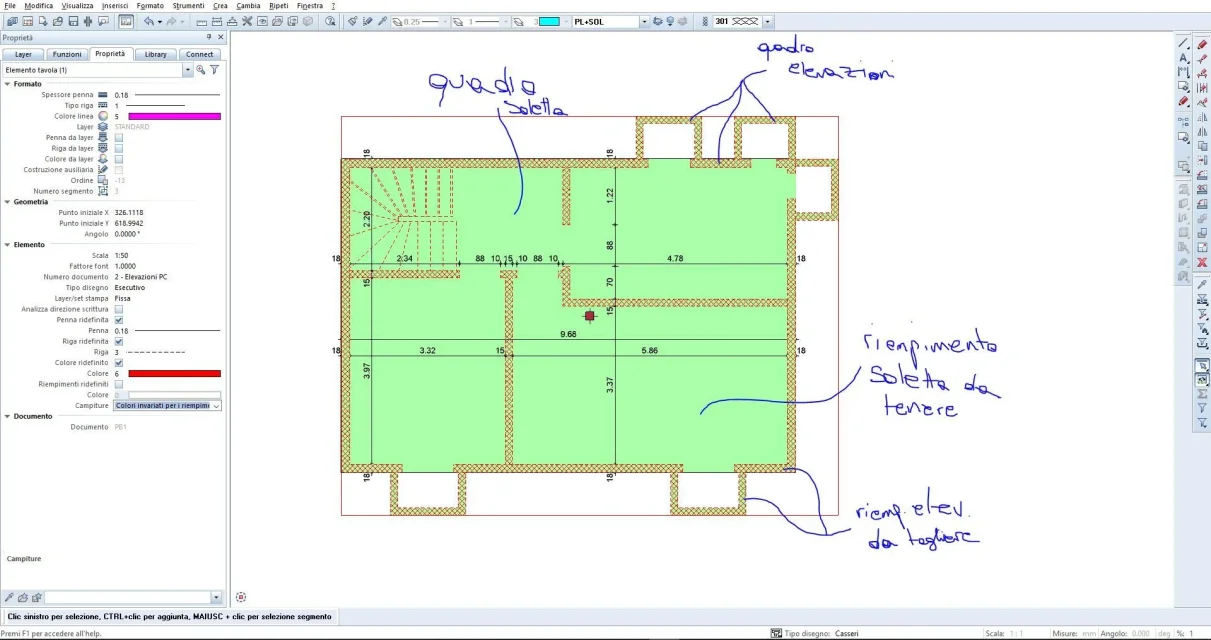
I am on the print layout, I need to print walls that have a dash and a filling, as I do (only on the layout) to remove the filling (only the filling not the retino), I tried to put white but I have a insole under the filling with in turn another filling to hold and so I do not like, smartly I looked for the color "transparent" but does not exist, how do I do?

I attach a couple of photos to make you understand better.

thanks in advance :d
 

Attachments

  • Allegato_1_Soletta+Elevazioni.webp
    Allegato_1_Soletta+Elevazioni.webp
    148.6 KB · Views: 11
  • Allegato_2_Soletta+Elevazioni.webp
    Allegato_2_Soletta+Elevazioni.webp
    131.5 KB · Views: 5
Hey, dario,

Excuse me, but is the filling loft under the walls that have the same fill color?
So what do you want to do if you can put a transparent color, like you thought, you'd see the color of the loft that is the same as that of the walls...
If you physically remove the filling from the walls (which you do not want to do, and in fact it would be useless) you would see the dash on white background, that is the same thing that apply a white color with the function "elenca table elements" without changing anything... .
Sorry, but maybe I didn't understand the kind of result you want to get
Hi.
 
It is true, what you said but this is a very simple house, with more complex projects I find myself with compounds with various altitudes of jet, this means that the color of the dashboard changes (eg, if for 5 meters the thread above the loft is at -2.00 can give itself that after it thickens or rises and then the thread above comes to a quota of -2.30, and I only have to change color to the yard I want there to be an option in the settings that says "fill layers: ......." so that you can turn it off later. In short, you understood very well, for this project is useless but for others instead I need it. In any case, thanks to the answer, I hope you will be able to give me a solution, it is for 1 month that I look for a... I also contacted allplan support but do not respond... Bye and good evening.
 
Last edited:
I saw your post on the Allplan connect forum. by curiosity, why do you shoot yourself by student and here instead result a Swiss engineer titolato (who uses allplan, revit, autocad, etc.) & site manager?
 
hi, yes, I know well that there is written engineer here, only that when I made the account for this forum I did not know what to put considering that I live in Swiss and here I would be a "apprenticeship of civil genius", in fact it is not a profession I am still studying but I work in an engineering office, but now I change it immediately, so that you do not think that I am an engineer since I know practically nothing about engineering. Also my age is false but that is voluntary and I don't want to change it because it is very simple, if I said that I am 16 years probably wouldn't take anyone seriously since in many countries at 16 years you go to high school and then autocad/revit/allplan you don't use them and so I thought that no one would answer me thinking that you just wanted to break the boxes. However, I can use very well autocad so I can handle it with revit and with allplan I'm starting to handle it. I apologize for the misunderstanding. hello and good day.
 
insert fillings on different layers or paintings and use them to highlight the various areas. having them differentiated in this way you can turn off, overlay, move, etc.
 
First of all thank you for the answer, however your solution is not okay, I am not using allplan as a cad so I do not have the filling element, the restraining element etc... I have only the wall element that has the fill property, and I can not remake the fillings with the appropriate command as they would not move if I change the wall. In practice I would like you to choose the layer of each property of the wall (a little like it happens with the stairs), so as to have fillings, restraints, and contorni walls on different layers and to be able to manage them as I want, but I need it to be part of a single element so that you do not have to go crazy when you have to change.
 
in this case you just have to work with dynamic fields (stili area) which can be freely composed by restraints, retinals, images, etc. and vary according to the type of representation desired (project = preliminary, definitive, executive) or scale (1:100, 1:50, etc.). their representation can be managed both in the document editor and in the layout of the tables and therefore, for example, hide the only filling and maintain the hold/retire.

here you find an old 2012 video:
https://www.youtube.com/watch?v=hp4uqaro7mw
 

Forum statistics

Threads
44,997
Messages
339,767
Members
4
Latest member
ibt

Members online

No members online now.
Back
Top