
• This forum is the machine-generated translation of www.cad3d.it/forum1 - the Italian design community. Several terms are not translated correctly.

quotas on table

  • Thread starter Thread starter cervicale
  • Start date Start date

cervicale

Guest
Good morning to all,

I tried to search the forum but I couldn't find anything specific.
I attach an image in which you see a recurring discrepancy between the quotas in the two indicated views.
the correct view is that of the lower view (67,44) and not 73,45.
as it is possible that two dimensions that must be equal are indicated with different values.
It happens to you, too. It's a setup problem.
I wait for your help. as usual.
Thank you very much.
 

Attachments

  • Cattura.webp
    Cattura.webp
    16.9 KB · Views: 55
Good morning to all,

I tried to search the forum but I couldn't find anything specific.
I attach an image in which you see a recurring discrepancy between the quotas in the two indicated views.
the correct view is that of the lower view (67,44) and not 73,45.
as it is possible that two dimensions that must be equal are indicated with different values.
It happens to you, too. It's a setup problem.
I wait for your help. as usual.
Thank you very much.
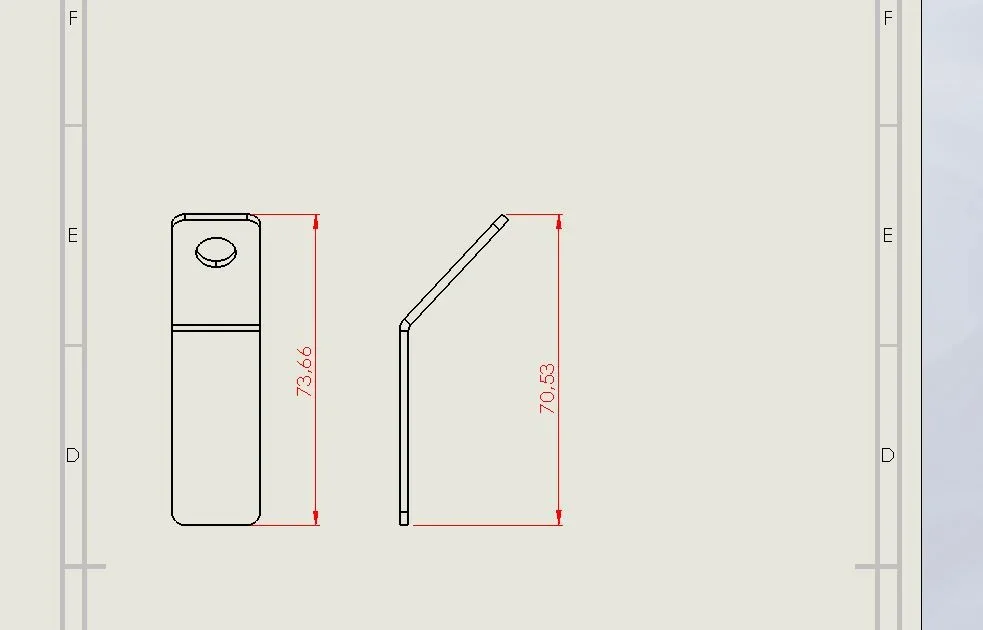
try to put the view projected to the right and see if it does even on the 32.6. 3d model was made in sheet metal environment?
 
The main view is the top view.
I tried with the projected right and kept 32.6.
was made in sheet metal environment.
the secondary view is projected.
I attach the file.
I've been putting on the table from scratch since always non-consistent values.
I do not have the true meaning of the projects because it is a relative view.
 

Attachments

  • 39411_01.zip
    39411_01.zip
    149.4 KB · Views: 4
  • Cattura.webp
    Cattura.webp
    8.6 KB · Views: 49

Attachments

  • Cattura.webp
    Cattura.webp
    22 KB · Views: 44
I press that I used very little sw and not to make food. but that that quota is referred to the diagonal, put down in that way, what sense or utility has? I can't find it, but if such a widespread cad leaves this possibility open, maybe there is a reason, but I miss it. Does anyone know?
 
what its usefulness is not known, perhaps it is only due to the fact that you are not listing a two-dimensional element like in autocad, but three-dimensional and therefore in a sense the quota is correct being on two different planes (if you could select the lower right edge you would have a still different quota). probably in some context, that I do not know, is useful and users have made it required.
or solidworks cannot distinguish, in the quotation, between isometric view and flat view, and therefore bisgnja specify that the quota is not the projected one, but the true one.
or it is a problem that they have never managed to solve and have wandered around by setting up the property manager.
 
The main view is the top view.
I tried with the projected right and kept 32.6.
was made in sheet metal environment.
the secondary view is projected.
I attach the file.
I've been putting on the table from scratch since always non-consistent values.
I do not have the true meaning of the projects because it is a relative view.
you have attached the only side file; if the problem is on the drawing file there should also be this otherwise what we check?
 

Forum statistics

Threads
44,997
Messages
339,767
Members
4
Latest member
ibt

Members online

No members online now.
ciao
Back
Top