• This forum is the machine-generated translation of www.cad3d.it/forum1 - the Italian design community. Several terms are not translated correctly.

quote styles and editable instances in revit

  • Thread starter Thread starter ChIP_83
  • Start date Start date

ChIP_83

Guest
I press that I am going from autocad to revit for architectural design and I begin to find the first difficulties.

the thing that bothers me most in the drafting of the plan is that I can't customize as I would like quotas.
In particular, I cannot allow the quota text to be within the quotation line (centered).
between the options there is different to define thicknesses, size and characteristics of the texts, but I find nothing that allows me to do that.
How do you do it?

I would also like to understand something...
If I have 4 doors of different width, do I have to create 4 separate families with each one its width?
Can I not insert a family object and then change the width of only that specific instance?

Thanks :)
 
I don't know for the first question.

for the second not 4 families but 4 different types of family, or a single family but with the wide parameter at the level of instance and not of type.

Hi.
 
I don't know for the first question.

for the second not 4 families but 4 different types of family, or a single family but with the wide parameter at the level of instance and not of type.

Hi.
it would have been nice, changing the quota that is indicated in the annotation that creates automatically, instead of changing the width of the whole family, can only change the width at the level of instance.
but in the families that are in the set of being able/standard windows included in the program there is no in which there is this type of length associated with the only instance?

As far as the problem with the quotation is concerned, does anyone know how I can do it?
to better clarify this, I give you an example with autocad:
40906380.jpg
 
it would have been nice, changing the quota that is indicated in the annotation that creates automatically, instead of changing the width of the whole family, can only change the width at the level of instance.
but in the families that are in the set of being able/standard windows included in the program there is no in which there is this type of length associated with the only instance?
However, this is not the philosophy of revit.if you create different types of doors with different widths, operation for no more than two minutes you will always have at your disposal, and you can switch from one type to another in a moment by selecting an instance and varying the type from the appropriate selector.doing so, revit allows you a proper management of the doors in the abachi.porte of different sizes will have, that I know, a difference
Hi.
 
....the thing that bothers me most in drafting the planimetry is that I can't customize as I would like quotas.
In particular, I cannot allow the quota text to be within the quotation line (centered).
between the options there is different to define thicknesses, size and characteristics of the texts, but I find nothing that allows me to do that.
How do you do it?

...
Thanks :)
in the properties of the element (quota)>modification type, text section, there is the parameter of "offset text". Unfortunately, however, the offset does not accept negative values, so the maximum setting is aligned to the inferor part of the number.
However, manually, with the value grip you can place the number above the quota line.
the bottom, must be placed on "ork" not to "see" below the number, the line of the quota
 
in the properties of the element (quota)>modification type, text section, there is the parameter of "offset text". Unfortunately, however, the offset does not accept negative values, so the maximum setting is aligned to the inferor part of the number.
However, manually, with the value grip you can place the number above the quota line.
the bottom, must be placed on "ork" not to "see" below the number, the line of the quota
Yes, I had seen the offset and trying a negative value had made me mistake. the only way is, as you say, to move it manually.
but so doing is a good job if you have very complex projects.
In addition, the background that I must set on "work", would cause me different problems in overlapping with some element (e.g. furniture).

We say that in the management of revit quotas is very lacking.
 
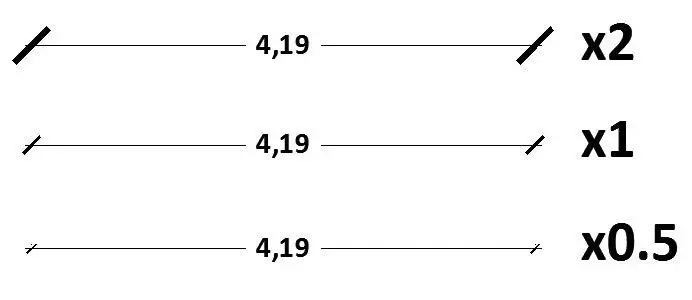
but how do I change the size of the "simbolo" which marks the ends of the quota line? (the diagonal by default)
 
... I didn't read well... .
if you mean the length of the diagonal, you cannot (system families are not editable) the dimensions are those provided in the drop-down menu
 
... I didn't read well... .
if you mean the length of the diagonal, you cannot (system families are not editable) the dimensions are those provided in the drop-down menu
This is what I mean:


Is it possible?
 

Attachments

  • quoteab.webp
    quoteab.webp
    6 KB · Views: 37
Last edited by a moderator:
hello chip83, of course you can get what you posted, as you can see from the image I attach.
just go to settings > arrows and then the usual history of duplicating.
Also in property of the type of quota you can set the thickness of the mark.
Hi.
 

Attachments

  • dimensioni diagonali.webp
    dimensioni diagonali.webp
    47.2 KB · Views: 70
Thank you very much, so I solved:d
sin for the text that cannot be placed within the quota line automatically :)
 

Forum statistics

Threads
44,997
Messages
339,767
Members
4
Latest member
ibt

Members online

No members online now.
Back
Top