
• This forum is the machine-generated translation of www.cad3d.it/forum1 - the Italian design community. Several terms are not translated correctly.

recover deleted derivatives party

  • Thread starter Thread starter asblo
  • Start date Start date

asblo

Guest
Hello everyone
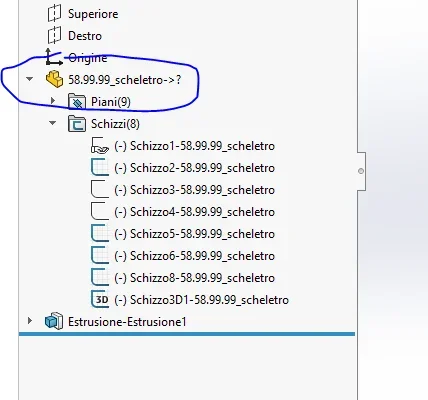
I have a problem with a derivative part. is the code 58.99.99 you see in the image. was a skeleton part with several sketches that I used as a matrix to get the other parts. by making a rename in the folder, for some dark reason it has erased!
now they are without skeleton, opening the parts that used the skeleton, on it appears the "?" because it does not find the file, however the references are all correct, all the plans and sketches of the skeleton are still "live". my question is therefore if somehow you can recover the file from the derived parts... if the references are still alive obviously still exists in the multiverse.
I also attach a file of a derivative if some good soul wants to try.
1636550242533.webp
 

Attachments

my question is therefore if somehow you can recover the file from the derived parts.
No. in fact if known in the body folder you have only the extruded plate; this means that part 58.99.99_skeleton is fictitious, see its content, but does not exist.
check in system options if you have a set backup folder and see if you saved a copy of the file.
check if it's in the basket (even if I imagine you already did it)
do a search on the whole pc to verify that it didn't move by mistake
test with the program Recover (or similar programs) that recovers, if possible, deleted files
 
Unfortunately I worked on servers and I have no vault. it mysteriously erased after using the rename with utilities of solid.. .
 
Did you do a search on the server?
a couple of times it happened to me that renamed I inadvertently eliminated the point before the sldprt extension and could not find it again by adding it back; but the file existed in the folder (of course not having extension was an unknown file)
or maybe you hid it and the server folder is set not to show the hidden files
 
nothing unfortunately.. I remember that at the time of giving the ok from the rename module appeared to me the window like "you want to overwrite the file ---new name--- to the file ---old name---"? and it seemed a little strange to me, usually with rename does not ask you to overwrite, it just does. But since the names were correct I gave him ok, then he disappeared
 
nothing unfortunately.. I remember that at the time of giving the ok from the rename module appeared to me the window like "you want to overwrite the file ---new name--- to the file ---old name---"? and it seemed a little strange to me, usually with rename does not ask you to overwrite, it just does. But since the names were correct I gave him ok, then he disappeared
did you activate shadow copies on the server? in case just reload the previous version of the folder. or, do you have a backup from which to recover the file? Surely you can't recover it from "sons" files or from solidworks
 
not being the recoverable file, except you bark a backup, you could make this attempt:
your file now contains, virtually, the particular 58.99.99_skeleton and plans and sketches are still selectable.
you can recreate the plans from scratch, do not rely on those of the part inserted, however facilitating you with the relief of measures.
on these new plans I would grow sketches by making a convert entity of the existing ones and then eliminating any relationship to the latter; in this way speed up the creation of sketches and make them independent and unreported; then if necessary by new constraints.
at this point part 58.99.99_skeleton should be eliminated, so if you select any new plan or sketch you should not appear the link arrow to the inserted part.
Now you just have to save the part again as 58.99.99_skeleton and you should (compulsory conditional supermega) find it correctly reported in the parts where you inserted it.
I hope I've been quite clear.
 
hi, already done last night ex novo, it was faster because in fact by double-clicking on the various sketches of the missing one I displayed all the quotas, so I recreated it equal. Thank you for your help!
 

Forum statistics

Threads
44,997
Messages
339,767
Members
4
Latest member
ibt

Members online

No members online now.
Back
Top