
• This forum is the machine-generated translation of www.cad3d.it/forum1 - the Italian design community. Several terms are not translated correctly.

red color quotas after update links

  • Thread starter Thread starter deep70
  • Start date Start date
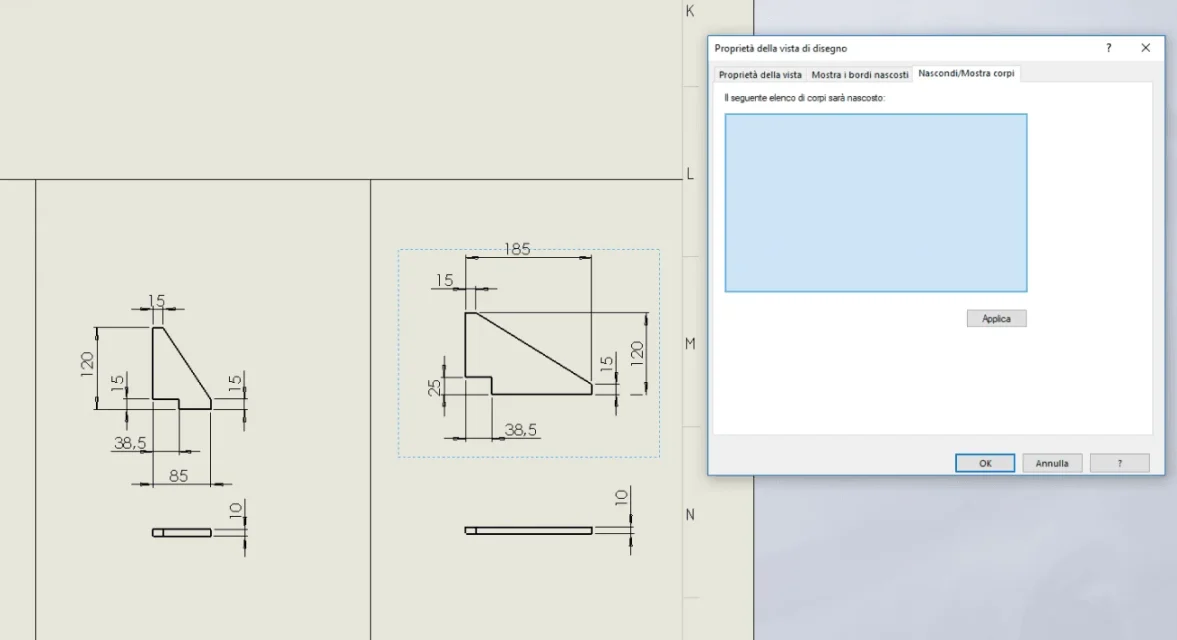
after a while I managed to isolate the two plates of the image (in the rightmanca the total height)
qquella quoted has a quantity of 19 pieces, correct?
The other three pieces, right? Can none of these three share?

putting them on the table all 3 li quoto without problems
 
great boulders, I modified the options as you said and now I can quote it, the model I presume was made with solidworks, but I'm not sure, I know it is a revision of a model of years ago.however solved, thanks a thousand boulders, as always you are the top!
 
I tried a thousand times, first together and then alone.. but only that gave me that problem, now with the magazine settings I can quote it.
Thanks again and good evening to you.
 
a last massive question, but also to you when you go flying from select bodies the view turns out to be gigantic? basically like the whole frame? as I said before I had to put them up, but it's not that I really like it as a solution but it seems to me the only one possible. .
 
If you change the options you can quote it means that it is hidden from something. It could be, as I wrote, that when you seleziponed your body, you have selected another one that was not displayed in the model.
do these tests:
in the model in the graphic area right-click and you should appear in the context menu the voice shows hidden bodies (or something similar); select it and click on the various bodies that appear. in the table you should find one of these bodies and the dotted plate.
another test and right click on the view, property and go to the hidden body tab and see if there is anything, if you delete it and exit. the result is like the test above
 
a last massive question, but also to you when you go flying from select bodies the view turns out to be gigantic? basically like the whole frame? as I said before I had to put them up, but it's not that I really like it as a solution but it seems to me the only one possible. .
No. remains valid my hypothesis that you have selected some other body, maybe one of those long beams.
 
The second of the evidence is this, I see nothing hidden. .

while for the first I did not understand how to do it, do I have to select the model or in the tree?1541959379577.webp
 
if in the model you have hidden bodies you mainly have two methods to return to show them.
one is to select with the right button the separate materials or the body folder of the feature manager and first make a nascondi corpand then shows corpi.the other, more practical and flexible, is to right-click the graphics area (not feature manager, not model) and select the item shows hidden bodies (see image)
 

Attachments

  • Immagine.webp
    Immagine.webp
    29.9 KB · Views: 6
mah, it seems to me there is a bit of a mess, I selected a plate that however I quoted first individually and hid three quarters of frame, perhaps it would have them remake it completely. .
1541961445764.webp
 
Last edited:

Forum statistics

Threads
44,997
Messages
339,767
Members
4
Latest member
ibt

Members online

No members online now.
Back
Top