
• This forum is the machine-generated translation of www.cad3d.it/forum1 - the Italian design community. Several terms are not translated correctly.

remove surfaces without removing features

  • Thread starter Thread starter LuPo_81
  • Start date Start date

LuPo_81

Guest
hello to all, sorry for the long absence, I had to make several transfers along Italy, now I hope to have stabilized.

ban on cheeks, arrival to the point.
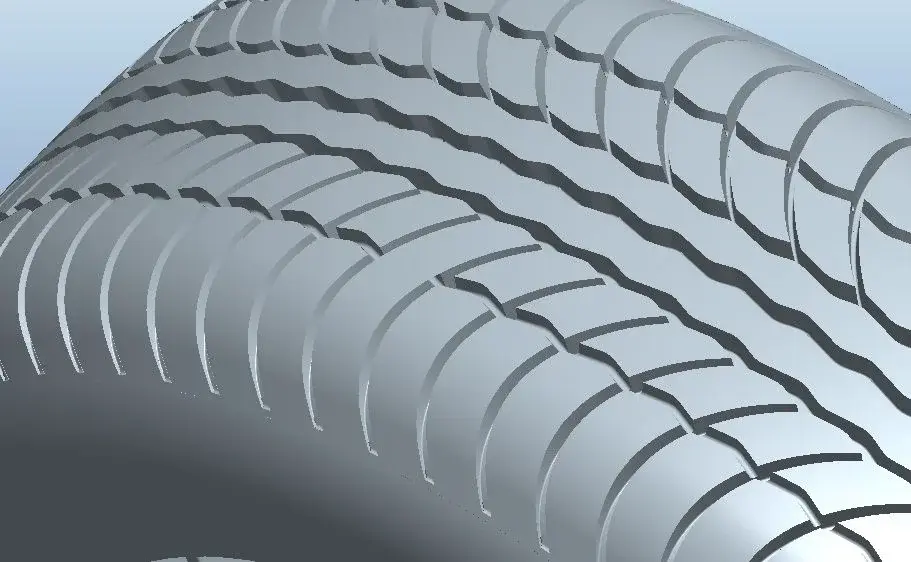
I made the model of a tire modeling (superficially) a single step of the sequence and then making the series. Now I have to export iges surfaces to give them to the customer, but I can't eliminate a surface that served me for modeling but that in the model should not be there. the surface you see on the top of the canalt (in the only modeled step ... for the series: find the differences!) served me to get the bottom surface of the canalt through the "offset" command (the construction is done so, do not ask me why). But now the starting surface must be eliminated, leaving the child unaltered.

there is the "remove" feature, which should allow to eliminate a surface from the model leaving the model tree unaltered, i.e. what it is for me! But ... it doesn't work! And yet it doesn't have many options, I tried them all but it always fails! I also tried on a very trivial part with two surfaces of ca..o but I just can't use it 'sta feature. help me please!
 

Attachments

  • 1.webp
    1.webp
    47.2 KB · Views: 25
can you post the file and explain what the unwanted surface is?
usually just hide it and in export stage set the right mode, but not knowing how it was modeled the part is difficult to give a solution.
If you have confidentiality issues, you can contact me privately and then we publicly explain where the problem was.
 
In the image I posted you clearly see the surface in question, it is the only closed duct.

you are right, hiding the surface, this is not exported, but it would seem more correct to remove it from the side, since I already use abundantly hide and reactivate surfaces for other reasons, if then I have to remember to hide some surfaces only for export ....

the problem is that I can't use the "remove" feature not only in this model, but in no one. Do a new part, draw two surfaces, do a ripple and then try to make a "remove". I don't know about you, but it doesn't work for me. never.

place a very similar model in which the surface to be removed is called "remove" (what imagination, eh), you see a little you, maybe I am dumb.

at least explain to me what the "remove" feature is for.
 

Attachments

In the image I posted you clearly see the surface in question, it is the only closed duct.

you are right, hiding the surface, this is not exported, but it would seem more correct to remove it from the side, since I already use abundantly hide and reactivate surfaces for other reasons, if then I have to remember to hide some surfaces only for export ....

the problem is that I can't use the "remove" feature not only in this model, but in no one. Do a new part, draw two surfaces, do a ripple and then try to make a "remove". I don't know about you, but it doesn't work for me. never.

place a very similar model in which the surface to be removed is called "remove" (what imagination, eh), you see a little you, maybe I am dumb.

at least explain to me what the "remove" feature is for.
uelà but if a surface has entities or features related to it you cannot remove it (you must first dissociate relationships to this connected).
the remove function serves to erase feature of imported objects (e.g. rounding, hole, extrusion, on step files).

the fact that you have to hide it seems normal to me, since the finished model does not foresee its presence.
once hidden you have to go on display save status if you want to avoid reappearance to the next file opening.

a system to avoid this can be to hide the layer relative to the surfaces, so you hide them all.

another way, to have a correct export, is to select the "solid" option in the export stage.
in this way only solid bodies will be exported and the surfaces will be abandoned.
 
if you eliminate the starting surface you also eliminate the child is obvious

Put the surface you don't want to see and on a layer and then hide it..... I'm on purpose!
Moreover if in the future you want to change the geometry of the channel just change the starting surface

edit
I had not seen the answer above written at the same time
 
I press that what I have to export is only the surfaces, there are no solids.
the second premise is that I can't use the layers (mea culpa, I should start cuffing a little, otherwise I will never learn!).

the doubt came to me because I often use ad hoc surfaces to trim the model, and these surfaces then remove them from the model, without of course eliminating the feature daughter, using the option "remove the surface of the rifilo".

the idea of removing a surface as an object in itself (and not the feature that created it) therefore is not so silly, only that with the operation "rifilo" I can do it directly in the feature itself (because there is the appropriate option) while in the "offset" feature is not expected.

possible that there is no feature that allows you to delete objects, leaving the features unaltered?
 
hide hide hide hide is the function you look for ... if you delete the object also delete the connected features.
the use of the layers at the base level is very simple, crumble a little and you will see that you find the square.
once you have created one, right-click on the same ownership and you open the window to include the features you want.
 
discovered the ark of the "remove" feature: removes a surface (not the feature, attention!) if and only if you can close adjacent surfaces. in the image you see the surface to be removed (red abortions) and the proposed closure (in yellow).
 

Attachments

  • New Picture (3).webp
    New Picture (3).webp
    12.1 KB · Views: 14
Last edited by a moderator:
discovered the ark of the "remove" feature: removes a surface (not the feature, attention!) if and only if you can close adjacent surfaces. in the image you see the surface to be removed (red abortions) and the proposed closure (in yellow).
You didn't read what I wrote, did you?
This is a defeature function, and is mainly used on imported files.
in case you post, the rounding between the 2 surfaces is eliminated.
 
Yes I read your post, however, not to contradict you, but you can do it on any surface, leaving the starting features intact in the model tree and creating completely new surfaces. for the record: the eliminated surface does not come from a rounding feature, but it is a sweep along a trajectory, sweep that as seen remains intact in all surfaces less than in the eliminated one. :finger:
 

Forum statistics

Threads
44,997
Messages
339,767
Members
4
Latest member
ibt

Members online

No members online now.
Back
Top