
You are using an out of date browser. It may not display this or other websites correctly.
You should upgrade or use an alternative browser.
You should upgrade or use an alternative browser.


stef_design
Guest
update: Can you change the name of the various bar controls?
mcbramby
Guest
test with dx key on the bar or view/bar of the tools.
from them you should be able to do everything.... try then let you know (I never tried)
should work even if only for the contents of menus e.g. open ..... etc. etc. etc. etc.
from them you should be able to do everything.... try then let you know (I never tried)
should work even if only for the contents of menus e.g. open ..... etc. etc. etc. etc.
mcbramby
Guest
tried............ works for commands and menus, not for menu titles to pop up file type, edit etc. etc. but for the internal commands you open etc. ............ if I find I say how to do also for those:biggrin:
stef_design
Guest
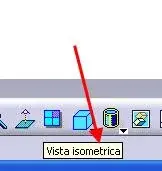
mcbramby
Guest
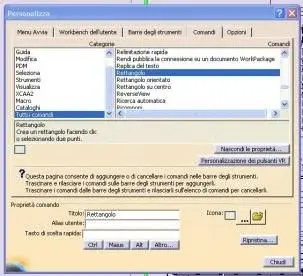
mcbramby
Guest
But your isometric view I didn't find it ....................................................................................................................................................................................................................................................................................
stef_design
Guest
when you walk with the mouse pointer over a command appears the command name. Here, I would like to change the name that appears. example: pocket, fitting, open, material...etc.But your isometric view I didn't find it ....................................................................................................................................................................................................................................................................................
Can you do that? ! ?
from what I have seen you can only change the name of the commands of the drop-down menus but not the name of the commands in the bars.
Hi.
falonef
Guest
but in this way you buy your life. to every new version you will have to adapt the menus!!!
mcbramby
Guest
quoto falonefwhen you walk with the mouse pointer over a command appears the command name. Here, I would like to change the name that appears. example: pocket, fitting, open, material...etc.
Can you do that? ! ?
from what I have seen you can only change the name of the commands of the drop-down menus but not the name of the commands in the bars.
Hi.
 ............... cmq in customization if you change the "title" in the commands you change what you see through the mouse.
I don't know how many and what commands you need but you have to look for it here.
Try to do some tests, I tried with the "open" command and it works:smile:
tomahawk64
Guest
Good morning, everyone.
I would like to know if you can add a new drop-down menu (maybe after driving ).
If it is not possible what is said, it is possible by customization, to create a new bar with the icon opening other under icons, like those of the views, to understand?
I wonder if I can help because I created fifty macros and assigned them to icons. Unfortunately, many people occupy me a lot of space. I thank all those who will help me. Thank you.
I would like to know if you can add a new drop-down menu (maybe after driving ).
If it is not possible what is said, it is possible by customization, to create a new bar with the icon opening other under icons, like those of the views, to understand?
I wonder if I can help because I created fifty macros and assigned them to icons. Unfortunately, many people occupy me a lot of space. I thank all those who will help me. Thank you.