Atreiou
Guest
sw explorer, however, takes a long time to check the connections, even on a local ssd. .

not if you use the context menu. right-click on the file>solidworks>remin/setting... .to understand if you do with explore resources change name moves etc but lose references and exit the question mark
depends on how the search options on solidworks explorer are setsw explorer, however, takes a long time to check the connections, even on a local ssd. .
I have a problem when I use that function. when I want to rename a part or a set I go to search for links only and exclusively in the same folder where the file is saved that I want to rename/spost and not in the other folders where there are the axioms that use that file. Let me give you an example.not if you use the context menu. right-click on the file>solidworks>remin/setting... .
He did something like that to me, try to remove and put the tick on (see circle) and try to relaunch the search without closing and opening "rename document".I have a problem when I use that function. when I want to rename a part or a set I go to search for links only and exclusively in the same folder where the file is saved that I want to rename/spost and not in the other folders where there are the axioms that use that file. Let me give you an example.
I want to rename "vite.sldprt" saved in the "cartella a"
axiemes using "vite.sldprt" are spread in "cartella b" and "cartella c".
the window that allows me to rename "vite.sldprt" searches for links only in the folder where the screw is saved or "fold a". How do I make him understand that he must also search in "cartella b" and "cartella c"?
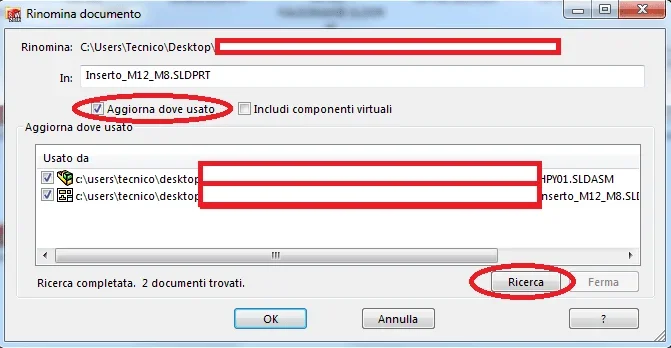
already tried several times. I also tried to check out "include comp. virt." but nothing changes. Also when I open solidworks explorer before running the pogram tells me that it cannot communicate with the pdm server, when I am finally on the solidworks explorer, it displays only the local folders of the pc but not the folders where the works located on the company server are saved.He did something like that to me, try to remove and put the tick on (see circle) and try to relaunch the search without closing and opening "rename document".
View attachment 53451
Wow. I've been making a case for days, I confirm. That's great. It finally works! I can change the name of an assembly from feature manager and save or in all other ways (excluding rename the file obviously) and it's not all out of context... great! who knows when they corrected the thing, I would want to stap a champagne at the precise moment!So, I did some evidence and probably recently solved the problem. references of a sketch in one part to another do not go out of context (->?) when the axieme containing them is renamed. this is that you renounce directly from the feature manager of open sw and then you save, whether you operate from contextual menu right-click on the file and, at this point without trying, even from sw explorer believe.