• This forum is the machine-generated translation of www.cad3d.it/forum1 - the Italian design community. Several terms are not translated correctly.

replace document in dft

  • Thread starter Thread starter pod
  • Start date Start date

pod

Guest
Hello, everyone.
I have many files that I differ from among them shortly. for example imagine a parallelepiped to which the measurements change from time to time l,p,h. of all these files I have to make the table. I usually make the table of the first, then I make as many copies as the files and then with design manager I replace the documents. Is there a way to do this faster/automatically?
I put two pictures to better understand what I mean.
list par/dft:LISTA.webp

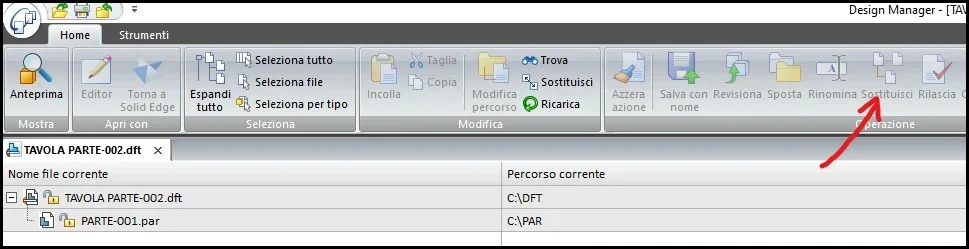
comando in revision mangagerSOSTITUISCI.webpGrazie!
 
Hello, everyone.
I have many files that I differ from among them shortly. for example imagine a parallelepiped to which the measurements change from time to time l,p,h. of all these files I have to make the table. I usually make the table of the first, then I make as many copies as the files and then with design manager I replace the documents. Is there a way to do this faster/automatically?
I put two pictures to better understand what I mean.
list par/dft:View attachment 70664
comando in revision mangagerView attachment 70665Thank you.
open par in design manager
search--where used
set operation "Save with name" both on the par and on the draft

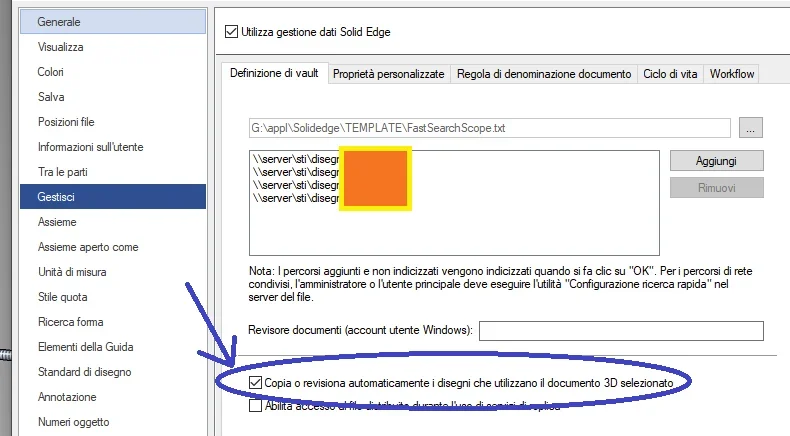
if you enable the "solid edge data management" the search--> where used is carried out automatically.

it should also be possible to copy part and board connected directly from the cad, but I'm not sure.
1710242599376.webp
 
Thank you. But I don't think I understand how to use it.
if I enable solid edge data management and insert the directory that contains the pars how do I make them make automatic copy?
consider that I have already created all files. I just have to do dfts.
 
Thank you. But I don't think I understand how to use it.
if I enable solid edge data management and insert the directory that contains the pars how do I make them make automatic copy?
consider that I have already created all files. I just have to do dfts.
If you've already done it, I think there's no way to do it manually as you're already doing.
for the future studies how to enable data management and then the copied drafts will come you out automatically creating a new par, if the starting par already had the table.
 
Okay. But I did a test like you said. summarize the steps to understand where I'm wrong.
1. Enable solid edge data management including folder where pars and dfts are
2. I create a par and its table inside the folder included in data management
3? What do I do exactly?
 
Okay. But I did a test like you said. summarize the steps to understand where I'm wrong.
1. Enable solid edge data management including folder where pars and dfts are
2. I create a par and its table inside the folder included in data management
3? What do I do exactly?
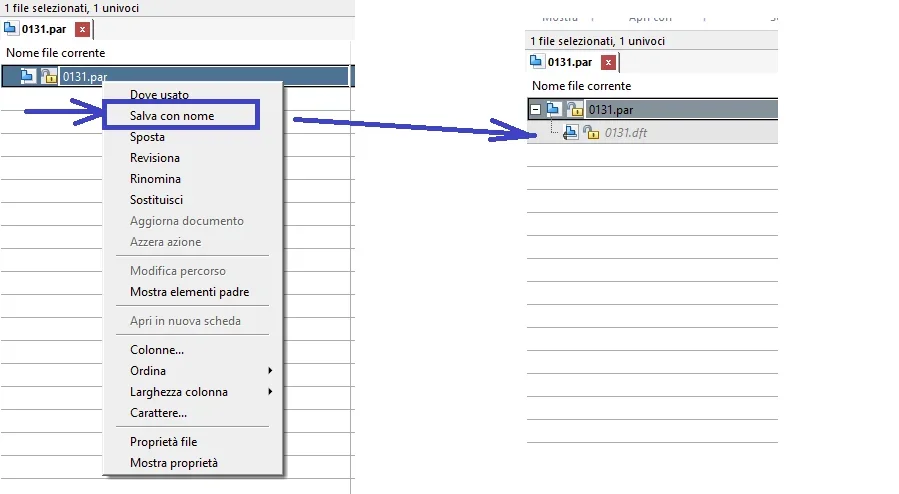
you have to wait for windows to build the index (it could take several hours), then it will happen that when you open the design manager part and do "save by name" (or other), automatically the system recovers all related documents:
1710344597522.pngequally in cad environment: if you open the part and do "save (copy) with name", it is automatically saved with the same name also the table of the starting part.
 
Last edited:

Forum statistics

Threads
44,997
Messages
339,767
Members
4
Latest member
ibt

Members online

No members online now.
Back
Top