• This forum is the machine-generated translation of www.cad3d.it/forum1 - the Italian design community. Several terms are not translated correctly.

reverse a solid preforated in negative with autocad 2013

  • Thread starter Thread starter Ego71
  • Start date Start date

Ego71

Guest
Good day to all,

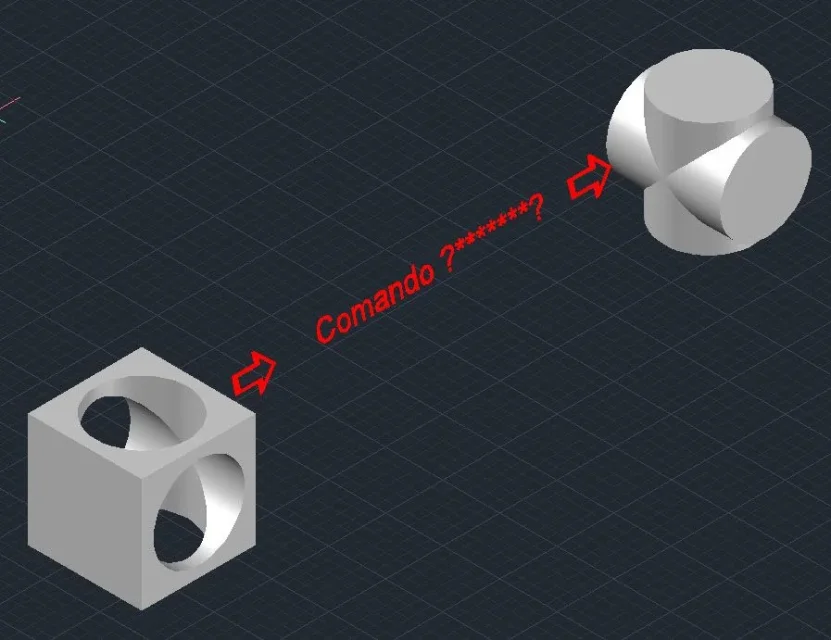
I wondered if it was possible, through a command, to create from a solid preforated inside another solid, a sort of negative of its empty inner part.

Thank you.
 
I mean, you want to create a cube for example, with a hole in the middle and inside another cube?
 
Hi.
no, if I create orthogonal round holes in a solid, such as a cube, I would like as a result to extract the "crucies" of the two cylinders as solid, then the reverse of the blank part in solid.
If I wasn't clear, and it's likely I can send you a drawing.
thanks for the answer 100 visits without comments.
 
creates a copy of the solid before drilling it, then you will remove the perforated one.
 
Sottrazione.webpHi.
@gp
ok works in part, I have to get a solid not surfaces.

attached image.


Thank you
 
test the interference command, which I believe does to your case (always I understand well what you need)

however as it says gp, solid - solid from a solid. surface - solid returns surfaces.
 
Reassure yourself, please believe that we understood very well and give for certain that by subtracting a solid from another solid you get (always) a solid.
if, in the case of your image, from the original cube you will subtract the perforated cube you get the resulting solid "quel".
maybe you can also consider that there is something wrong with the model mentioned in your post #6, you have already been asked to attach the dwg...
455.webp
 
ok gp you're right I did another test work,
I don't know what strange reason, as you can see in the first image I posted, the result is surfaces, which I think you can't explain either.
It's probably like you say there was something in the solid that I created that wasn't going.

Thank you very much.
 
you have to convert it to solid and to do so you need all surfaces not to coincide but to intersect
you can use those surfaces and use the cutting command by selecting surface, but it is long enough as process
 

Forum statistics

Threads
44,997
Messages
339,767
Members
4
Latest member
ibt

Members online

No members online now.
Back
Top