• This forum is the machine-generated translation of www.cad3d.it/forum1 - the Italian design community. Several terms are not translated correctly.

rhino: rounded corners with fillet

  • Thread starter Thread starter Lord Daz
  • Start date Start date

Lord Daz

Guest
Hi.

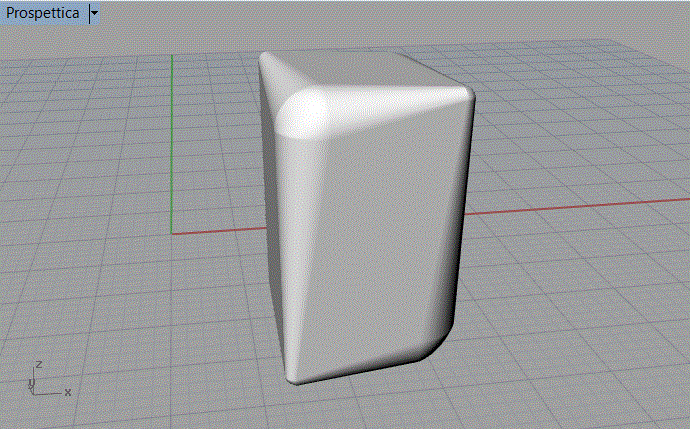
I'm making this parallelepiped and I'd like it to have all the beveled sides. the bevel is on one side smaller and on one side larger.

I can't smooth the two ends of this parallelepiped. I don't understand where I'm wrong. select the "fillet" command and select the edge for the connection, but I do not get a proper bevelling.
Angoli Arrotondati.gifI'm sure I make a mistake of thinking, but I don't understand where...

Thank you for your help,
 
Hi.

I'm making this parallelepiped and I'd like it to have all the beveled sides. the bevel is on one side smaller and on one side larger.

I can't smooth the two ends of this parallelepiped. I don't understand where I'm wrong. select the "fillet" command and select the edge for the connection, but I do not get a proper bevelling.


I'm sure I make a mistake of thinking, but I don't understand where...

Thank you for your help,
if you want all the perimeter to be radiated ...if you select the 'concatenabord' option of the fillet command.
 
if you want all the perimeter to be radiated ...if you select the 'concatenabord' option of the fillet command.
Thank you for the answer!

so doing I get a homogeneous bevel on all sides. I would like the bevel to merge with the bevel of long sides so as to have a narrower bevel on one side and wider on the other.

Esempio.gifHow can I do that?

Many thanks,
 
Thank you for the answer!

so doing I get a homogeneous bevel on all sides. I would like the bevel to merge with the bevel of long sides so as to have a narrower bevel on one side and wider on the other.

How can I do that?

Many thanks,
you need to study the fillet command....see example of billy73.
 
Yes, exactly billy73 your example is exactly what I have in mind!
can you explain to me how to proceed x realize it?
 
I was raised to get the bevel I wanted. My mistake was that I didn't work on all corners at once!
Immagine1.gifImmagine2.gifNow I see that the bevel is not very soft, but we come to create almost a straight line between the bevel and the sides of the parallelepipedo. How come?

How do I make the bevel soft and melt with the sides?

Thank you.
 
What you're doing is not a bevel but a ray.
calling things with the right name helps you understand.

by force of things you have a visible line, it counts that you pass from a curved surface (the ray) to a plain.
with a single command is geometrically impossible to make it disappear.
you should split flat surface and radius with an isoparametric for example, then between the two edges go to create a tangency surface.
But you lose the regularity of that radius.
depends on what you need.
 

Forum statistics

Threads
44,997
Messages
339,767
Members
4
Latest member
ibt

Members online

No members online now.
Back
Top