
- Home
- Forums
- mechanical engineering
- creo parametric (ex pro/e)
- creo parametric - modeling of parts and sheet
You are using an out of date browser. It may not display this or other websites correctly.
You should upgrade or use an alternative browser.
You should upgrade or use an alternative browser.
Teo-77
Guest
Hi.
I don't know what your problem is.
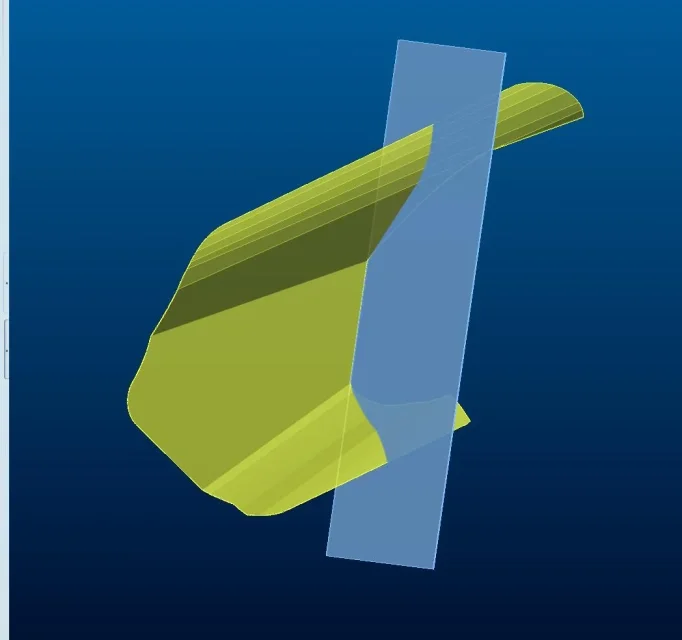
you have a sheet (the green one), and you want to cut it in 2 parts along a floor (the blue one)?
What size does the object have?
is the sheet iron, stainless or what?
Do you have any tolerances to respect?
I don't know what your problem is.
you have a sheet (the green one), and you want to cut it in 2 parts along a floor (the blue one)?
What size does the object have?
is the sheet iron, stainless or what?
Do you have any tolerances to respect?
DANI-3D
Guest
no, the green sheet must be interrupted at the blue sheet and vice versa.
I am using the operation function with components > removers and ... I must say that it works well and is not influenced by size, material and tolerances.
I am using the operation function with components > removers and ... I must say that it works well and is not influenced by size, material and tolerances.
320i S
Guest
question 1: Are you in the environment together?
Question 2: Do you have the assembly advanced by chance?
Question 2: Do you have the assembly advanced by chance?
DANI-3D
Guest
Bye. the answer is yes for both questions.question 1: Are you in the environment together?
Question 2: Do you have the assembly advanced by chance?
320i S
Guest
I go for points:
1-decids together which of the 2 sheets will be the first assembled and which the second (because then change order, will create circular references that by itself are only annoying).
2-active the first together
3-way on the bottom right selector and steps from "smart" to geometry
4-always together, go to the second sheet and select the surfaces with which you will then cut the first
5-command "copy geometry"
5.1-inside the copy geometry command, add other surfaces that you think can be useful (also references and edges, but eye to select the right collector inside the menu "references", otherwise lose as you selected)
6-open apart from sheet 1 and with the command extend, or project edges, or with a sheet extrusion, cut using the copied surfaces (see you then if you want to play for coupling or similar).
7-Return all with sheet 2 using 1 for geometries copies.
if you move the components together, the cuts will be updated accordingly (within limits)
you can undelete copy geometry, putting them in manual update, instead of automatic
n.b. if you use creo: there is the possibility to put in the update of the copy geometry, the check "no dependence", the eye that this release in a total way the copy geometry (such as the "isolated" of catia), does not go back, touch remake the copy geometry and replace it to the previous one, with obvious cases if the copy geometry is complex.
1-decids together which of the 2 sheets will be the first assembled and which the second (because then change order, will create circular references that by itself are only annoying).
2-active the first together
3-way on the bottom right selector and steps from "smart" to geometry
4-always together, go to the second sheet and select the surfaces with which you will then cut the first
5-command "copy geometry"
5.1-inside the copy geometry command, add other surfaces that you think can be useful (also references and edges, but eye to select the right collector inside the menu "references", otherwise lose as you selected)
6-open apart from sheet 1 and with the command extend, or project edges, or with a sheet extrusion, cut using the copied surfaces (see you then if you want to play for coupling or similar).
7-Return all with sheet 2 using 1 for geometries copies.
if you move the components together, the cuts will be updated accordingly (within limits)
you can undelete copy geometry, putting them in manual update, instead of automatic
n.b. if you use creo: there is the possibility to put in the update of the copy geometry, the check "no dependence", the eye that this release in a total way the copy geometry (such as the "isolated" of catia), does not go back, touch remake the copy geometry and replace it to the previous one, with obvious cases if the copy geometry is complex.
DANI-3D
Guest
Thanks, as soon as I can try, and I'll let you know.
320i S
Guest
I forgot, in case you have a sheet with multiple folds (like if the blue one in the photo was not flat but more similar to the yellow), it can be that you can not project/intersecate the surfaces to create the single cut line then flatten the sheet, make a single cut and then fold, it is safer to cut fold, it is longer, but in case of changes in the position of the most stable sheet.