
DetailDesign
Guest
hi, I have a problem on autocad 2015, this morning working at sustained speed, after a series of clicks in rapid succession, I found myself in the whole screen mode, not knowing how to get out I opened another autocad and then closed the whole screen.
Everything is back normal except for the fact that the files are gone, these are meant to us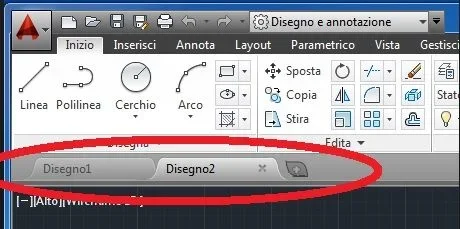 Now I can't put them back, I also tried to repair the installation from the setup but nothing.
Has anyone happened yet?
You know how I can solve this?
I work with a dozen open drawings and to pass from one to another now I have to pass on the autocad icon below or use ctrl+tab, but both methods are a little slow and I fan to waste a lot of time.
thanks in advance
Andrea
Everything is back normal except for the fact that the files are gone, these are meant to us
Now I can't put them back, I also tried to repair the installation from the setup but nothing.Has anyone happened yet?
You know how I can solve this?
I work with a dozen open drawings and to pass from one to another now I have to pass on the autocad icon below or use ctrl+tab, but both methods are a little slow and I fan to waste a lot of time.
thanks in advance
Andrea