• This forum is the machine-generated translation of www.cad3d.it/forum1 - the Italian design community. Several terms are not translated correctly.

rotation with autocad tangency

  • Thread starter Thread starter plinio
  • Start date Start date

plinio

Guest
good evening to the whole forum, hoping that it is the right section I would like to ask a question to all those who use autocad 2018 or to those who used it in the past.
As an annex I would like to make a rotation of two symmetric circumferences with respect to a vertical axis that at the end of rotation are tangents with two parallel lines.
I'm getting crazy, but I can't.
 
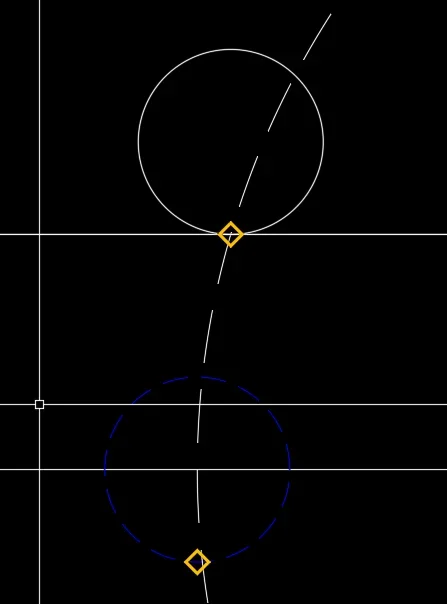
Actually, you can't just rotate it, because the tangent on the circumference is continuously variable according to the angle of rotation. but you can build it geometrically correct.1673691783378.pngstep 0 - factual state
1673691824620.pngstep 1 - build your rotation circle
1673691915338.png1673691991870.pngstep 2 - move the blue circle from the dial to the in. rotation/line
1673692088254.png1673692106435.pngstep-3 build red line from cen circle to int with circle re rotation
1673692200922.png1673692227697.pngStep 4 - Move the circle from cen to int (or if you prefer from extreme red line to the other extreme). as you see the intersection point between cen circle and horizontal line happens in a point that geometrically is difficult to intercept.
with a double mirror get the other circle
 

Attachments

  • 1673692052481.webp
    1673692052481.webp
    5.9 KB · Views: 6
Actually, you can't just rotate it, because the tangent, on the circumference is continuously variable according to the angle of rotation, but you can build it geometrically correct.
thanks, I fossilized myself trying to exploit the snap during rotation as an alternative I managed using the constraints as written by @lattu
 
excellent graphic solution that proposed by crystal glass.
autocad could never make a similar rotation with just one step, or could never place a circle that is tangent to a line. You can do the opposite, that is, build a line that is tangent to a circle, but you can't place a circle that is tangent to a line.
 
Actually, you can't just rotate it, because the tangent on the circumference is continuously variable according to the angle of rotation. but you can build it geometrically correct.View attachment 67368step 0 - factual state
View attachment 67369step 1 - build your rotation circle
View attachment 67370View attachment 67371step 2 - move the blue circle from the dial to the in. rotation/line
View attachment 67373View attachment 67374step-3 build red line from cen circle to int with circle re rotation
View attachment 67375View attachment 67376Step 4 - Move the circle from cen to int (or if you prefer from extreme red line to the other extreme). as you see the intersection point between cen circle and horizontal line happens in a point that geometrically is difficult to intercept.
with a double mirror get the other circle
nice solution ziethanks
 
Maybe you don't need it anymore but I still attach the solution using dynamic constraints.
to vary the distance of the lines the drawing is updated
 

Attachments

beautiful lattu solution, great if you have to change
but perhaps too elaborate in placing constraints, if you have to build a single solution
 

Forum statistics

Threads
44,997
Messages
339,767
Members
4
Latest member
ibt

Members online

No members online now.
Back
Top