• This forum is the machine-generated translation of www.cad3d.it/forum1 - the Italian design community. Several terms are not translated correctly.

rotazione takes

  • Thread starter Thread starter MFT
  • Start date Start date

MFT

Guest
Good morning

I should be able to turn a hinged lever with a pin of a given angle, I can't understand what kind of bond I have to put.

Thank you.
 
the problem is not very clear to me, but usually when there are half rotations, the bond to animate is the angle.
post image if you can.
 
the problem is not very clear to me, but usually when there are half rotations, the bond to animate is the angle.
post image if you can.
I tried with the angle only that I can't figure out how to know which is the center of rotation, in practice it is a horizontal lever that I have to rotate around a axis in another 5 degree configuration. for the other components where there are only horizontal or vertical movements I managed in this case I can not.
 
the problem is not very clear to me, but usually when there are half rotations, the bond to animate is the angle.
post image if you can.
Have patience, he comes from a world where the bonds are a tabooo, not to mention.
 
Have patience, he comes from a world where the bonds are a tabooo, not to mention.
in fact they are an absolute absurdity, not so much for the constraints but for the fact that they are conceived....... logic is not part of this program.
 
I tried with the angle just that I can't understand how let us know which center of rotation is, in practice it is a horizontal lever that must rotate around one axis in another 5 degree configuration. for the other components where there are only horizontal or vertical movements I managed in this case I can not.
Try giving it to him.
If you put a link between the axis of rotation of the lever and the axis of the pin where you have to rotate, maybe inventor will seem a little more logical:biggrin:
 
Try giving it to him.
If you put a link between the axis of rotation of the lever and the axis of the pin where you have to rotate, maybe inventor will seem a little more logical:biggrin:
made...... in fact my logic so works, but he does not want to know. It's the program that's too stupid.
 
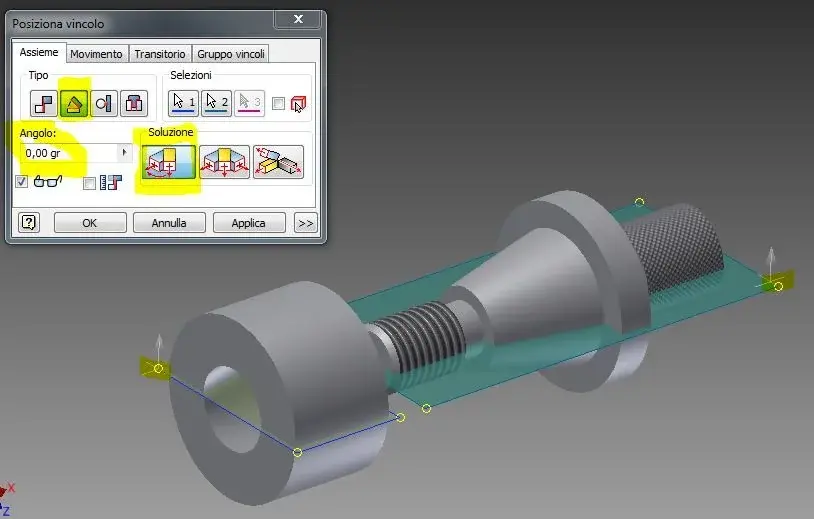
try to do this:

catch1.jpg

and then:

capture2.jpg
 

Attachments

  • Cattura1.webp
    Cattura1.webp
    29.1 KB · Views: 10
  • Cattura2.webp
    Cattura2.webp
    41.3 KB · Views: 7
Last edited by a moderator:
Thank you.

I managed it last night, the constraints are the ones you indicate except that I didn't use that pin/hole. the problem was in constraints that they did not reconcile with others and for I tried to erase and reinsert the details and put the ex-novo constraints and everything went. I have no idea if the procedure is correct is actually working.
 

Forum statistics

Threads
44,997
Messages
339,767
Members
4
Latest member
ibt

Members online

No members online now.
Back
Top