• This forum is the machine-generated translation of www.cad3d.it/forum1 - the Italian design community. Several terms are not translated correctly.

rough settings?

  • Thread starter Thread starter domever92
  • Start date Start date

domever92

Guest
Hello, everyone. .
I am beginning to work with catia machining prismatic and I would need a hand in setting the crude in a few words I remain at this point. .
are in part desing with the piece drawn in 3d..
photo links: http://img526.imageshack.us/img526/8874/partdesing.pngthen once finished I press:
-start/machining/prismatic machining and click 2 times on working group in the tree on the left.
and I get this:
photo links: http://img84.imageshack.us/img84/6962/machining.pngHow do I set a crude?

thanks from Sunday. .
 
to assign the crude you must first create it.

search for the functions indicated in the figure, then start the process of cnc.

However you will create an additional leotard to your part file that schematizes a crude, or an additional catpart file that schematizes the fusion.

Hi.
 

Attachments

  • Foto01.webp
    Foto01.webp
    6.6 KB · Views: 78
to assign the crude you must first create it.

search for the functions indicated in the figure, then start the process of cnc.

However you will create an additional leotard to your part file that schematizes a crude, or an additional catpart file that schematizes the fusion.

Hi.
So far, I've got another sorry problem. .
Now I managed to set the crude but I when I work my pocket comes out this job:
when I click on processing select pockets from where to where:
photo links: http://img217.imageshack.us/img217/1762/asdasdw.pngBut when I look at the video I see it makes me quesa processing. .
photo links: http://img684.imageshack.us/img684/4373/asdasd1.pngCan you tell me what I'm wrong?
Where am I wrong?
thanks from domenico
 
So far, I've got another sorry problem. .
Now I managed to set the crude but I when I work my pocket comes out this job:
when I click on processing select pockets from where to where:
photo links: http://img217.imageshack.us/img217/1762/asdasdw.pngBut when I look at the video I see it makes me quesa processing. .
photo links: http://img684.imageshack.us/img684/4373/asdasd1.pngCan you tell me what I'm wrong?
Where am I wrong?
thanks from domenico
If I understand what you're asking...... you must remove the islands (the 1 and 2)
 
then some things............to eliminate the islands you have to right click in the cube that stands at the center of the image of the pocket when you type the processing. .. look for example figure217.. click and a drop-down menu appears... Choose them remove islands then go into the first tab of your processing..... go into the radial voice and put the check mark on any ridge on all the livvelli..... you used a toric tool and catia chooses as step the radius of the tool therefore during the processingw are left those small ridges you see in your image 684.......
 
Thank you all. .
I managed to get the processing. .
another thing. .
Sorry for all these requests. .
I wanted to know because the piece I have to do and so:
photo links: http://img140.imageshack.us/img140/6684/grezzocatia.jpgto work the end of the piece marked in red as I could do?
Sorry but I'm a beginner and I'd like to learn. .
and a passion I've always dreamed of and I hope it becomes my job. .
 
I would do a profile processing...... so I would clean the side of the piece..... then still a pocket processing to empty the remaining part.... if maybe you put the process we can help you....
I have a question to ask, but how do you share photos across an internet address? which site allows you to do this?? ?
 
I would do a profile processing...... so I would clean the side of the piece..... then still a pocket processing to empty the remaining part.... if maybe you put the process we can help you....
I have a question to ask, but how do you share photos across an internet address? which site allows you to do this?? ?
Then I'll explain this process. .
in practice on this site: http://imageshack.us/I have an image. .
If you want to put your own image you have to do like a picture of the screen you realize that the top button near f12 and the button to take the photo.. press it and open paint, once open paint press ctrl+v and copy the image, then save the image in .jpg, and press browse the site I gave you. will give you a series of links. you copy the direct link and made.. If you don't understand just ask.. ;)
 
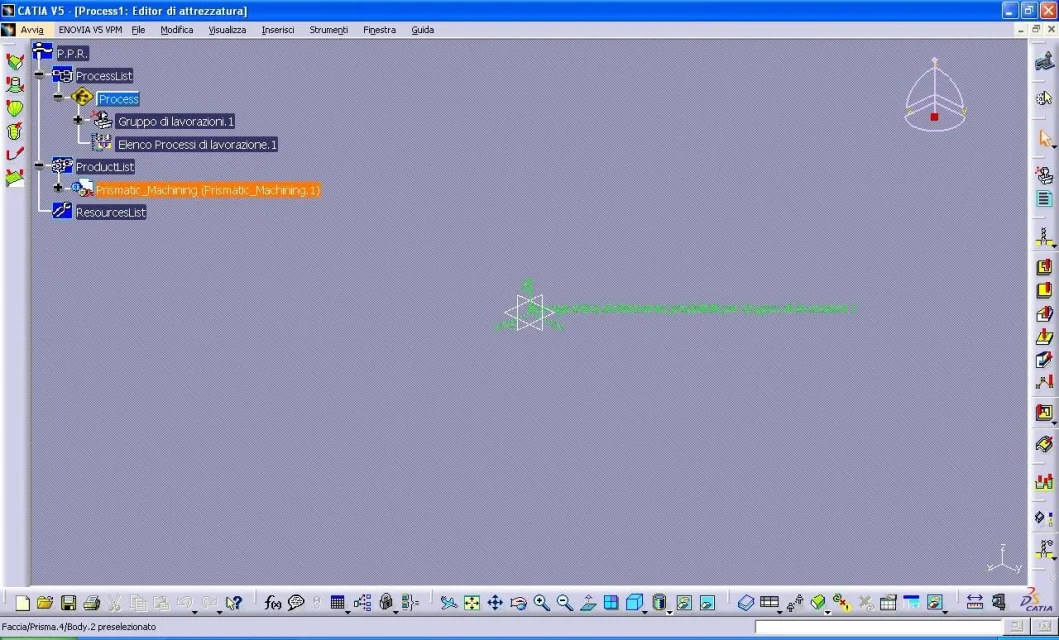
I need your help. After creating the solid in part design, I move into the environment: machining-prismatic machining, but it doesn't show me the solid that I made the background is like:
http://www.mediafire.com/view/?adxq9r366o609z1how do I view the solid and proceed with the operations to do?
 

Attachments

  • catia_prismatic machining.webp
    catia_prismatic machining.webp
    236.2 KB · Views: 11

Forum statistics

Threads
44,997
Messages
339,767
Members
4
Latest member
ibt

Members online

No members online now.
Back
Top