• This forum is the machine-generated translation of www.cad3d.it/forum1 - the Italian design community. Several terms are not translated correctly.

saldatura con solidworks

  • Thread starter Thread starter PiegatoreSolidworks
  • Start date Start date

PiegatoreSolidworks

Guest
I have a problem that I hope to solve thanks to you...
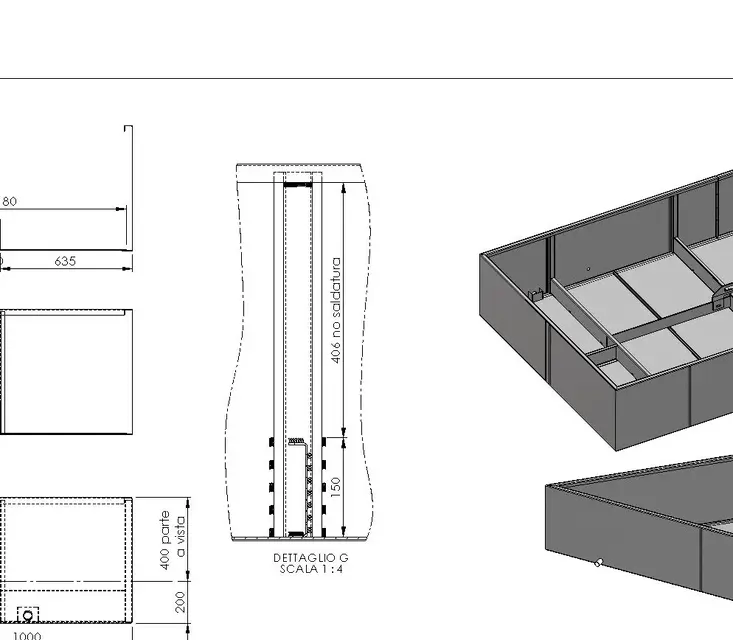
I have a sheet metal set and I wanted to add welding points and traits to positions specified by me. How do I do that? when I open together it doesn't allow me to use the welding functions. . .

Thanks soon, Marco.
 
already popped but the icon is almost all gray... He doesn't let me use them!
..no,
the together functions > welding symbol.
maybe a little "incasinate" but very complete as options.. There are rules to be respected so you can't just put all the strings you want (and that in reality you normally do). still try and find out the limits.

greetings
Marco:smile:
 
..no,
the together functions > welding symbol.
maybe a little "incasinate" but very complete as options.. There are rules to be respected so you can't just put all the strings you want (and that in reality you normally do). still try and find out the limits.

greetings
Marco:smile:
Where is "common function"?
 
or in the joint command manager:View attachment 17059or from the menu insert > assembly functions > welding cordHello
marco
hi marco are in the "cacca" (between quotes) because I don't understand how this function works... Where can I find an explanation?
 

Attachments

  • saldatura.webp
    saldatura.webp
    22.1 KB · Views: 33
hi marco are in the "cacca" (between quotes) because I don't understand how this function works... Where can I find an explanation?
I told you maybe it was a little "hot." but you get there:smile:
search in online driving welding cords:SALDA ASSIEME.webp CORDONE GUIDA.webpI practically never use it, and I can't explain it to you on the fly.
follow the guide that if you can what you ask you can do it.

greetings
Mar
 
I told you maybe it was a little "hot." but you get there:smile:
search in online driving welding cords:View attachment 17079 View attachment 17080I practically never use it, and I can't explain it to you on the fly.
follow the guide that if you can what you ask you can do it.

greetings
Mar
I've seen it before, but I couldn't do it, it doesn't give me the options... But now it's late, I'll be back tomorrow.
Thank you again!
 
I told you maybe it was a little "hot." but you get there:smile:
search in online driving welding cords:View attachment 17079 View attachment 17080I practically never use it, and I can't explain it to you on the fly.
follow the guide that if you can what you ask you can do it.

greetings
Mar
I took a step forward, now I have to find out how weld points are made! !
ideas?
 

Attachments

  • saldatura2.webp
    saldatura2.webp
    10.5 KB · Views: 13
for those few times I need the table, the function
caterpillar is very comfortable.
 

Attachments

  • Vasca fiori SX.webp
    Vasca fiori SX.webp
    41.4 KB · Views: 19
  • Vasca fiori SX-2.webp
    Vasca fiori SX-2.webp
    22.1 KB · Views: 14
for those few times I need the table, the function
caterpillar is very comfortable.
hi mike if it doesn't break you could explain to me how to use the caterpillar? I want to try to make a test also because I only need it as an indication for the workers.. .

Thank you, Marco.
 
hi mike if it doesn't break you could explain to me how to use the caterpillar? I want to try to make a test also because I only need it as an indication for the workers.. .

Thank you, Marco.
those are simple:smile:
in the right clik table and the context menu choose Notes > caterpillar. follow the property manager that is of immediate understanding.

greetings
Marco:smile:
 
hi mike if it doesn't break you could explain to me how to use the caterpillar? I want to try to make a try also because I just need it as an indication for the workers...

Thank you, Marco.
idem... .

I dragged the icon directly into the toolbar "drawing"
so you have that function immediately available.
usefulness is simple and intuitive, more than you think.
the beauty is that if you have to make some welds at times, put them in a few clicks.
you can drag the cord to where you need it, give it the welding side, the sense
and thickness.
Try, you'll see that you won't be struggling.
calculates that I am not a designer, I am a metal builder who learned (at night)
and with prg not really "official" to draw) and I understand you very well. . .
always available to help you.
Hello, colleague... :finger:
 
calculates that I am not a designer, I am a metal builder who learned (at night)
and with prg not really "official" to draw) and I understand you very well. . .
always available to help you.
Hello, colleague... :finger:
Then you understand why I'm in your own boat too! if I use solidworks it is because I have imposed myself to learn it and because I am so passionate about its use and its functionality!

thanks to all boys, without you it would have been much more difficult!

Thank you! :finger:
 
Then you understand why I'm in your own boat too! if I use solidworks it is because I have imposed myself to learn it and because I am so passionate about its use and its functionality!

thanks to all boys, without you it would have been much more difficult!

Thank you! :finger:
idem... .

I dragged the icon directly into the toolbar "drawing"
so you have that function immediately available.
usefulness is simple and intuitive, more than you think.
the beauty is that if you have to make some welds at times, put them in a few clicks.
you can drag the cord to where you need it, give it the welding side, the sense
and thickness.
Try, you'll see that you won't be struggling.
calculates that I am not a designer, I am a metal builder who learned (at night)
and with prg not really "official" to draw) and I understand you very well. . .
always available to help you.
Hello, colleague... :finger:
Here's my result, not bad for the first time!
thanks to you and all the members of this beautiful forum!
 

Attachments

  • saldatura3.webp
    saldatura3.webp
    9.6 KB · Views: 24

Forum statistics

Threads
44,997
Messages
339,767
Members
4
Latest member
ibt

Members online

No members online now.
Back
Top