
• This forum is the machine-generated translation of www.cad3d.it/forum1 - the Italian design community. Several terms are not translated correctly.

save together as a surface

  • Thread starter Thread starter Stigness
  • Start date Start date

Stigness

Guest
good evening to all, I would need to save a set as a surface, leaving only the "external shell".
I tried to save the axieme as a part, but unfortunately enabling the rescue of the external faces, blue lines (centinaia) appear to me that "rovinate" the file.
I also tried with defeature, but I did not get usable results.
Would you have any suggestions?
keep in mind that the file should then pass it to an external to be able to use it with programs for increased reality, so it is important that the file aesthetically remains perfect.
 
What do you mean by blue lines?
If you want to safeguard the inside of the machine you have to save as part only skin... external surface and work a little on the options. you'll have to make some configurations a little more emptied if you want to pass to give not a surface but a solid. It is the usual problem that has been turning from a lifetime....many methods but no one who achieves the goal.
 
Hello and thank you for the answer. by blue lines I mean real lines that appear in some side edges. I think this happens because the generation of surfaces is not perfect and leaves holes highlighted by these lines. Tomorrow, when I get back to the office, I'll publish a photo to get a better understanding.
 
Hello and thank you for the answer. by blue lines I mean real lines that appear in some side edges. I think this happens because the generation of surfaces is not perfect and leaves holes highlighted by these lines. Tomorrow, when I get back to the office, I'll publish a photo to get a better understanding.
blue lines are the lines that border the edges of the surfaces.
 
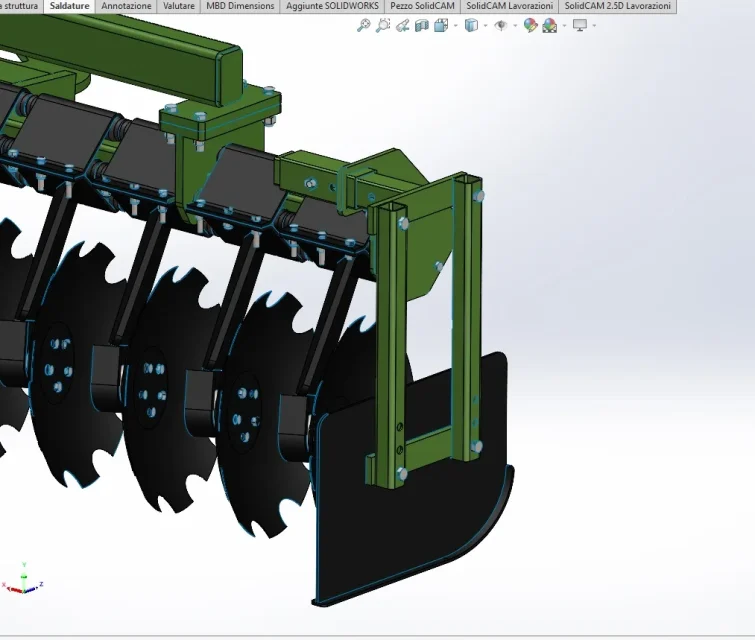
Good morning, here's a photo of a detail.
practically when I go to save the axieme as part, saving only external faces, the software loses some faces and marks the edges with blue lines.
 

Attachments

  • 30-06-22.webp
    30-06-22.webp
    59.6 KB · Views: 26
As already mentioned, the blue edges are due to your current color setting of solidworks, blue by default are the edges delimiting the surfaces, they are all surfaces without constraints between each other.
if you change color setting you can show you the color you prefer
 
exactly, the color is not real. is the cad setting that shows it like that. I wouldn't worry. You do a little test and give it to those who have to do the job.
 
Good morning, here's a photo of a detail.
practically when I go to save the axieme as part, saving only external faces, the software loses some faces and marks the edges with blue lines.
if you pass in shaded display (without borders) you should no longer see them. in solids there are black edges, in blue surfaces.
 

Forum statistics

Threads
44,997
Messages
339,767
Members
4
Latest member
ibt

Members online

No members online now.
ciao
Back
Top