
• This forum is the machine-generated translation of www.cad3d.it/forum1 - the Italian design community. Several terms are not translated correctly.

scalare una schizzo

  • Thread starter Thread starter HappyFly
  • Start date Start date

HappyFly

Guest
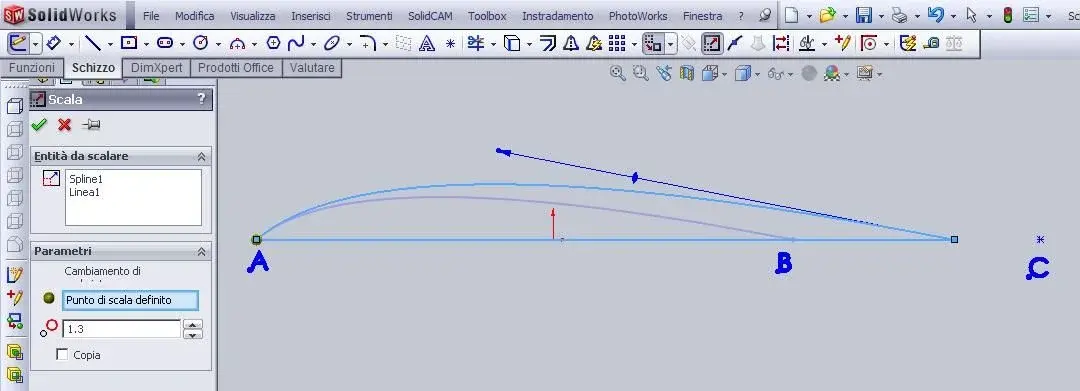
so much that there are today placed another small request for help ... I can not scale sketch design as you do in other programs cad or setting as a scale ratio not a number but the relationship between a segment taken by origin and a chosen as destination ...

in practice I would like to say to the sketch below (a spline and a segment) to enlarge centering me in to do coincide the length ab with the length ac ...

now I am forced to take the two quotas by hand and use the calculator, without having the guarantee that b and c are coincident due to rounding ...

I am not very experienced so I ask you to be patient if I asked for stupidity... :smile:

p.s. : I obviously tried to put a smart quota between a and b and vary it but obviously deforms me the spline ...
 

Attachments

  • scala.webp
    scala.webp
    36.2 KB · Views: 27
Maybe I'm a "facilone" but if you do : ac:ab you get the value
of scale... or not?

Moreover, if the lines have the relationships, they will always be coincident.

rounding? Have you noticed how many decimals has sldwrks???
 
Maybe I'm a "facilone" but if you do : ac:ab you get the value of scale... Or not? ?
Of course, you're right, just that I do it tens of times for each design ... I just asked ... in cad 2d instead of putting the scale report selections first points a and b then you say "door" and selections a and c ... if someone has a trick to speed I willingly accept it...
Besides, if the lines have the relationships, will they always coincide? ?
You mean by using odds or scale factor? using the scale factor I don't have any problem, I was just wondering if there was a sharper method that didn't expect copy, paste and calculator...
If instead you mean with quotas I tried, I climbed the base well but the spline deforms instead to me it serves on an exact scale.. .
rounding? Have you noticed how many decimals has sldwrks???
You're right, I was saying rounds using the hand calculator... or I'm missing in the piece... by chance there's a solid calculator that I can call back with a key while I'm in a numerical field?
 
Of course, you're right, just that I do it tens of times for each design ... I just asked ... in cad 2d instead of putting the scale report selections first points a and b then you say "door" and selections a and c ... if someone has a trick to speed I willingly accept it...


You mean by using odds or scale factor? using the scale factor I don't have any problem, I was just wondering if there was a sharper method that didn't expect copy, paste and calculator...
If instead you mean with quotas I tried, I climbed the base well but the spline deforms instead to me it serves on an exact scale.. .


You're right, I was saying rounds using the hand calculator... or I'm missing in the piece... by chance there's a solid calculator that I can call back with a key while I'm in a numerical field?
use the window itself where you enter numerical values as calculator; write there directly "the equation" using the numeric keyboard symbols (including brackets etc.).

if the spline probably deforms the starting one is not completely defined (all black).

greetings
Mar
 
Of course, you're right, just that I do it tens of times for each design ... I just asked ... in cad 2d instead of putting the scale report selections first points a and b then you say "door" and selections a and c ... if someone has a trick to speed I willingly accept it...


You mean by using odds or scale factor? using the scale factor I don't have any problem, I was just wondering if there was a sharper method that didn't expect copy, paste and calculator...
If instead you mean with quotas I tried, I climbed the base well but the spline deforms instead to me it serves on an exact scale.. .


You're right, I was saying rounds using the hand calculator... or I'm missing in the piece... by chance there's a solid calculator that I can call back with a key while I'm in a numerical field?
Excuse me:wink:, I assumed you knew about the integrated calculator
in solidworks... You know, these are things that, after 10 years, I don't mind anymore.
assumed that it is "normal" to have the calculator "active" in each
input window. . :finger:
 
Thanks really for the advice ... the calculator suspected there was but with hundreds of manual pages the small things always pass in the second floor ... :biggrin:

Thanks really also to the suggestion of the undefined spline, in fact sometimes I realize that my alar profiles are blue and obviously deform me if I impose smart quotas.

the fact is that I amount alar profiles in .dat format or create in sw a curve from xyz points and then I fill it in a 2d sketch to work on it; sometimes (I have to understand why) I don't get black and so I can't work with quotas ...

I have to study studying and then try to try.... :biggrin:
 

Forum statistics

Threads
44,997
Messages
339,767
Members
4
Latest member
ibt

Members online

No members online now.
Back
Top