• This forum is the machine-generated translation of www.cad3d.it/forum1 - the Italian design community. Several terms are not translated correctly.

scale problem

  • Thread starter Thread starter eliost
  • Start date Start date

eliost

Guest
Good morning, everyone, I have a big problem I can't solve. I have autocad dwgs that I try to import with copy and paste into inventor 2018, some are perfect, others completely out of scale with logical enlargement reports. an autodesk technician told me that you can't fix it! ! !
Thank you.
helium
 
right scales in autocad and reimport them.
inventor can't know what you're putting him in as a reference, if it's not native.
 
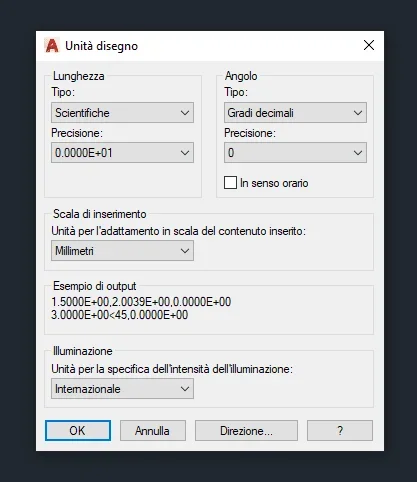
see also that unit of measurement is set in autocad (by keyboard command unit) and possibly correct it so that it is the same used in inventor. very often the ratios of magnification without logic have to do with 25.4 (or, worse still, with the cm of the 'giometers).
Also make sure that what matters is not maybe views of details magnified manually by autocad with the adjusted quotation that tricks you. copy & paste imports I made many and all errors were attributable to these causes, although of course autodesk can always surprise us.
1612352925233.webp
 
Hi.
after giving the "paste" command in inventor, click on dx button and select paste option1612356104932.webpgoing to manage the conversion inches /mm without retracing from autocad.
Moreover if, the autocad object is a block, through the flag you can decide whether it has to stay locked even in your sketch. this last trick cuts the head to the bull to any involuntary deformations1612356221594.webp
 

Forum statistics

Threads
44,997
Messages
339,767
Members
4
Latest member
ibt

Members online

No members online now.
Back
Top