@leggera I am rereading some of your old open discussions in the solidworks area and I know that you have the unpleasant habit of not saying whether the solutions you have been given were useful or not.
as time to write something like: Thanks you solved the problem It doesn't mean much time loss, as well as being able to do it from home, it would be the case to start making it a habit.
This thing I've already pointed out to you.
This way of acting is contrary to the spirit of a forum, which is not a service center, where even responding that receipt is the right solution can help others.
it is also a form of respect not being the other users the children of the servant to your service and those like you
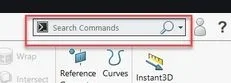
google docet tells me how to search the commands in the box, but I didn't find how to activate the box that disappeared.
You're right, unfortunately I have to do my culpa.
I will try to change way of presence on this forum.
google shows how you search the commands in the box, but I did not activate the box.
You're right, I have to be my crib.
I try from here forward to change way of doing.
Anyway I managed to fix to activate the search box commands.
System options > > search > > show solidworks search box.