
pertengineering
Guest
Bye.
I would like to share with you this small utility I wrote.
The purpose is to search for a text within multiple designs, without opening them.
I tested it with autocad 2012 64.
I gave him the command ex_f (extended find).
the form is designed as follows: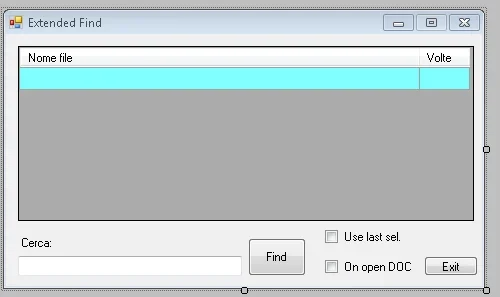 a button for running the program,one for exit,a cry where to view the results,two check box.
the idea is that you write the text content to be searched in the textbox under "search" and you press find.
at this point the classic explores resources to select dwg files in which to search for the text.
in the grid are displayed the names of the file where the text was found and the occurrences ("number of times").
for the two check boxes, the first "use last sel" serves to bypass the request of where to search and use the selection of the previous dwg files.
The second is looking for the text on dwg already opened in autocad.
(There's no monkey-proof control on this side (example use last sel. to the first execution of the program .. )
if you double-click on the grid opens the corresponding design.
I developed it with vb.net 2010 express (it's free downloadable from microsoft) + ad-hoc plugin (idem from the autodesk site. )
the plugin provides a "mycommands" module in which you can add a command that will be made available in the autocad session.
I'll explain.
once finished our project and compiled its "executable" (effectively it's a .dll file extension)
we will have to load in autocad with the command netload + name dll and the above comendo will be available by autocad.
I'll train you the project, in bin/release there's the dll to load.
read the list before running the program, I made it available to share what little I know.
It's a small vademecum on how to interact with autocad entities.
Consider that I am not a professional programmer, responsible for any damages that the sw can give you... is for educational purposes.
I would like to share with you this small utility I wrote.
The purpose is to search for a text within multiple designs, without opening them.
I tested it with autocad 2012 64.
I gave him the command ex_f (extended find).
the form is designed as follows:
a button for running the program,one for exit,a cry where to view the results,two check box.the idea is that you write the text content to be searched in the textbox under "search" and you press find.
at this point the classic explores resources to select dwg files in which to search for the text.
in the grid are displayed the names of the file where the text was found and the occurrences ("number of times").
for the two check boxes, the first "use last sel" serves to bypass the request of where to search and use the selection of the previous dwg files.
The second is looking for the text on dwg already opened in autocad.
(There's no monkey-proof control on this side (example use last sel. to the first execution of the program .. )
if you double-click on the grid opens the corresponding design.
I developed it with vb.net 2010 express (it's free downloadable from microsoft) + ad-hoc plugin (idem from the autodesk site. )
the plugin provides a "mycommands" module in which you can add a command that will be made available in the autocad session.
I'll explain.
once finished our project and compiled its "executable" (effectively it's a .dll file extension)
we will have to load in autocad with the command netload + name dll and the above comendo will be available by autocad.
I'll train you the project, in bin/release there's the dll to load.
read the list before running the program, I made it available to share what little I know.
It's a small vademecum on how to interact with autocad entities.
Consider that I am not a professional programmer, responsible for any damages that the sw can give you... is for educational purposes.
