
Poggi Bonsi
Guest
Good morning
I am a first-armed student with 3d modeling software and I have trouble doing an accident plan section with the 2015 solidworks program.
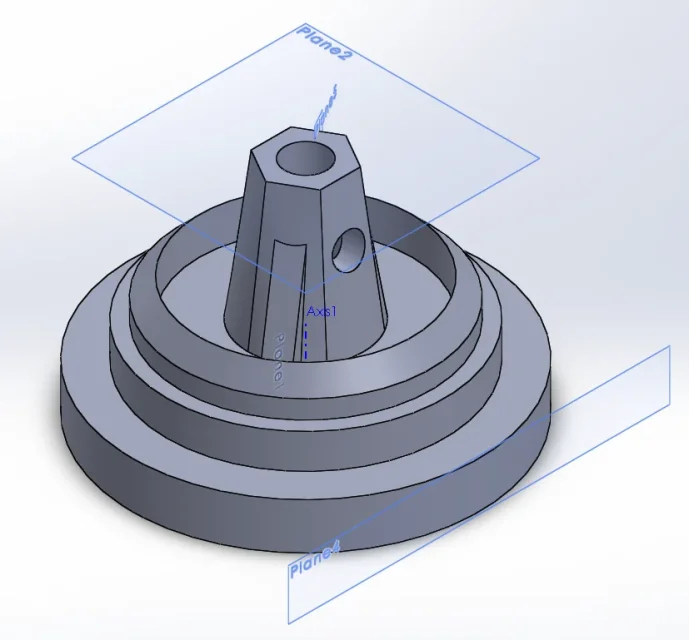
In particular, I have a piece with large symmetric lines compared to a central axis, with holes and ribs that are not aligned with each other. I therefore need a cut that crosses a hole and a rib.
when I use the section view command, select aligned (to make the cut to accident planes) and open a window where I have to choose between a aligned (allined) or a forshortened (to short) section view.
I choose the first but at this point the software does not identify the ribbing and me fields it as part of the rotation solid.
At this point I should be able to remove the sampling, select a region corresponding to my rib and sample the section again excluding the sampling. but I can neither hide the previous sample (using the command area hatch/fill, I create another one that goes over to the initial one), nor to select a closed region.
instead using the forshortened option I can select the ribs not to be sampled, but it creates a geometry other than that required and therefore I cannot use this option.
How can I solve this problem? is there a simpler procedure to avoid all these steps?
Forgive my inexperience in this matter, I am now beginning to learn the basics.
Thank you very much


I am a first-armed student with 3d modeling software and I have trouble doing an accident plan section with the 2015 solidworks program.
In particular, I have a piece with large symmetric lines compared to a central axis, with holes and ribs that are not aligned with each other. I therefore need a cut that crosses a hole and a rib.
when I use the section view command, select aligned (to make the cut to accident planes) and open a window where I have to choose between a aligned (allined) or a forshortened (to short) section view.
I choose the first but at this point the software does not identify the ribbing and me fields it as part of the rotation solid.
At this point I should be able to remove the sampling, select a region corresponding to my rib and sample the section again excluding the sampling. but I can neither hide the previous sample (using the command area hatch/fill, I create another one that goes over to the initial one), nor to select a closed region.
instead using the forshortened option I can select the ribs not to be sampled, but it creates a geometry other than that required and therefore I cannot use this option.
How can I solve this problem? is there a simpler procedure to avoid all these steps?
Forgive my inexperience in this matter, I am now beginning to learn the basics.
Thank you very much
