• This forum is the machine-generated translation of www.cad3d.it/forum1 - the Italian design community. Several terms are not translated correctly.

select overlapping objects

  • Thread starter Thread starter Franco Giorgi
  • Start date Start date

Franco Giorgi

Guest
hi to everyone, my name is frank and I am a new user of vectorworks 2010 fundamental (for now but I soon realize to switch to architect version), I am of pisa and work in a big local studio that however, of course, uses windows and autocad. convinced by a friend I went in toto to mac and I'm starting to study vw. here's the question: I can't find a way to select an object superimposed to another. something similar to maize-barra spacer in autocad to pass from one object to another.
Thank you all.
franc
 
In fact I asked myself: do the same thing I did in revit with tab!
We wait for lumi... :mixed:
 
if "the object is superimposed to another (without apostrophe)" just click on it after pressing x or selecting the 2d selection.... if you want to select an object that is below another without selecting the one above.. I don't know: I don't know what it's gonna take but you can try them both by activating a lazo selection by pressing alt and then cancel the selection of the one above mausc premento and selecting it.. .

in any way it is more advisable that you work by categories, making editable the objects you want by activating them in the appropriate category

 
if you want to select an object that is below another without selecting the one above.. I don't know what it's like.
In fact, there would be a reason to have it, although it is certainly not a priority.
amounts a horrible design all of 3d polygon. at that point you convert them into 2d polygons but unfortunately you find a myriad of perfectly overlapped lines and polygons that affect the total loss of the file and the cleaning of the design. Here would make sense a command like that.
try to extrude a rectangle and then convert it into 2d polygon; see that in the end you have a group of lines or polygons still overlapping.
I usually go to select what I care to keep, cut, throw away what remains, take it back to the place.
Perhaps, a command that selects me automatically that is below and immediately after the canc key would save a few seconds.. .
I do.
 
I didn't look for the function on vw (right look) but for example in powercadd allows me to do from menu the cleaning of the design by deleting all the "objects" overlapping. once given the command opens me a second worksheet where all the items to be deleted are reported. then choose or cancel. Moreover the function also has the count of multiple helmets.
 
in the Italian version of vectorworks there is a function (in this case very useful) to identify and eliminate "clones", i.e. identical and perfectly overlapped objects.
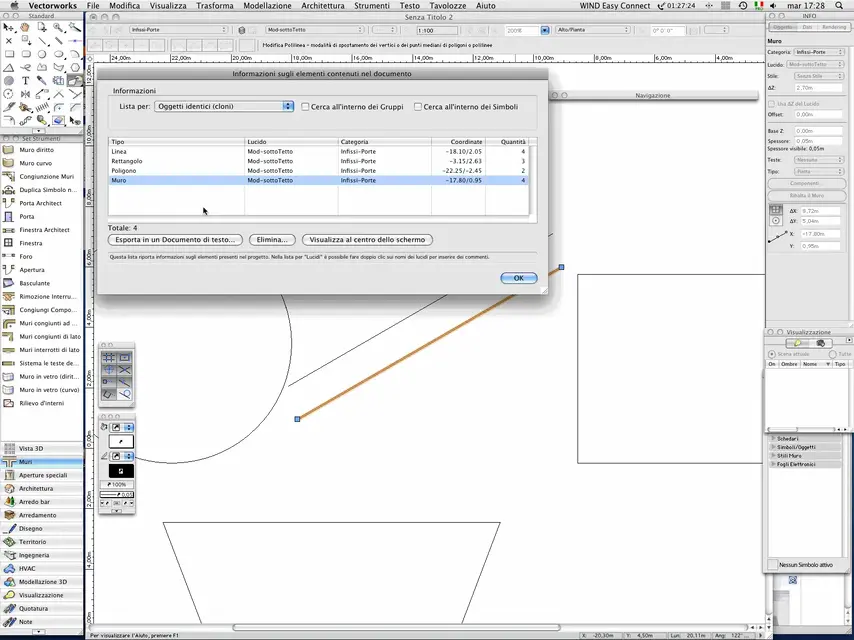
it is sufficient to recall the file command > document info, choose list for: identical objects and get an analysis of the project. you can then select the objects and possibly delete them.
 
Thank you very much to all.
it would be interesting something like in rhino where you open a window next to the pointing arrow with all the elements present and go to select in the list what you want to select, even visually since when you see the list you highlight in the drawing the interested one.
I hope I've been clear. (Oh!)
Hi.
 
every software has its own interface and you can't expect everyone to do what others do. Perhaps in rhino what you say makes sense, even because being a modeler you have to deal with a structure designed to manage an object (more or less complicated). vectorworks is a cad, so it is normally used to make thousands of objects. an interface like that could prove slow or useless.
 
cad based on parasolid have the popup selection I think, like nx and swx, I would put it among the first things planned for the next versions, since the modeling engine is the same. :
 
one thing is the modeling engine, another thing is to define the user interface. I can immediately assure you that for now such an implementation is not foreseen (and other things are interesting to have in vectorworks)
 
I tried the vw function from document info and, although it does not highlight the parts that will clear up, it works fine.
 
You can actually select in the clones list what interests you and click on the "view at the center of the screen" button to check where that item is.
 
cad based on parasolid have the popup selection I think, like nx and swx, I would put it among the first things planned for the next versions, since the modeling engine is the same. :
Well, I don't see it as a priority, even because the stratification of a 3d model is always organized for layers/gloss. that 2d per class/categories. and in fact the problems of overlapping of objects equal the encounter very rarely, just when cleaning dwg of others (do not hurt).
You can probably get there with a script. vw force is also in the ability to create ad hoc commands and pulgins to improve your workflow.
I do.
 
there will be other priorities surely, but if vw must consider himself also a 3d modeler, others that cad-bim which then is one of his strengths, flexibility, should nevertheless make life easy in that sense, even because it is not so question of overlap but precisely to select in a large 3d model, the right object, and not always you can work with the layers or classes, I see it when I use rhinoup, often if there is no selection. Although I still consider rhino as support for a program like vw, and not a substitute.
 
You can actually select in the clones list what interests you and click on the "view at the center of the screen" button to check where that item is.
You're right. I had misinterpreted the potential! !

here is also the vw screen
 

Attachments

  • VW.webp
    VW.webp
    97.4 KB · Views: 13
there will be other priorities surely, but if vw must consider himself also a 3d modeler, others that cad-bim which then is one of his strengths, flexibility, should nevertheless make life easy in that sense, even because it is not so question of overlap but precisely to select in a large 3d model, the right object, and not always you can work with the layers or classes, I see it when I use rhinoup, often if there is no selection. Although I still consider rhino as support for a program like vw, and not a substitute.
I never happened to have trouble selecting a useful object in any of the cads I use. not even in complex projects and rich in details.
For example, domus cad had a fusion function of overlapping elements.
I do not see what usefulness has an element under another identical one. What's that for? I don't see the practical case. I mean, if it's useless, I have enough selection and deletion of all doubles (or clones).
 
also because it is not so question of overlap but precisely to select in a large 3d model, the right object, and not always you can work with layers or classes,
My main job is to build 3d models, so I think I have acquired a certain experience (I have done it for 10 years...), much more than on the two-dimensional.
Sincerely, I am also quite fast now and, perhaps because I have never had such a command available, I have never even felt the lack.
one of my last works was the model of a 13-storey building, with a rather complex external skin. However, I have never had selection problems because I work a lot with the display options of layers and classes that I find, these yes, fundamental. managing the model correctly and with interactive cursor selection options I find everything very smooth.
However, I think it is a question of different experiences.
 
I'm sure you're very efficient. I'll get used to it well. often I don't need to pump up to select, so much he tells me what I want, otherwise it would be a go zoom way. I often model the details. :
 

Forum statistics

Threads
44,997
Messages
339,767
Members
4
Latest member
ibt

Members online

No members online now.
Back
Top