
• This forum is the machine-generated translation of www.cad3d.it/forum1 - the Italian design community. Several terms are not translated correctly.

selection

  • Thread starter Thread starter beppino
  • Start date Start date

beppino

Guest
Good morning, everyone.
as from title, my problem is selection elements.
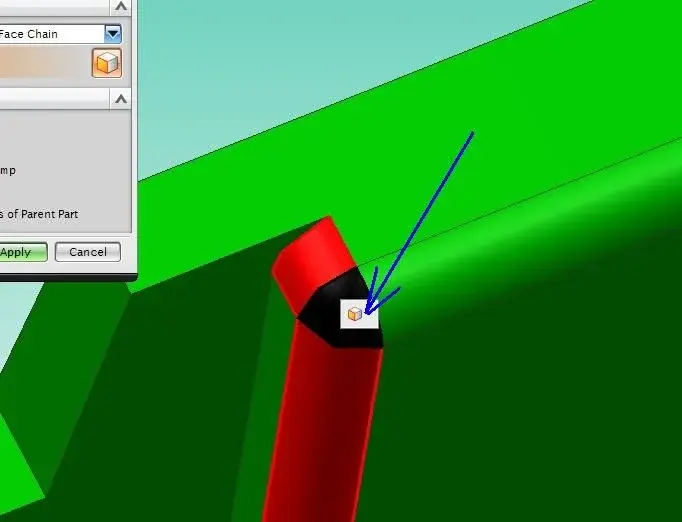
as seen in the video and in the image attached, if they select some faces, I always have in the middle of the paxxes and the selection popup (single, tangent, etc...).

is it possible to remove it from front of the mouse pointer, obviously without changing my selection options?

I can't find any settings in the customer default.

... I hope I've been clear.

Thank you!
 

Attachments

  • selection.webp
    selection.webp
    15.7 KB · Views: 16
  • selection.zip
    selection.zip
    131.4 KB · Views: 11
It seems to me that by pressing f3 it disappears... but I fear you also close the command dialog box.
I personally don't find it uncomfortable. to me remains visible only if after clicking the rest face with the stationary pointer; If after taking my face I move on another one disappears alone...
 
It seems to me that by pressing f3 it disappears... but I fear you also close the command dialog box.
I personally don't find it uncomfortable. to me remains visible only if after clicking the rest face with the stationary pointer; If after taking my face I move on another one disappears alone...
Thanks for the answer.
pressing f3 disappears, but reappear to the next selection of face.
I always find it in front of the pointer, so many times I click on him instead of on the next face, and I find it a little hateful. .

I think there's no way.
 
Thanks for the answer.
pressing f3 disappears, but reappear to the next selection of face.
I always find it in front of the pointer, so many times I click on him instead of on the next face, and I find it a little hateful. .

I think there's no way.
I use 7.5 and 8, but it is always displayed moved compared to the cursor.

ps. I always use the "small" cursor and not the one with the big circle as you have.
 
I use 7.5 and 8, but it is always displayed moved compared to the cursor.

ps. I always use the "small" cursor and not the one with the big circle as you have.
I tried with the small cursor, it is a little less evident, but we still find it often on my selection trajectory.

Thanks the same.
 

Forum statistics

Threads
44,997
Messages
339,767
Members
4
Latest member
ibt

Members online

No members online now.
ciao
Back
Top