
• This forum is the machine-generated translation of www.cad3d.it/forum1 - the Italian design community. Several terms are not translated correctly.

separate consolidated single-level basis

  • Thread starter Thread starter ansyolitico
  • Start date Start date

ansyolitico

Guest
Hi.
I come from modelling and windchill. now I'm using solidworks.. I'm a little early. But I wanted to understand if it was possible to make the distinct bases on a single consolidated level, in practice of all the final axieme to have the distinct parts, maybe even pulling in other voices beyond the name and quantity, like the group. in windchill you could do, I realize that a cad is not a plm. I would also like to know if ghost groups and wtparts can be made


Thank you.
 
Hi.
I come from modelling and windchill. now I'm using solidworks.. I'm a little early. But I wanted to understand if it was possible to make the distinct bases on a single consolidated level, in practice of all the final axieme to have the distinct parts, maybe even pulling in other voices beyond the name and quantity, like the group. in windchill you could do, I realize that a cad is not a plm. I would also like to know if ghost groups and wtparts can be made


Thank you.
solidworks can only produce distinct parts, but I don't know if it's what you mean. If I have understood well you want a distinct in which each element is mentioned once, assign included, with the amount related to the axieme that generates the distinct. this kind of distinct I get it from the pdm, I use ready2works pdm.
 
Three Axioms
Nonno(assieme)
- padre1(seat)​
-son1(part)​
-son2(part)​
-son3(part)​
- padre2(seat)​
-son1(part)​
-son2(part)​
-son3(part)​
- padre3(seat)​
-son1(part)​
-son2(part)​
-son3(part)​
I would like to see only the children(parts), their quantity, (group and rev, if it is possible)

Ghost attribute and wtpart are attributes that make the group and the invisible part when you go to generate the distinct.

is it possible only with solidworks generate such a distinct?
 
I forgot.

also make an inseparable group, that makes a group an article without seeing the parts
 
I don't know if it's me, but I can't find myself with these guides
I can't find the commands where they say

I don't even find the welding profiles folder in lang to make custom profiles
 
I can't understand
if from proprety maneger I go into property and in fact envelope in the distinct with recesses I see the group and its parts

if I make distinct only parts sees only the parts but some groups that I would not see them (justly).

I think without pdm, it doesn't come out.
 

Attachments

  • distinte.webp
    distinte.webp
    17.5 KB · Views: 5
I can't understand
if from proprety maneger I go into property and in fact envelope in the distinct with recesses I see the group and its parts

if I make distinct only parts sees only the parts but some groups that I would not see them (justly).

I think without pdm, it doesn't come out.
Forgive me, but I can't understand your problem.
If you click on the separate materials, the propertymanager opens on the left. you can select them (as you have already seen) those 3 types of distinction.
wanting solidworks allows you to create configurations in the "assieme" environment (where you can, for example, suppress components that will not appear in the distinct if you choose that specific configuration)....if you look under the three distinct types in fact there is a "configuration" voice that you will have preset of "default".

Moreover if you want extra information in the separate table materials you just have to add properties in the table itself --> right click on the table --> insert--> right column...and you will see a new column where you can select any properties such as weight, material...etc.
you can also create new properties from the 3d of the part, call them pippo and call them in the table.

I hope you've been at least a little helpful.
 
no useful
the problem arises if I make distinct only parts I see only the parts, including those of the subaxis, but some pieces I should see only the under assemblies and not their parts, of others I should see only the under together and not its parts. therefore the type of distinct that I use is good for one but not for another

Now I look at the concept of configuration that I don't really have. I apologize for the trivial questions, but solidworks I only saw it in one, for a little simple projects, without these problems from company.
 
no useful
the problem arises if I make distinct only parts I see only the parts, including those of the subaxis, but some pieces I should see only the under assemblies and not their parts, of others I should see only the under together and not its parts. therefore the type of distinct that I use is good for one but not for another

Now I look at the concept of configuration that I don't really have. I apologize for the trivial questions, but solidworks I only saw it in one, for a little simple projects, without these problems from company.
try so.... in the axieme you want to make inseparable (only you)...click dx on the components of the axieme (one at a time) and "excluding them from the distinct base". You shouldn't see them in any way. It would remain the separate axieme if selections are "first level" and "reent".
 
 
Hello Massive
if I do as in your other post it does not work
"go to configuration tab​
go to the properties of the configuration/s​
in distinct material options"I'm going to be here."​
if I follow the link to the solidworks guide I cannot find with the right button options south menu the tendon
 
writing "does not work" is like telling the mechanic that the machine "does not leave".
if you want to manage the distinct in fashion to see the parts of a subaxieme or a subaxieme as a single part, you have to use the voices promote and hide
If you do not want to see a certain element you must exclude it from the distinct within the axieme.
all this has been explained several times in the forum.
 
Hello Massive
if I do as in your other post it does not work
"go to configuration tab​
go to the properties of the configuration/s​
in distinct material options"I'm going to be here."​
if I follow the link to the solidworks guide I cannot find with the right button options south menu the tendon
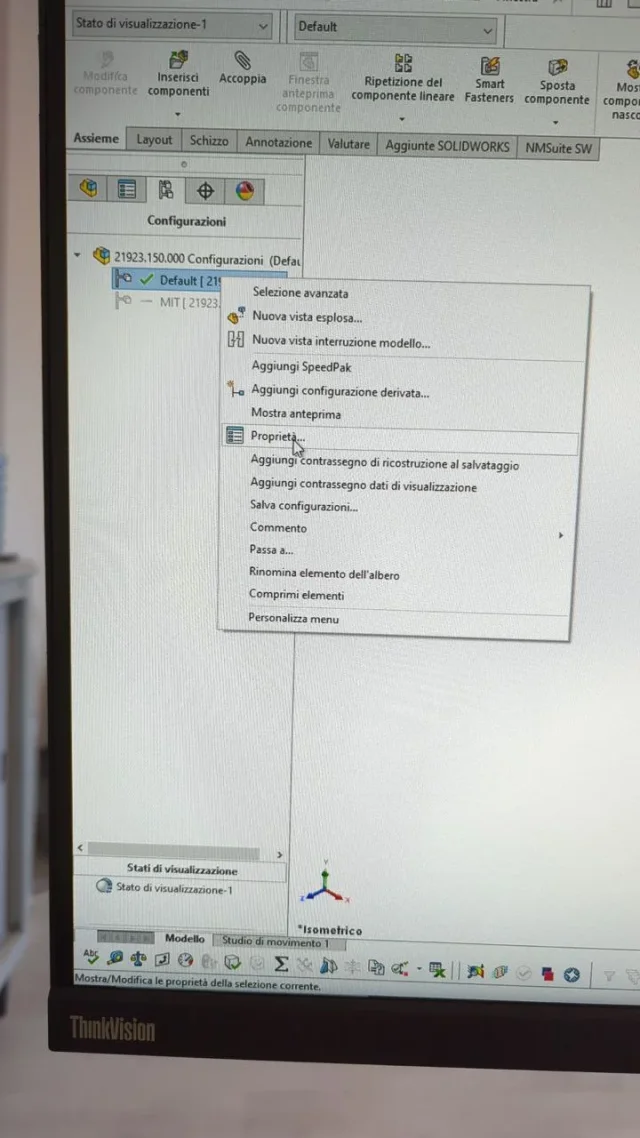
hi you have to right click on the configuration---> choose propertiesphoto_2_2024-01-25_09-22-12.webpopens a menu and choose "promote"
photo_1_2024-01-25_09-22-12.webpIn that way, in a separate set, you will not appear below together but the individual details that you can post at will.

Thus, any fictitious subaxis made only for assembly convenience do not result in the distinct.
 
I would have another question, if it is not pertinent deleted as well, it is possible at once only to add to several parts a voice in the property so in separate appears?
 
for future parts, you can implement it by editing the part template, adding what you need and then creating new parts using that template.

for those already made instead the only way is to use "planning utility or task scheduler " a program that you have to launch from programs (killed how complicated I am, in poor words it is not present in solidworks but is a utility installed aside)
open it, in the menu choose "upon custom properties" and then follow the directions.
you can do it massively on an entire folder or choosing every single part that interests you.
Once you choose the part(s) and click on the forward, a window similar to the custom template properties will open, you can add the type of property.
I don't know if you edit empty fields, so if it's not a common property to all parts, I suggest you put a "point" in the "value" box, then open every single file and change as you like.

Anyway, I think the guide is more understandable. .

:d :d
 
the scheduler I just used it to convert the drawings in pdf and dwg. fantastic as a tool. but I have also seen that there is also a possibility to make macros, I have to study them
 

Forum statistics

Threads
44,997
Messages
339,767
Members
4
Latest member
ibt

Members online

No members online now.
Back
Top