• This forum is the machine-generated translation of www.cad3d.it/forum1 - the Italian design community. Several terms are not translated correctly.

separate cut welding angles profiles

  • Thread starter Thread starter c.marcello
  • Start date Start date

c.marcello

Guest
Good morning, I tried looking around but I didn't find anything like my problem... I am trying to make another small step for the knowledge and use of the program and I have just come across the cutting distinte. . .
In practice it happens to me that the angle1 and angle2 parameters after making a shortcut of any profile (even simple) disappear.
the test procedure that I did is this:
I sketch a line on the top floor that intersects one of the other two floors;
I create a welding profile (e.g. from a 30x30x3) framework
..and until here everything well, if I go into the property of the separate cut I get the length and the two corners.. .
then from the welding bar I go on the shortcut and extend command, as a body to shorten click on the one created previously and as a cutting plan the plan that I had intersected in point one, and I eliminate one of the two parts (or even without eliminating the part does not change), at this point I go to update the separate cut and go on the property of the part, and there unfortunately the length is updated while the corners (both is... and the 2) is not.
I tried various settings but the result doesn't change... :confused:
 
oops.. Excuse me... I realized now that even if I had been enrolled for a while I never showed up... Excuse me. .

My name is marcello and I am from Trieste
I usually use 2d (autocad) software even if I am trying to figure out the basics to switch to a 3d software (more than physical the problem is to change the mental registry. . . )

Since I enrolled, I participated only by reading and trying to understand the basic operation of the program... without intervention (also because I do not think I have the basis or knowledge to intervene on this)
 
bye c. marcello,
depends on the settings you gave to the drawing. by default what you mentioned does not happen.

you have to look in the properties of the separate cut that did not appear "maintain element, barter". Also it is good that you do an upgrade in the 3d model before looking at the table in the 2d. if it is cut straight the tube must give 0°. I think you're wrong in modeling.

try to do the following: 2d or 3d sketch with 3 or 4 long lines about a 100 mm. then become a hollow picture profile (the smallest you have). Save and make the separate cut.

look at the tutorial as you work with profiles. otherwise post the incriminated files we take a look at. everything must go automatically, without leaving strange things around.

Careful: In the multibody part, look inside the body box (left up in the tree) and click with the dx button on the item list, then do automatic, and then again update.

You'll see that it's okay.
 
hello mechanicalmg, while thank you for the answer... .
But I think I've explained badly (discussed but I still have a little trouble and I get confused with the names between drawing and part..) ...the problem is not at 2d but in 3d (i.e. I'm not in the drawing file...I'm still in the part). maintains barbed element I find it on the 2d when I insert the cut distinction and can not find it in the part :-(
inside the body box the automatic box is already checked and even if I click on update the result does not change ...

if I make segments as you say both the cutting distinct and under the ownership of the multibody gives me the correct angles...the problem only exists if I shorten an element ...in practice in the shortened element the length is updated while the angles do not appear anymore... even if I do update nothing (and both on the cutting distinct in the 2d and in the property of the 3d multibody)...
after place a couple of pictures on what happens.. .
 
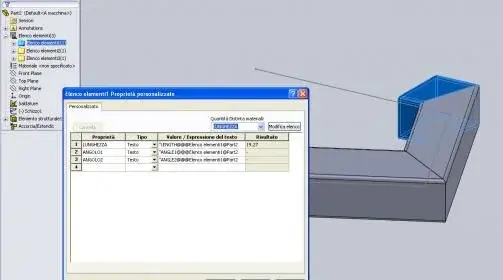
place 2 images... in practice the first image (image1) I made 3 profiles and going on the multibody the property of the first (and all others is correct). .
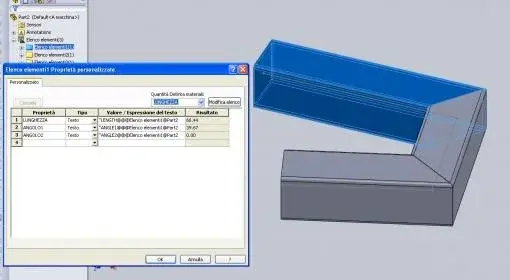
image2: I cut the first item I updated the item list but the corners of the 2 are gone. What I can't understand is that by absurdity I only change 1 of the 2 corners and at least that should remain, instead all 2 disappear:-(
 

Attachments

  • Immagine 1.webp
    Immagine 1.webp
    13.2 KB · Views: 31
  • Immagine 2.webp
    Immagine 2.webp
    11.6 KB · Views: 27
I saw the problem from your photos. I am using sw 2010 x64 sp 2.1 and it does not give me the problem. If you're using a sp0 or antecedent version might give you the problem. I tell you this because I tried to do the same exercise that you did yourself, but to me not from absolutely "-" as value and it updates correctly.

try pressing ctrl+q to force the full update of the model and tell me if something changes.
 
I tried giving ctrl-q shows me the symbol on list items that must be updated, the living room and everything as before...
I should look at the version, but I think it's not updated. . As the laptop is not mine, but I borrowed the owner to try the program during the holidays (sue...hihih) as soon as I mention the problem and then do as he wants (even though I don't know how the solid sp work - I mean as licenses - if they are included or not) ... vabbè thank infinite for the help and the time lost;) to good make :-) ...
However I am already happy that it is not my mistake but it is a problem of the sw:-)..eppoi who knows maybe a tomorrow I will take it also in stable plant and then I will start to attend more actively the forum... for now I think I will limit myself to sporadic uses according to the availability or not of the laptop. . .
 
All right. We'll send the bill to your friend hahaahahahahah
However if you have active the license agreement is connected to the internet and you do the update to the latest release. if it's just the old version however yes, you have to look at him his bureaucracy and convenience.
 

Forum statistics

Threads
44,997
Messages
339,767
Members
4
Latest member
ibt

Members online

No members online now.
Back
Top