• This forum is the machine-generated translation of www.cad3d.it/forum1 - the Italian design community. Several terms are not translated correctly.

separate description of cut

  • Thread starter Thread starter deep70
  • Start date Start date

deep70

Guest
Hello everyone,
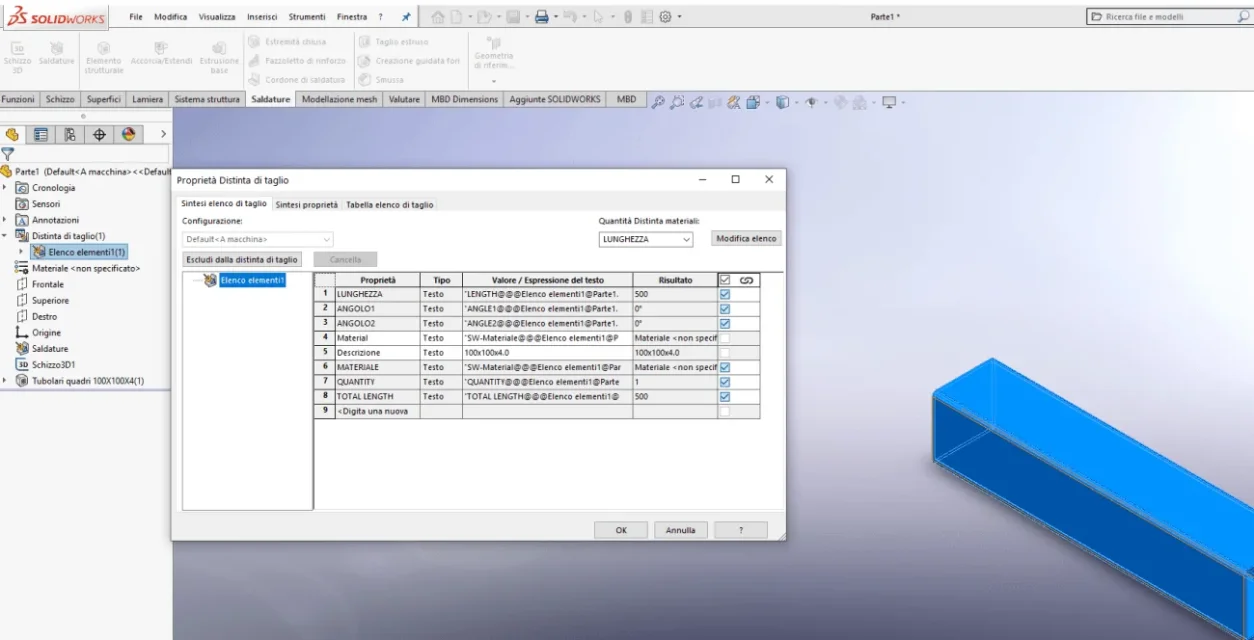
I find myself with a problem that I never remember having faced, in substance in the separate cut after creating a profile type a frame tube 100x100x4.0 does not appear to me the voice - description - even if I create the usual delimitation panel and I do not even appear the type of profile in the tree. (elements list instead of 100x100x4.0. I most likely checked or removed something in system options or other.
as always I thank you in advance of the answers given as well as your availability.
1592952740168.webp
 
description, like all non-automatic properties, is contained in the profile file, if it is not present can not be created.
the delimitation pane works on all the elements of the distinct, so also in those that are not structural elements, in this case the plate and from the description seems to have it; the problem must be assessed considering this aspect
 
I understand. so it might be that I have some damaged or worse deleted this file... Can you give me a copy? and where is your location?
 
don't you know what sldlfp files you use structural elements with?
open options> system options>position of welding profiles
from the indicated folder open the profile used in the image and check the file properties: if there is the description is a problem, if there is no other
 
I'm sorry. I didn't understand. I come to this point... The folder you say where I find it?1592990224530.webp
 
that you say you search in c:\programdata\solidworks.... or in c:\sw_utility...??? ? ?
 
Sorry about the delay. but today I was out of place late and only now I did this verification.. in fact on the files lacks the description item in all, I added it and now I see it... as shown in the image below.. Unfortunately, however, the sad thing is that all profiles are without it.. and to add to everyone the voice is really... heavier.. but this seems the only way for this.. Thank you very much for having solved the problem once again.. Good evening to you and thank you again.
1593039502266.webp
 
if you don't have any particular need to coordinate in the useful resources section of solidworks you find ready profiles
Alternatively, if you have a version (2017?) that allows, you can do configured profiles, i.e. make a profile with data table where you create all the necessary dimensions. the advantage of this profile management is that you will no longer understand that the frame goes into the cow because it moves from one profile to another.
 
I think the second option is the best.. I've never sincerely done this operation but it looks like the best.. Thanks again massive.
 

Forum statistics

Threads
44,997
Messages
339,767
Members
4
Latest member
ibt

Members online

No members online now.
Back
Top