
• This forum is the machine-generated translation of www.cad3d.it/forum1 - the Italian design community. Several terms are not translated correctly.

separate table materials with unique configuration

  • Thread starter Thread starter mohammed.majdouli
  • Start date Start date

mohammed.majdouli

Guest
to all

I am a manufacturer of ovens for the painting of carriages of all kinds.

every day I make many sets at the table of my plants exploded before,
what I can't understand and that I can't do is;
a table connected to an explosion gives me quantity nr bubble and name all connected to the axieme to which I refer.

if you want to connect a single component to that initial table as I proceed?

I send you an example of my problem
thanks wait for your feedback

prg = sldwrk - 2016
 

Attachments

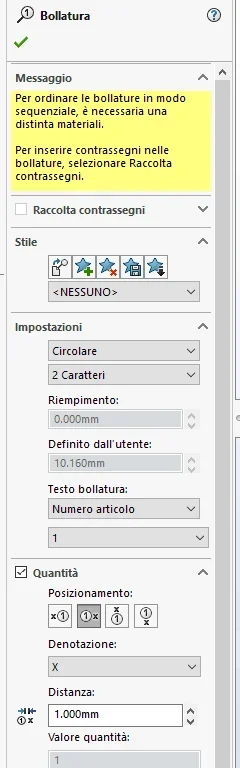
in the bubble there is the option to insert the quantities also as bubble properties you can insert the amount
 

Attachments

  • Immagine.webp
    Immagine.webp
    21.5 KB · Views: 14
but it is also possible to do it with separate table materials
a bubble is made only with the presence of a distinct material.

in the second pdf that you attached the single table of the second sheet as it was created?
how was the view inserted?
 
in the second sheet I created the table from the view I see was only to show an example table
I know perfectly that once you create a table for a long time that is not the initial explosive
solidwork considers it as a piece with bubble one.

but if you want to keep the amount and nr of the bubble of the initial sheet creating a single table for each pz I put on the table.

so you would avoid doing so many steps to perform a function that you do with a shortcuts,
for many passages I mean 2 different bubbles plus I have to connect the name to the part.

instead if I could somehow connect the table of the main explosion to all the other individual tables it would be enough for me to create the table.
 
if the view does not come from the axieme, but from the particular single you cannot connect it to the separate axieme.
if the view derives from the assieme a method, depends on the difficulty of the job, it would be to create a configuration by element in which to exclude from the distinct suit how much it does not serve (numbering starts from 1); or insert the total distinction and hide the uninterested lines (the numbering remains equal)

there is the possibility of inserting the relative amount of the axieme into the part as property, but of course this part must be used only and exclusively in that axieme; probably you can carry as property also the distinct location, but I didn't have to verify
 
if the view does not come from the axieme, but from the particular single you cannot connect it to the separate axieme.
if the view derives from the assieme a method, depends on the difficulty of the job, it would be to create a configuration by element in which to exclude from the distinct suit how much it does not serve (numbering starts from 1); or insert the total distinction and hide the uninterested lines (the numbering remains equal)

there is the possibility of inserting the relative amount of the axieme into the part as property, but of course this part must be used only and exclusively in that axieme; probably you can carry as property also the distinct location, but I didn't have to verify
  1. I had tried but as the pieces repeat themselves in various assemblies with the property becomes a madness.
  2. the process of putting the general thebella into each piece then hiding all the pieces and a procedure that with monotony leads to a series of distraction errors (work with details that are repeated sometimes changes a letter or a number)
  3. the difficult work is not complicated and that as already written monotony leads to distraction / transcription errors
attached I show you a channeling of a plant that for itself are elementary drawings
three four shares on the cross, but as you know there are many channels (this and one of the smaller plants).
in some sheets to optimize rub every hole to insert a piece because if not when I go to print them I make the company fail.
and here that arises my need to run a table with configuration linked to the first.
(to make this attachment takes approximately 3/2 hours if I can get all in a shortcut I would be able to shock at an hour or an hour and a half the time and money and you lose it to control the error)

thank you very much again for the availability !!!
 

Attachments

you can do through the bubble.
the only way I found to connect the tables is as follows:
insert the bubbles on the part by connecting them to the various headings no., description, quantity
insert a blank general table
double-click a cell and then select the bubble.
hide or not bubbles.
 

Forum statistics

Threads
44,997
Messages
339,767
Members
4
Latest member
ibt

Members online

No members online now.
Back
Top