
• This forum is the machine-generated translation of www.cad3d.it/forum1 - the Italian design community. Several terms are not translated correctly.

set line thickness according to parts

  • Thread starter Thread starter GianniM
  • Start date Start date

GianniM

Guest
Hello, everyone! That is my last doubt, in the hope that someone can help me.
we hypothesize to make the table of a set composed of 3 parts.
all parts are visible, so the program puts them all with the same line thickness.

you can configure inventor to set part 1 and part 2 with the thickness of defoult.
part 3 instead, although equally in sight put a thinner line thickness.
(obviously without selecting each line one by one)

:
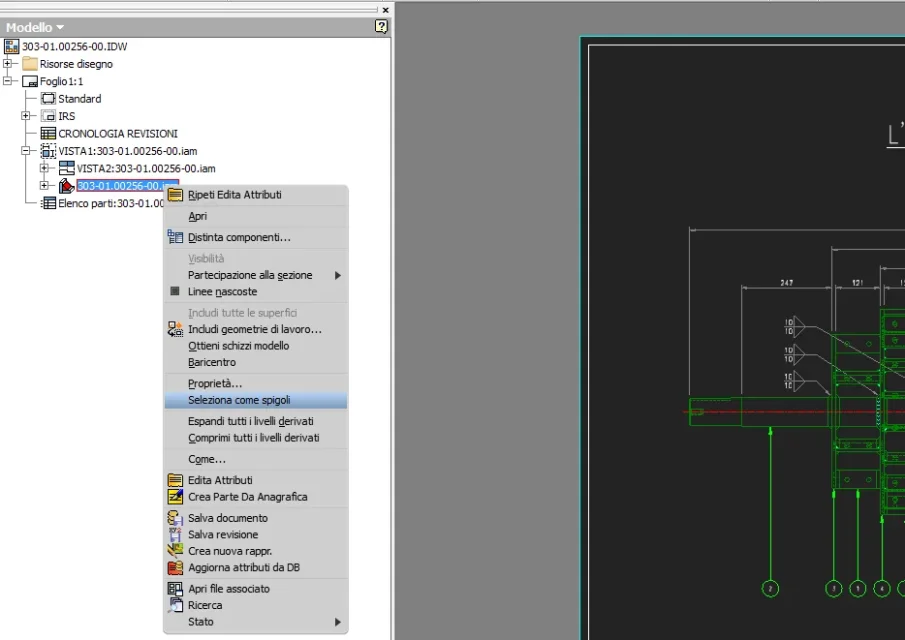
 
I don't think, but to speed up, instead of selecting lines one by one, expand from the browser the view of the part (or of the assieme), select the part (or the assieme) directly from the browser, click dx and select "select as edges".
now you can change the properties of the lines without having selected them one by one.
 

Attachments

  • Immagine.webp
    Immagine.webp
    34.9 KB · Views: 11
con inventor (messa in tavola *.idw) is simple:
in the environment (*.dwg ) I do not know, ignores this answer:

for inventor:

1) you are at table (*.idw)
2) activate the filter ( select priority part )
3) select one or more parts you want to change the line thickness.
4) dx key select "property"
5) remove the check from the " layer" box
6) now the properties can be changed, " thickness ", " type line ", " color " (the scale cannot be changed).
7) select thickness and choose one of the preset or overwrite ones.

you have thus modified the line thickness (and possibly line type and color) only of the fractional part.

I hope I've been helpful

Good job
 

Forum statistics

Threads
44,997
Messages
339,767
Members
4
Latest member
ibt

Members online

No members online now.
Back
Top