• This forum is the machine-generated translation of www.cad3d.it/forum1 - the Italian design community. Several terms are not translated correctly.

share guided by equation

  • Thread starter Thread starter tester
  • Start date Start date

tester

Guest
good morning to all,I have a small problem in linking a quota to an equation,in the sense that before,doing double click on a quota there was the icon to add an equation,but in the 2016 version there is no more,I looked at the guide online,but I can't understand how to do,you could help me? Thank you.
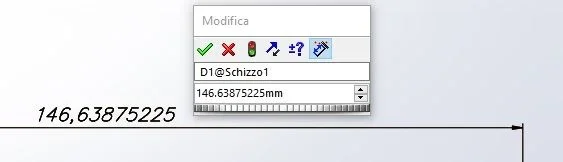
 
the equation is written = equation. the part to be inserted is that in lanes and in the place of equation the formulaio is to put the image of the change quota obtained with the double click, could you indicate what the icon of the equation would be?
Immagine.webp
 
thanks massivonweizen for answering me immediately, with the precision and punctuality that counts you, although I do not write much on the forum, (because use of thecam, now autodesk, and there are not many people who use this program compared to solidworks), often your answers (sometimes rightly strict) are of help to solve even my problems, as regards the icon I was badly expressed,
 
I found in the guide the key you were referring to, should be the one you refer to questa pagina della guida 2010from 2010, to 2016 tools have changed a lot.

another way to insert equations is to use the appropriate command indicated by guide 2016if you need the Connect Value, you have to right-click the quota and find it in the bottom of the list
 
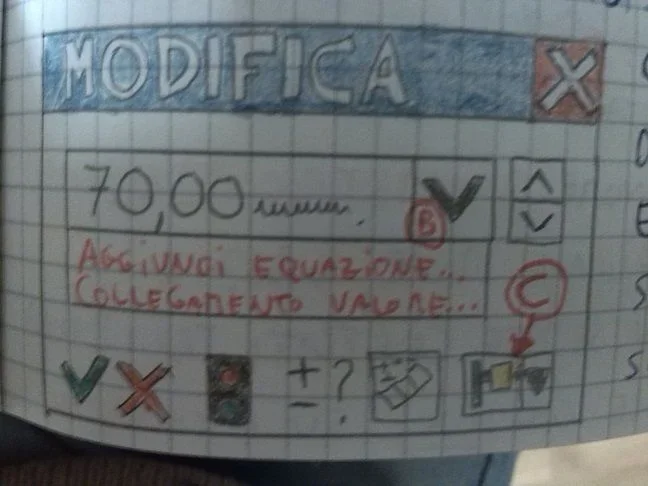
as you wanted to demonstrate clear and precise answer,thanks,this is a design of how was the window of the quota in the version 2010.IMG_20170314_064009.webp,I took it from my 2010 notes when I followed the tutorials of Franco prampolini,
 
ooops came a little big, however by clicking the "b" drop-down menu came out the 2 choices,
 
to the face of notes. As soon as you were there, you could whip it, which is a little rough.:redface:
be' calculates that I have written 6 notebooks of notes and exercises, (I have put more than 6 months), all with drawings and explanations, but, as long as you write like a robot and not reasons you understand little of how you use a program, for me it is worth much more the practice than the theory, and now, since at work the situation is not much rosea, I decided to remake all the "course", seen that solidworks
 
be' calculates that I wrote 6 notebooks of notes and exercises,(I put it more than 6 months), all with drawings and explanations
You've done it now, so I refrain from saying what you should have done then. only one thing: in the future never do such a thing to learn software again.:cool:
 

Forum statistics

Threads
44,997
Messages
339,767
Members
4
Latest member
ibt

Members online

No members online now.
Back
Top