
• This forum is the machine-generated translation of www.cad3d.it/forum1 - the Italian design community. Several terms are not translated correctly.

"sheet surface transformation"....

  • Thread starter Thread starter PiegatoreSolidworks
  • Start date Start date

PiegatoreSolidworks

Guest
I would like to ask you a question that I have found in the exercise phase: I was making an extruded surface to a loft surface... I was able to trim the so-called "lamiera" (red) but I was wondering if I had used the right method or if there was a more correct solution than mine!

Thank you all, Marco.


(....clearly if the surface had been linear the speech would be very simplified! )
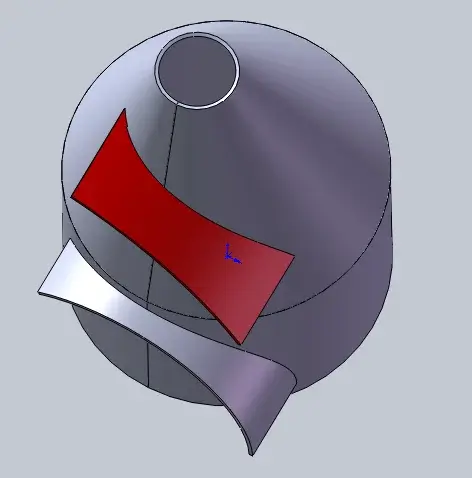
 

Attachments

Hello, Marco.

if you had made the surface "surface-offset1" complete (without the joint space) you could have extruded directly with the base flange
to the surface.
the extruded cut creates a step, unlike the above system does not happen.
place the file in format 2012.
 

Attachments

Hello, Marco.

if you had made the surface "surface-offset1" complete (without the joint space) you could have extruded directly with the base flange
to the surface.
the extruded cut creates a step, unlike the above system does not happen.
place the file in format 2012.
Hello, mike, thank you for the answer! I'm sorry I don't have 2012, can you explain to me more simply the function used? I don't understand. I'm trying to learn now. I realized they can help me!

Thank you.
 
Hello, mike, thank you for the answer! I'm sorry I don't have 2012, can you explain to me more simply the function used? I don't understand. I'm trying to learn now. I realized they can help me!

Thank you.
I tried to create a surface by moving the junta to the opposite side and making the flange with the option up to the surface, but it does not work.
I found another solution using the split command.
I think it's okay.
View attachment 24511
 
Hello, mike, thank you for the answer! I'm sorry I don't have 2012, can you explain to me more simply the function used? I don't understand. I'm trying to learn now. I realized they can help me!

Thank you.
here is the file 2011
I tried to create a surface by moving the junta to the opposite side and making the flange with the option up to the surface, but it does not work.
I found another solution using the split command.
I think it's okay.
View attachment 24511
with the surface works fine, try the attached file.
 

Attachments

Okay.
But my solution is wrong?
to understand in the future whether I can proceed one way or another.
I don't know, I didn't download your file, I was just answering that with
the surface function.

if your model is spying you have achieved the purpose.
solidworks can achieve the same result with different paths, just learn to choose the best both in terms of simplicity and in terms of practicality, as well as precision.
Now I open your file and examine it.
Hi.


ps: if I don't remember badly, the divide, it doesn't work on cuts that are not perpendicular to the thickness of the sheet,
I strongly doubt that your sheet rolls.
Now I try and let you know.
 
Okay.
But my solution is wrong?
to understand in the future whether I can proceed one way or another.
Now I can answer you, my doubts were founded:
the function divides, does not perform a "normal cut" accordingly
the sheet does not break.
You decide what to do.
bye
 
Now I can answer you, my doubts were founded:
the function divides, does not perform a "normal cut" accordingly
the sheet does not break.
You decide what to do.
bye
Okay.
incorrect solution for development.
Thank you.
 

Forum statistics

Threads
44,997
Messages
339,767
Members
4
Latest member
ibt

Members online

No members online now.
Back
Top