
• This forum is the machine-generated translation of www.cad3d.it/forum1 - the Italian design community. Several terms are not translated correctly.

sketch included in the feature

  • Thread starter Thread starter Tender
  • Start date Start date

Tender

Guest
'was to all

I've been approaching solidworks for some time, after a long militancy with solidedge, that's why the question arises spontaneously:

nn is there any way to not include a sketch in a child feature, so you can use it for multiple different features? both for cuts and extrusions, solidworks "ingloba" sketches in the features, which the good edge did not.

solidworks 2008 here

Thank you.
up
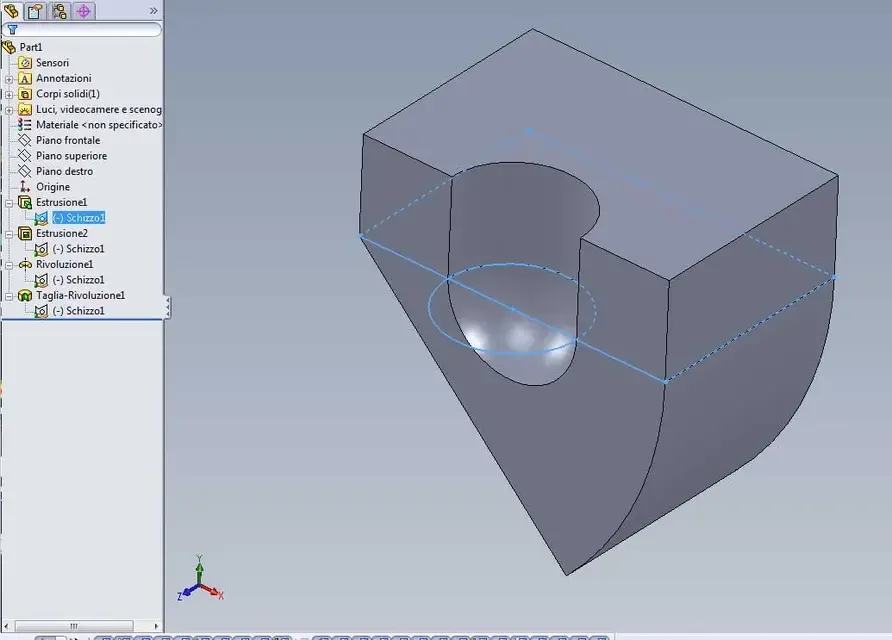
 
you can reuse them anyway in other features, if you reuse them, an icon shows that it is reused in other features. In any case it is incorporated in the first time you use it.
 
'was to all

I've been approaching solidworks for some time, after a long militancy with solidedge, that's why the question arises spontaneously:

nn is there any way to not include a sketch in a child feature, so you can use it for multiple different features? both for cuts and extrusions, solidworks "ingloba" sketches in the features, which the good edge did not.
solidworks 2008 here
simply reset the sketch1 which is incorporated into the first function (e.g. extrusion1) then choose the new function to apply (other extrusion, revolution, cut etc.)
inside the various functions you will always have the sketch1 which however has a different icon, with under the handle of sharing.
 

Attachments

  • schizzo condiviso.webp
    schizzo condiviso.webp
    40.5 KB · Views: 23
Uh, more than trivial.
This actually solves the problem.
Intuitively cmq this thing of the grooving the sketch does not seem very comfortable. I can't, for example, move the sketch up and down along the feature tree. .
who enjoys cmq =p

thanks to the answers ^^^
up
 
Uh, more than trivial.
This actually solves the problem.
Intuitively cmq this thing of the grooving the sketch does not seem very comfortable. I can't, for example, move the sketch up and down along the feature tree. .
who enjoys cmq =p

thanks to the answers ^^^
up
Yes, you can. Of course, respecting the parent-child constraints. Just put the features insert bar just below, between the function icon and the sketch absorbed. After a warning the sketch will be placed exactly where it was before being "absorbed" by the function.

to have a more elegant solution, if you know that a sketch will be used by multiple functions, use a sketch and in the function make a new sketch derived from the first by converting entities. In case of significant changes, it will be necessary to manually correct erased-new entities that invalidate the son sketch. using the same sketch as a previous feature, there's the inconvenience of having to run behind it, but the security that changed that, modified everyone.
 
mmh. I assumed that you could not put the insert between a feature and a sketch-pad.
music already changes.

Thanks again
 
I don't think that's very convenient. I can't, for example, move the sketch up and down along the feature tree. .
Maybe tonight I have the tired neuron but I don't understand the utility of moving a sketch into the feature tree when this sketch is embedded in a feature. you will move it like any other element in the tree of history, compatibly with father-son relationships. Or not?
I miss what differs solidedge
 
Let's assume that he created a more relative extrusion sketch as a last operation, and I realize that I want to use it even in a more "top" feature in the tree. I have to move the above before the feature, and I thought I couldn't do it if he is already the father of another feature (the speech of the groovy).

all this, at the bottom was a finesse
 
Let's assume that he created a more relative extrusion sketch as a last operation, and I realize that I want to use it even in a more "top" feature in the tree. I have to move the above before the feature, and I thought I couldn't do it if he is already the father of another feature (the speech of the groovy).

all this, at the bottom was a finesse
select the plan on which you want that sketch, select the above
and transform it with the command "convert entities".
 

Forum statistics

Threads
44,997
Messages
339,767
Members
4
Latest member
ibt

Members online

No members online now.
Back
Top