• This forum is the machine-generated translation of www.cad3d.it/forum1 - the Italian design community. Several terms are not translated correctly.

solid creation surfaces

  • Thread starter Thread starter ingegnere000
  • Start date Start date

ingegnere000

Guest
Good evening to all,
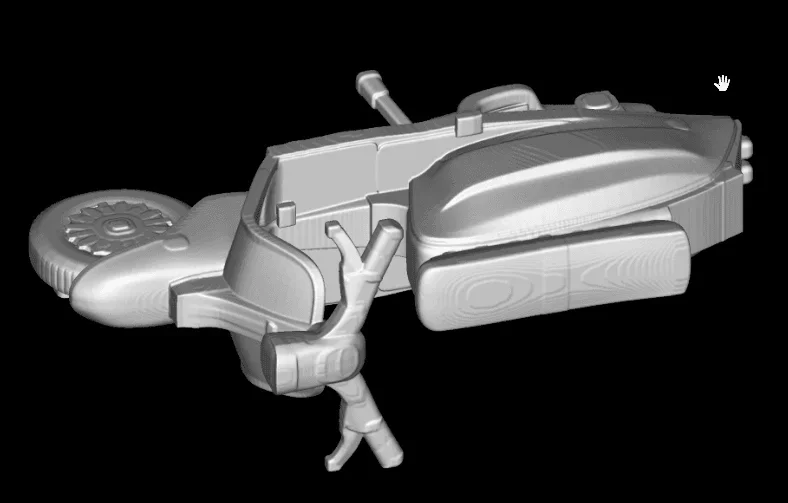
I was sent by a client the file in the photos.
Now this seems to me a mesh or at least you see the curves that make up the surface.
I would like to get a solid.
How can I do that?
with autocad I tried but change the way to see the file is not enough.
the file told me the client was created with rhino I have.
Thank you. ko1.webpko1.webpko1.webpko2.webpko3.webpko4.webp
 
That's a superifice, the ones you see are the isoparametrics of the same.
seeing how they are arranged I would say that it is a polysurface, that is, an entity composed of multiple surfaces joined together.
a surface cannot be a solid, to have a solid you must have a series of combing surfaces and delimiting a closed volume.
 
is there no way to change even the display type?
I would like to see it full so that I can work with it.
Thank you.
 
just change the view. depending on the software I use you have the command in a given location.
 
just change the view. depending on the software I use you have the command in a given location.
I can't try with autocad and rhino but I can't.
Can you tell me the procedure with rhino or inventor or creo or autocad?
are all software we use at work.
Thank you.
 
no procedure, you just need to change the type of display.
in rhino, if I remember, is in the button with the blue sphere that you see from your screen.
in inventor I had exposed the bar with various display options, there is the key to orient the views, that for display mode etc.
If they are cad you use it is impossible that you do not know the command.
 
I can't try with autocad and rhino but I can't.
Can you tell me the procedure with rhino or inventor or creo or autocad?
are all software we use at work.
Thank you.
Good morning.
to view the surfaces with their "skin" in rhino there is, in the toolbar, a command that appears like a gray sphere (which in turn, at the bottom right, opens the cascade of commands "view"), click on it with the left button and appears "closed and solid", with the right they return to see the "transparent" surfaces and all the isoparametrics.

in this mode, to select the surfaces you have to touch them on the isoparametrics with the cursor on the screen, if you have seen the surfaces you can touch them on any point of the visible "skin".

if they are single surfaces, not united, click one and only turn on that, if they are instead polysuperfici, united, touch any one and turn on all.

in the command "properties", moreover, there is a window "isocurve motion", if it has appeared see the isocurve, otherwise it makes you see only the edges of the surfaces, even if they are united to form a polysurface.

are quite basic commands, you have to see on your rhino as you set them, if you have exposed the toolbars or if you have to work with the drop-down menus.

good work, greetings
 
Good morning.
to view the surfaces with their "skin" in rhino there is, in the toolbar, a command that appears like a gray sphere (which in turn, at the bottom right, opens the cascade of commands "view"), click on it with the left button and appears "closed and solid", with the right they return to see the "transparent" surfaces and all the isoparametrics.

in this mode, to select the surfaces you have to touch them on the isoparametrics with the cursor on the screen, if you have seen the surfaces you can touch them on any point of the visible "skin".

if they are single surfaces, not united, click one and only turn on that, if they are instead polysuperfici, united, touch any one and turn on all.

in the command "properties", moreover, there is a window "isocurve motion", if it has appeared see the isocurve, otherwise it makes you see only the edges of the surfaces, even if they are united to form a polysurface.

are quite basic commands, you have to see on your rhino as you set them, if you have exposed the toolbars or if you have to work with the drop-down menus.

good work, greetings
Thank you very much!!!
 
hi, I made some experience to correct stl models with holes and thin walls to be able to print them in 3d
 

Attachments

  • 3d_lambretta_stl1.webp
    3d_lambretta_stl1.webp
    17.5 KB · Views: 4
  • 3d_lambretta_stl2.webp
    3d_lambretta_stl2.webp
    18.1 KB · Views: 4
hi, I made some experience to correct stl models with holes and thin walls to be able to print them in 3d
Hi, it's the second post you do identical (in an old discussion, by the way... )
If you want to tell us something you don't want to open a discussion?
 

Forum statistics

Threads
44,997
Messages
339,767
Members
4
Latest member
ibt

Members online

No members online now.
Back
Top