
• This forum is the machine-generated translation of www.cad3d.it/forum1 - the Italian design community. Several terms are not translated correctly.

solid in 3d with different heights. how do you build?

  • Thread starter Thread starter bba
  • Start date Start date

bba

Guest
Good evening. I am learning now to work with the 3d. I tried to watch online video lessons to understand how to do but without result. I have to extrude a solid that doesn't have to be a parallelepiped. I'll explain. in the plant is a rectangle. but from solid heights are different. a side of this rectangle, then a face, in 3d, must be 3 m tall while the opposite side (face) 5 m. how do I build a solid that does not have the same heights? Thank you.
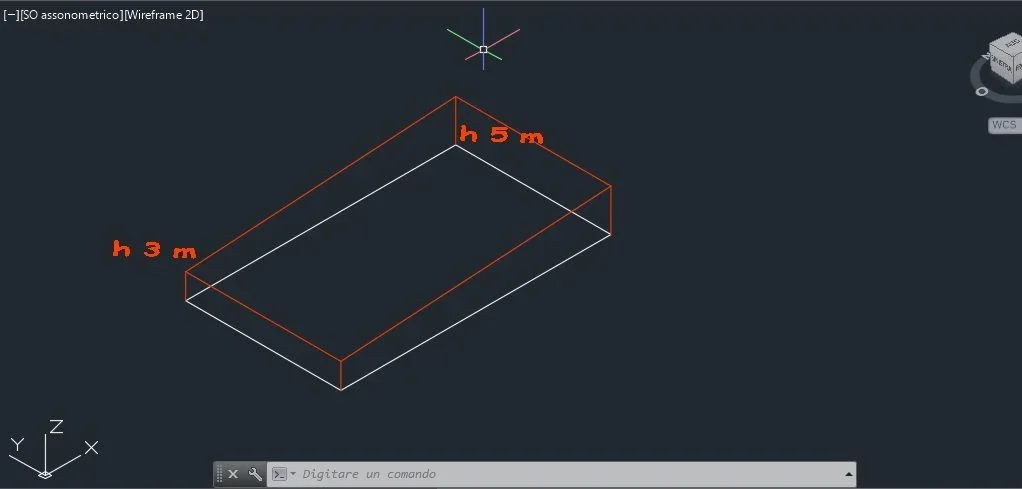
 
Good evening. I am learning now to work with the 3d. I tried to watch online video lessons to understand how to do but without result. I have to extrude a solid that doesn't have to be a parallelepiped. I'll explain. in the plant is a rectangle. but from solid heights are different. a side of this rectangle, then a face, in 3d, must be 3 m tall while the opposite side (face) 5 m. how do I build a solid that does not have the same heights? Thank you.
I'm sorry, but I don't know what you have to do. Take a shovel on a piece of paper, photograph it and post it. Then we see how to help you.
 
a solution is that of boulders .. or extrude a rectangle and then do a deform on the upper face.
 
:unsure:that of stones is easier.. because you control geometry better.. My solution to think about it is complicated, you have to count in trigonometry
 
@Babe , as you opened another discussion where you received answers is your concern to make feedback and thank you. and of course also to those linking internally
 
Mass is much faster. on condition of having familiarity with the ucs (something inverosimile, given the question).
another way, without inconvenience the trigonometry, is to extrude it with h=5m and then slice the upper part by means of an appropriate _slice (no need of usx but only to put in a 3d view.
the suggestions (consciously) we have given them, deepen there's argument in truth no, given the user.
 
a quick procedure consists in raising one edge (or lowering the other) through grip, after selecting it by holding ctrl
634.gif
 
I don't iron a solid face.
only the grips at the base appear, I can stretch it in height, make it become trapezoidal... but not just one side.
 
@Babein the modification of solids it is necessary to be a little "heaters".
with autocad even more ' (but all in all with all other software). There is no unique method.

The quickest and most sensible solution is the one suggested by gp.But you can get that solid by drawing a 2d trapeze and then extruding it.
or drawing a cube and pulling it obliquely.
you need to waste some time to find out what tools the program provides.
there is also an icon that allows you to filter selections (for points, edges or faces).
the control button at the same time as the selection allows you to select glispigoli or the faces
 
.. we will see pimpante. he declares his degree. :
I worry, maybe something happened to her.. .
You say it's just pure rudeness? Inefficient parents. It's a cross.
 

Forum statistics

Threads
44,997
Messages
339,767
Members
4
Latest member
ibt

Members online

No members online now.
ciao
Back
Top