• This forum is the machine-generated translation of www.cad3d.it/forum1 - the Italian design community. Several terms are not translated correctly.

specific input data from excel

  • Thread starter Thread starter blintz
  • Start date Start date

blintz

Guest
Hello
I have read several discussions about excel/autocad speech
all valid and very useful
but before I go into the speech I ask a question
is it possible based on choice on cell excel insert block?
 
Of course I do.
thanks for the answer
I'm not exactly a top with vba/autocad
I attach a draft of the file in excel
in sheet 2 there is the mother block where (in autocad electrical) various blocks must be added
My intention would be this
1. cells c4 and c15 go to x1
2. if c4 is a photocell the corresponding block is recalled


how can I transfer cell data to the particular x1 of the mother block?
to insert the block I need to create a database or just indicate the physical location in the pc?

Thanks for the help you can give me
Hi.
View attachment Input2.rar
 

Attachments

Last edited by a moderator:
in input2, the c4 and c15 cells of sheet2 are not marked in any way or fall into the "image 18". Is that right? or is it a matter of how I see it? You mean c4 and c5?

textbox1 and textbox2 are not inside the "x1" box. Is that right?

What is the cryptorium to understand if the text in c4 points to a photocell?

What do you mean to "transfer cell data into the particular x1 of the mother block"? do you refer to the text in the cell that should be rewritten in the textbox associated with the particular location (e.g. "x1") of the mother blockoc? or other (e.g. an autocad block to paste somewhere on the excel sheet)?

to understand better and still operate I would need dwg in autocad format 2010

exulting a little (but not too much)
- don't you want to work with the graphics completely in autocad, even connected to excel?
- textboxes embedded in the sheet enlarge each time I enter it: is it desired? How do you do that?
 
answer for friend ricvba

d: In input2, the c4 and c15 cells of the sheet2 are not marked in any way or fall into the "image 18".
Is that right? or is it a matter of how I see it? You mean c4 and c5?

r: the image is only of reference
as you see I can add txtbox, link to values, as I want but the goal is not this.

d: what criterion to understand if the text in c4 points to a photocell?

r: cell c4 does not hit anything. if you see with button2 the form makes you choose which component to choose,
based on the choice appears block (I'm working on it)

d: What do you mean to "transfer cell data into the particular x1 of the mother block"?
refer to the text in the cell that should be rewritten in the textbox associated with the particular location
(es "x1") of the mother blocko? or other (e.g. an autocad block to paste somewhere on the excel sheet)?

r: I would like the data contained in the cells (e.g. c4-input and c15-output) to be written in autocad.
in the attached dwg you will see that I put an example. Please note that in this specific case the output is above

d: to understand better and still operate I would need the dwg in autocad format 2010

r: sorry I provide, I have 2015

d: Do you not want to work with the graphics completely in autocad, while connected to excel?

r: I'm working on it

d: the textboxes embedded in the sheet enlarge each time I enter it: is it desired? How do you do that?

r: Strange almost all txtboxes have a code to themselves only to act with the or the forms.
in fact if you enter the editor of the vba see that there are nothing but simple instructions

however reepilogando

we pretend that in g4 I have in reference to a link on the pc: c:\autocad\simboli\a00 (in this case corresponds to a photocell)
or a fictitious voice that recalls the link (not to confuse the user so much).
will you ask, but this voice? is automatically recalled according to the choice made in the form on the combobox in "components"

said this, could you tell me how to put in the right coordinates on autocad the selected block?
you will see in the attached dwg (2010) an example
the excel file partially modified for explanation
an autocad image with the coordinates I see
Thank you for your patience

Hi.
 

Attachments

Last edited by a moderator:
purtopoo did not understand much of the operation of your file. but it doesn't matter as you just know how to insert a block in a drawing

from the example of the online help of autocad activex and vba reference on how to insert an external reference, I bring here a reduction that I believe useful to your case
Code:
sub example_attachexternalreference()
    ' this example adds an external reference.
    ' this example uses the "city map.dwg" found in the sample
    ' directory. if you do not have this drawing, or if it is
    ' in a different directory, insert a valid path and file name
    ' for the pathname variable below.
    
    dim insertpoint(0 to 2) as double
    dim insertedblock as acadexternalreference
    dim pathname as string
    
    ' define external reference to be inserted
    insertpoint(0) = 1: insertpoint(1) = 1: insertpoint(2) = 0
    pathname = "c:\program files\autocad\sample\city map.dwg"
      
    
    ' add the external reference to the drawing
    set insertedblock = thisdrawing.modelspace.attachexternalreference(pathname, "xref_image", insertpoint, 1, 1, 1, 0, false)
    

end sub

ciao
 
purtopoo did not understand much of the operation of your file. but it doesn't matter as you just know how to insert a block in a drawing

from the example of the online help of autocad activex and vba reference on how to insert an external reference, I bring here a reduction that I believe useful to your case
Code:
sub example_attachexternalreference()
    ' this example adds an external reference.
    ' this example uses the "city map.dwg" found in the sample
    ' directory. if you do not have this drawing, or if it is
    ' in a different directory, insert a valid path and file name
    ' for the pathname variable below.
    
    dim insertpoint(0 to 2) as double
    dim insertedblock as acadexternalreference
    dim pathname as string
    
    ' define external reference to be inserted
    insertpoint(0) = 1: insertpoint(1) = 1: insertpoint(2) = 0
    pathname = "c:\program files\autocad\sample\city map.dwg"
      
    
    ' add the external reference to the drawing
    set insertedblock = thisdrawing.modelspace.attachexternalreference(pathname, "xref_image", insertpoint, 1, 1, 1, 0, false)
    

end sub

ciao
Hi.
Maybe I'm wrong but I think I also have to load some add-ons
here:dim insertedblock as acadexternalreference I'm wrong
Hi.
 
Last edited by a moderator:
for certain in the "references" (I believe it is under the "instruments" menu) you have to check out the autocad library that has the name similar to "autocad 20xxx type library".
 
for certain in the "references" (I believe it is under the "instruments" menu) you have to check out the autocad library that has the name similar to "autocad 20xxx type library".
Thank you.
but now it always stops on this line
"set insertedblock = thisdrawing.modelspace. attachexternalreference(pathname, "xref_image", insertpoint, 1, 1, 1, 0, false)"
I think there is no reference to the design, even if this is open
that is thisdrawing should refer to the file
 
you must "set" thisdrawing to the file on which you want to insert external references.
if qs file is definitely already open and it is definitely active0 when your vba routine turns, then you have to enter at the beginning of your sub the following lines of code:

dim acad as acadapplication
dim thisdrawing as acaddocument
set acad=getobject(,"autocad.application")
set thisdrawing = acad.activedocument


and then go with what previously indicated.
 
Sorry but nothing works
I use excel 2013 (32bit), autocad electrical 2015 (64bit) on win7 to 64bit
I initially blamed the two platforms and then tried on the laptop where autocad electrical 2013 is 32bit, same mistake
I tried with autocad vba, same mistake

active references in the excel vba are:
1. visual basic for application
2. microfoft excel 14.0 object library
3. ole automation
4. microsoft office 14.0 object library
5. mocroft forms object library
6. autocad 2015 type library
7. autocad focus control for vba type library
8. axdb

this is the button code
Code:
private sub commandbutton3_click()
dim acad as acadapplication
dim thisdrawing as acaddocument
set acad = getobject(, "autocad.application")
set thisdrawing = acad.activedocument
dim insertpoint(0 to 2) as double
dim insertedblock as acadexternalreference
dim pathname as string
    
    ' define external reference to be inserted
    insertpoint(0) = 1: insertpoint(1) = 1: insertpoint(2) = 0
    pathname = "c:\autocad\smoke\f06.dwg"
      
    
    ' add the external reference to the drawing
    [COLOR="#FF0000"]set insertedblock = thisdrawing.modelspace.attachexternalreference(pathname, "xref_image", insertpoint, 1, 1, 1, 0, false)[/COLOR]
 end sub
everywhere I always have this mistake
keep in mind that even with other examples of the guide ('help online autocad activex and vba reference) happens the same

so if:
set thisdrawing = acad.activedocument - the currently open design (c:\autocad\smoke\disegno2)
pathname = "c:\autocad\smoke\f06.dwg" - the position of the block to be imported
Are you okay (?)
set insertedblock = thisdrawing.modelspace. attachexternalreference, perhaps has wrong references

Can you please attach me a excel file of proof?
 
Hello ricvba
Thank you.
I did some tests.
autocad electrical 2015 > excel 2012
autocad electrical 2012 > excel 2012
autocad 2012 > excel 2012
but the problem persists
at this point I think it's a bookcase problem
I use type library 2015 and 2012 while you le 2011
I don't get into it
 
in your vba code placed in the middle of "attachexternalreference" and press the f1 button. so see if your autocad library provides that method and with which parameters. Maybe it changes nonsense.

alternatively to this method you could use one with qs sequence of actions by vba code:
- open the file that contains the block that interests you
- insert a reference in your drawing of interest
- close the file you used the block.
if you look in the autocad activex and vba reference guide you find the necessary methods with relative examples.
-
 
in your vba code placed in the middle of "attachexternalreference" and press the f1 button. so see if your autocad library provides that method and with which parameters. Maybe it changes nonsense.

alternatively to this method you could use one with qs sequence of actions by vba code:
- open the file that contains the block that interests you
- insert a reference in your drawing of interest
- close the file you used the block.
if you look in the autocad activex and vba reference guide you find the necessary methods with relative examples.
-
I followed your instructions
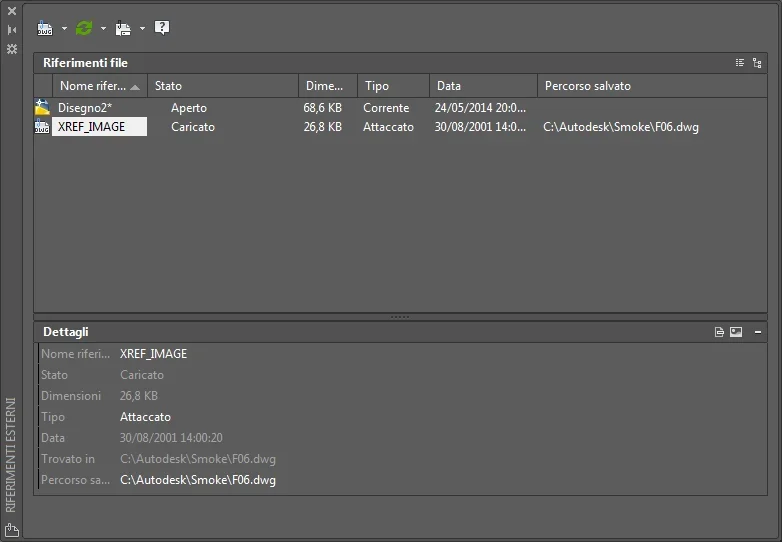
Here I found a valid helphttp://autocad.compago.it/guidasviluppatori2008/acad_aag/ws1a9193826455f5ff1a32d8d10ebc6b7ccc-6d86.htmalso in autocad I followed thishttp://docs.autodesk.com/acd/2013/ita/index.html?url=files/guid-bc0fd3c1-3bfc-4c5d-ab9a-bf480d5084be.htm,topicnumber=d30e85965the result is thisrif_blocco.webpif the file is loaded (the reference file is currently associated with drawing)
because I don't see it
 
I saw you posted on the forum augi: do you still have the problem "necessary object"?
Have you tried to zoom extensions?

the first link is the same thing you find in the online guide of activex and vba and the example is what I've already posted reduced
 
I saw you posted on the forum augi: do you still have the problem "necessary object"?
Have you tried to zoom extensions?

the first link is the same thing you find in the online guide of activex and vba and the example is what I've already posted reduced
for "necessary object" I solved so
Code:
sub lc_attach1()
    on error goto errorhandler
    dim acad as acadapplication
    dim thisdrawing as acaddocument
    dim insertpoint(0 to 2) as double
    dim insertedblock as acadexternalreference
    dim tempblock as acadblock
    dim msg as string, pathname as string
    ' define external reference to be inserted
    set acad = getobject(, "autocad.application")
    set thisdrawing = acad.activedocument
    insertpoint(0) = 1: insertpoint(1) = 1: insertpoint(2) = 0
    pathname = "c:\autodesk\smoke\e20.dwg"
    ' display current block information for this drawing
    gosub listblocks
    ' add the external reference to the drawing
    set insertedblock = thisdrawing.modelspace.attachexternalreference(pathname, "xref_image1", insertpoint, 1, 1, 1, 0, false)
    zoomall
    ' display new block information for this drawing
    gosub listblocks
    exit sub
listblocks:
    msg = vbcrlf ' reset message
    for each tempblock in thisdrawing.blocks
        msg = msg & tempblock.name & vbcrlf
    next
    msgbox "the current blocks in this drawing are: " & msg
    return
errorhandler:
    msgbox err.description
end sub
and now it works
Thank you.
 

Forum statistics

Threads
44,997
Messages
339,767
Members
4
Latest member
ibt

Members online

No members online now.
Back
Top