
• This forum is the machine-generated translation of www.cad3d.it/forum1 - the Italian design community. Several terms are not translated correctly.

speed up solidworks

  • Thread starter Thread starter Sp4rk0
  • Start date Start date

Sp4rk0

Guest
good morning to all, I wanted to know if it is possible to speed solidworks through some setting of the pc.
I explain better, when I do ctrl+q together and in the tables the pc puts us a lot to load, but it tells me that the use of the cpu is 14%, rarely comes to 20%, there is way to make use of more solid memory so that to upgrade it puts us less? ?
Thank you.
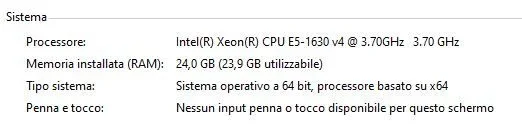
 
How many cores has your cpu? solidworks or just one. .
and the percentage you read could also be 100% of the core speed you are using. .
 
your cpu has 4 cores, so theoretically if winzozz says 25% that core that soloworks uses is 100%
 
is why the workstation you choose is better to take it with less core and higher rated frequency possible. .
 
good morning to all, I wanted to know if it is possible to speed solidworks through some setting of the pc.
I explain better, when I do ctrl+q together and in the tables the pc puts us a lot to load, but it tells me that the use of the cpu is 14%, rarely comes to 20%, there is way to make use of more solid memory so that to upgrade it puts us less? ?
Thank you.
What version of sw do you use? write it in profile
 

Forum statistics

Threads
44,997
Messages
339,767
Members
4
Latest member
ibt

Members online

No members online now.
Back
Top