
You are using an out of date browser. It may not display this or other websites correctly.
You should upgrade or use an alternative browser.
You should upgrade or use an alternative browser.
MassiVonWeizen
Guest
meanwhile, mark this link from which you can obtain the length or coil diameter values.
then I attach a part where you can keep the length value controlled by a variable.
from this concept, i.e. a variable managed by you, you could create a formula that gives the length and step manages the revolutions to get you out the corresponding spiral.
explanation of the attached part:
after the spiral there are two sketches:
the first recreates the spiral with a convert entity to be able to hook a note. this note serves to create the variable.
the second sketch is a line as long as the spiral, the quota in fact is equal to the variable.
in your case you could put the sketch with the line at the beginning (with no variable quota), create a variable equal to the quota and then create an equation with the formula of icui I said above. put the line sketch at the beginning facilitates the management of the length measurement because you just need to change the quota instead of entering the equations folder to change the variable
I got a little lost in explanations and I hope I didn't mess up the concept.
then I attach a part where you can keep the length value controlled by a variable.
from this concept, i.e. a variable managed by you, you could create a formula that gives the length and step manages the revolutions to get you out the corresponding spiral.
explanation of the attached part:
after the spiral there are two sketches:
the first recreates the spiral with a convert entity to be able to hook a note. this note serves to create the variable.
the second sketch is a line as long as the spiral, the quota in fact is equal to the variable.
in your case you could put the sketch with the line at the beginning (with no variable quota), create a variable equal to the quota and then create an equation with the formula of icui I said above. put the line sketch at the beginning facilitates the management of the length measurement because you just need to change the quota instead of entering the equations folder to change the variable
I got a little lost in explanations and I hope I didn't mess up the concept.
Attachments
re_solidworks
Guest
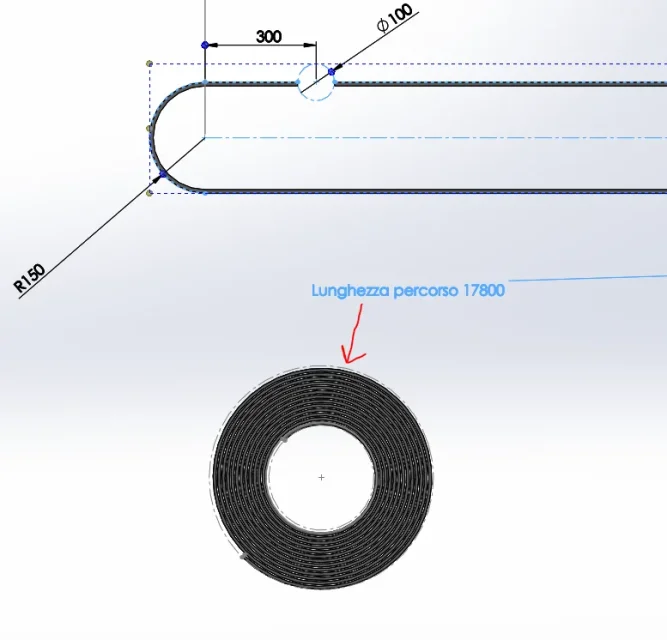
Do you need to draw the packed tape?hi, I would have the need to impose the length of a path to a spiral...
spiral length = path length
Is it possible for you? How?
View attachment 47465
reggio
Guest
hi king, yes exact, the departure is the path or length of the tape (the semi-asola) the point of arrival would be the spiral with parametrizable center, parameterizable step and development of the spiral = length path.Do you need to draw the packed tape?
Any ideas?
Hello Masses:In the meantime, I'll give you this link
links? What?
. I think I have not understood well, the concept that I express is correct: the line (in my case it must be a path though) commands the spiral, only that looking at your example I understand instead that it is the spiral that commands the line ...You could create a formula that gives the length and the step handles the revolutions to get the corresponding spiral out. . put the line sketch at the beginning facilitates the management of the length measurement because you just need to change the quota instead of entering the equations folder to change the variable

length = "rd1@annotations"
"d1@schizzo3" = line = length
... what is it and how do you create "rd1@annotations"?
MassiVonWeizen
Guest
You'd like to know, huh?Hello Masses:
links? What?
go there that I am good and a little rinco and yesterday I forgot, and I make you win easyhttp://origin-www.europe.fasson.com...=475&rl=8.6&mt=20000&cd=80&dun=0&ul=4&noucn=
In fact in my example the line is commanded and serves in case it is necessary to use the length of the spiral (insert it in a property, use it for other functions, if it calls you the commercial and wants to know how far you bolas go when it turns you.... ). I think I have not understood well, the concept that I express is correct: the line (in my case it must be a path though) commands the spiral, only that looking at your example I understand instead that it is the spiral that commands the line ...
length = "rd1@annotations"
"d1@schizzo3" = line = length
But by putting the line at the beginning of the tree you can turn the method and it is no longer the spiral to command, but the line. then inserting an equation you can use the line quota to manage the number of revolutions or the step.
You'd like to know. If I tell you later, I should kill you. . .... what is it and how do you create "rd1@annotations"?
That's pretty trivial. once the conversion of the spiral (create a sketch, select the spiral, convert entities) insert a quota that touches the converted spiral. if you insert it external to the sketch defines it as annotation (because I inserted it external you will ask? I don't remember it anymore...) so create the variable.
reggio
Guest
Lucky you wrote it to me... because your avatar has always disturbed me, I don't want to make you angry:You'd like to know. If I tell you...
donecreate a sketch - select the spiral - convert entities
done
done
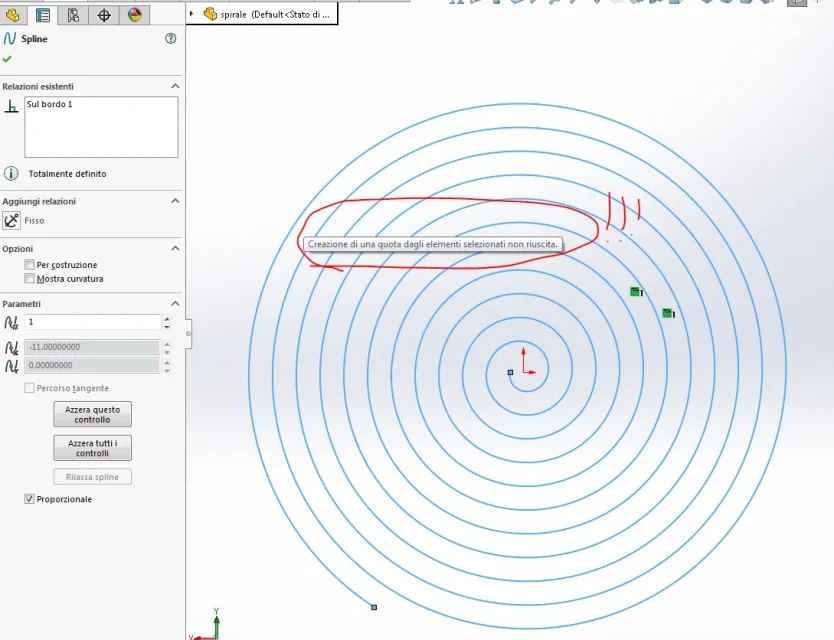
... not quota...??? What banality did I forget? ? ?insert a quota that touches the converted spiral
MassiVonWeizen
Guest
That's why I put the share out of the sketch. . .... not quota...??? What banality did I forget? ? ?
then:
close the sketch
keep it in show mode
insert quota
touches the spiral of the sketch