• This forum is the machine-generated translation of www.cad3d.it/forum1 - the Italian design community. Several terms are not translated correctly.

standard size text tables

  • Thread starter Thread starter Daniele-san
  • Start date Start date

Daniele-san

Guest
Bye to all,
I tried to do a research, but I didn't find anything. Can you please help me?

how can you set the standard (and font) size of the text that is inserted in a table?
Is there a chance?

Besides, is there the possibility to hide the outline of a table while leaving intact the text within it?

Thank you.
Hi.
 
Hi.
the style of the text in the table set it with default_font, but it probably will also change that of the quotas.
to remove the edges, select the table, dx of the mouse, view rows, turn off or reactivate.
 
Bye.


In addition under the menu "annotation->format->manage text styles" you create your custom style that, once set as default, use it for the table.
 
Hi.
the style of the text in the table set it with default_font, but it probably will also change that of the quotas.
to remove the edges, select the table, dx of the mouse, view rows, turn off or reactivate.
bye dani-3d

these are strings in my file.dtl

drawing_text_height 2.500000

text_width_factor 0.800000
default_font font

in fact notes and quotas faithfully respect the above strings
while if I go to write within na table these are the values:

height 0.156250
thickness 0.150000
thickness factor 0.800000
font

Is there something going on? :confused:
 
Bye.


In addition under the menu "annotation->format->manage text styles" you create your custom style that, once set as default, use it for the table.
hi bfausto

this customization is however usable from time to time (every time you open a design to understand us) is not saved
Am I wrong?
 
Hello everyone.. .
Sorry I'm late.
I've done a lot of evidence, then I've solved it. I think the system's wrapped up.
Now fortunately it's okay.
thank you for your help.
Hi.
 
Hi.
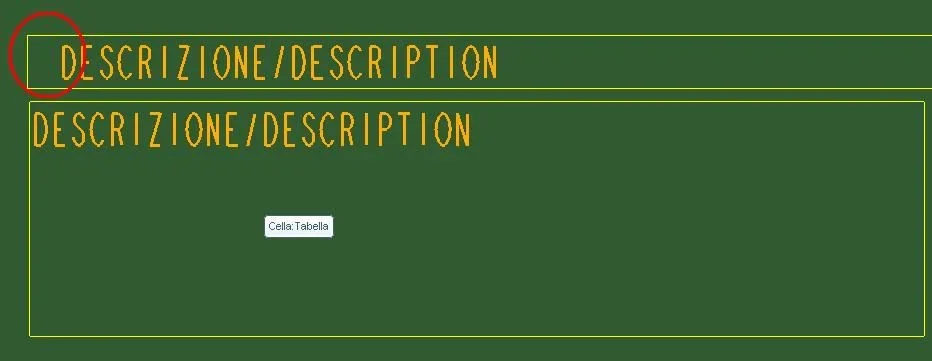
how you manage the start of the text in a table.
are there particular configurations of the .drw file?
both texts have horizontal positioning on the left...but they actually leave differently
see image image
 

Attachments

  • testo.webp
    testo.webp
    14.4 KB · Views: 4
Hi.
how you manage the start of the text in a table.
are there particular configurations of the .drw file?
both texts have horizontal positioning on the left...but they actually leave differently
see image image
Hi. .
Any suggestions?
 
but are your custom tables recovering from disk or creating them on the table flight - insert - table?
Hi nicksoft,
one is recovered the other is created. .
I did some evidence that you depend on the font size set in the config
even if the strings regarding the config text have never been changed, I happen this problem.
I have made several attempts and in none of which puts the text attached to the table edge on the left.
I suppose but I'm not sure that: some time ago I had problems with the font size while not having touched anything in the config... why I opened this discussion and creating a table I brought behind the problem.. .
I would have solved by making ex novo the necessary table.
Thank you.
 

Forum statistics

Threads
44,997
Messages
339,767
Members
4
Latest member
ibt

Members online

No members online now.
Back
Top