
New Rider
Guest
Good morning to all, surely it will be a cabbage but unfortunately I do not go out.
In essence I have drawn a straight line we say having a length of 50 units.
I have to start a second orthogonal straight/colline to this at about 10 units from the final point of the previous tracked line. In the default settings of dynamic insertion I have the reference from the origin of the design. I would need the dynamic insertion to report the original quotas of the point they select (both the final/initial/mezzeria etc).
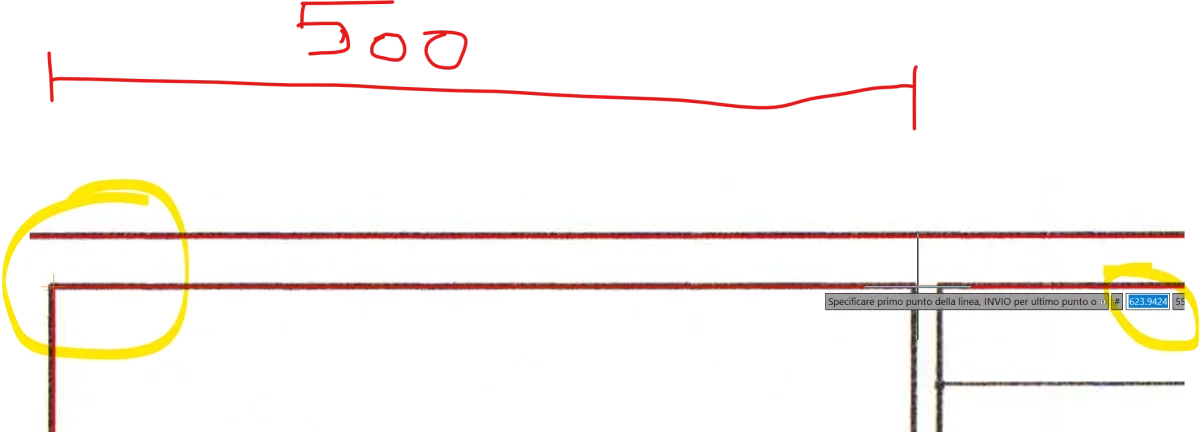
In the example below I should start a line 500 mm from the yellow initial point for so long I should place myself on the starting point type 500 and from there start with the starting point of a new straight.
I hope to be explained ..
Thank you.
In essence I have drawn a straight line we say having a length of 50 units.
I have to start a second orthogonal straight/colline to this at about 10 units from the final point of the previous tracked line. In the default settings of dynamic insertion I have the reference from the origin of the design. I would need the dynamic insertion to report the original quotas of the point they select (both the final/initial/mezzeria etc).
In the example below I should start a line 500 mm from the yellow initial point for so long I should place myself on the starting point type 500 and from there start with the starting point of a new straight.
I hope to be explained ..
Thank you.