• This forum is the machine-generated translation of www.cad3d.it/forum1 - the Italian design community. Several terms are not translated correctly.

substitution parameter in text sketch without re-entry (in sketch)

  • Thread starter Thread starter Serviman
  • Start date Start date

Serviman

Guest
Bye to all,
having created a part only with paramentary texts, written in their sketches, obtained from a copy of feature, I wondered if it was possible to change the parameter of the text without having to return to every single sketch.
I unfortunately use creo2, perhaps in later releases. . .

thanks in advance,
 
Hi.
if you created a sketch curve, select the text icon and you specified "use parameter",
every time you change the value of the parameter (out of the sketch) your curve is updated.
Here, I don't understand the feature copy speech...if you can attach an example is better
 
Unfortunately this is not the case:

part
sketch!
sketch!
sketch!
sketch_4.. .

in each sketch there is only text placed with external constraints, with a single parameter:

footnote
footnote
footnote
Note_4.. .

the feature copy comes from the fact that, to do more quickly, being the bond of the single sketch, similar, but different, having to make many use of the feature copy. But then I have to change for each sketch a single parameter: So I'm going inside the sketch area and I'm changing it.
I was wondering if that parameter to which the sketch refers is replaceable from the outside without having to fit into the sketch environment.
 
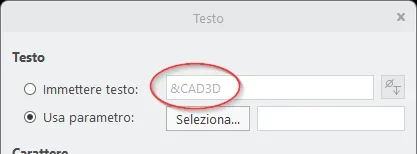
If you redefine the sketch curve, double click on the sketch, see that string &<nomeparametro> (&cad3d in my example)?
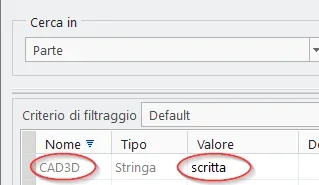
</nomeparametro>1717071405206.webpif yes, it means that your text is guided by that parameter; from the side go to tools - parameters, change the value "written" and update the feature curve
1717071409336.webp
 
Yes, thank you, that's the way I always use, I hope it was possible to alter the parameter without having to go back to the sketch, but I think it's the only way. .
 
but you don't have to go back to the sketch, you need to change the parameter from tools - parameters in the "part" mode.

In the example, I used you to go back to the sketch just to make sure it was driven by parametro
 
thank you first for the time dedicated to me.
thus changing the value to the parameter, which would change the result of other sketches.
I would like to change the parameter and not the value of the parameter.
 
for such actions it is better to use fdu then bring you behind a lot of information (features, relationships, param, qote, ...)
 

Forum statistics

Threads
44,997
Messages
339,767
Members
4
Latest member
ibt

Members online

No members online now.
Back
Top