
- Home
- Forums
- mechanical engineering
- creo parametric (ex pro/e)
- creo parametric - modeling of parts and sheet
You are using an out of date browser. It may not display this or other websites correctly.
You should upgrade or use an alternative browser.
You should upgrade or use an alternative browser.
SweptBlend
Guest
Todo depends... .
everything from what you have to do next.
there are different roads, covered by different mpoules, which have different future roads.
one might be to go in edit | operations with the features | removers (if you want to remove one part, "digging" the other).
for limits/benefits/etc.etc. I recommend course or manual. . .
Hi.
everything from what you have to do next.
there are different roads, covered by different mpoules, which have different future roads.
one might be to go in edit | operations with the features | removers (if you want to remove one part, "digging" the other).
for limits/benefits/etc.etc. I recommend course or manual. . .
Hi.
pecopepp
Guest
Maybe I don't explain. or maybe I'm just wrong.
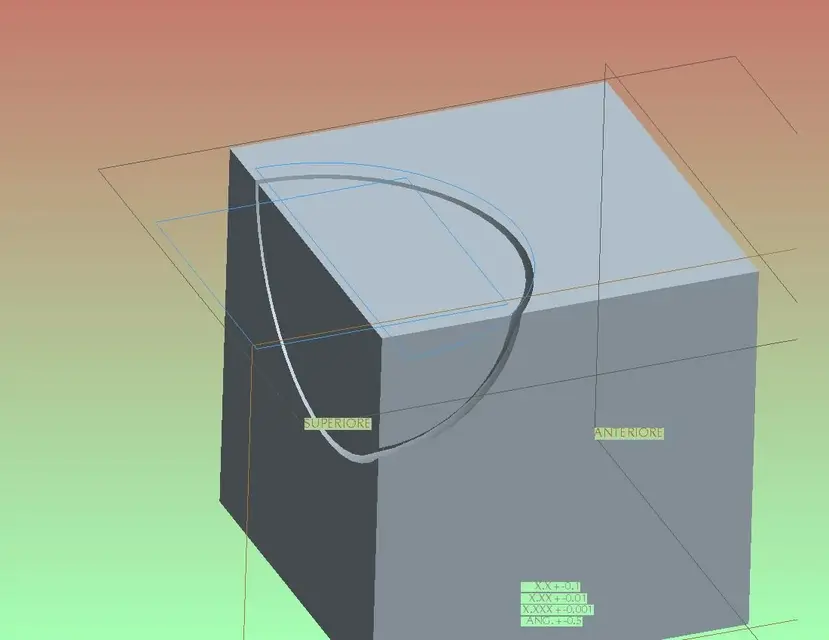
We do that I have a solid piece full (the cube) that I want to make it the matrix of my piece. I have the piece. now in an axis I place the sphere where I need them, and I want to get the cube with the imprint of the sphere.
what are the correct steps to do? or otherwise tell me about the guide, what I have to find. Thank you.
We do that I have a solid piece full (the cube) that I want to make it the matrix of my piece. I have the piece. now in an axis I place the sphere where I need them, and I want to get the cube with the imprint of the sphere.
what are the correct steps to do? or otherwise tell me about the guide, what I have to find. Thank you.
SweptBlend
Guest
you are together, go to change | operations with components | removers
choose the matrix, and then choose the tool
Sorry before I made the menu....
choose the matrix, and then choose the tool
Sorry before I made the menu....
pecopepp
Guest
Thank you, I did it as well. When I move the footprint, too! !

pecopepp
Guest
I'm so unhappy. It's too much that I didn't work and I miss the manual... but also many passages.. .
We took a step... but I still need help:
What if the figure is thick?
That inside piece that I have left?
practically I have to create stings and matrix of an injection mold
We took a step... but I still need help:
What if the figure is thick?
That inside piece that I have left?
practically I have to create stings and matrix of an injection mold
Attachments
mali_fx
Guest
these are the steps to follow:
1.model closure
2.Deffinition quarry
3.Delivery
the most ''right' method' is that of Moldovadesign (you have to have the licence though'), in practice once the closure makes you the automatic division of matrix and punch.
otherwise division to the old.
cmq is all about the complexity of the work you have to do.
1.model closure
2.Deffinition quarry
3.Delivery
the most ''right' method' is that of Moldovadesign (you have to have the licence though'), in practice once the closure makes you the automatic division of matrix and punch.
otherwise division to the old.
cmq is all about the complexity of the work you have to do.
cletus
Guest
Hi, I prefer, as explained here by ozzy, to use public geometry.
http://www.cad3d.it/forum1/showthread.php?t=606&highlight=booleane
http://www.cad3d.it/forum1/showthread.php?t=606&highlight=booleane
mali_fx
Guest
without the module though, I doubt you can find the siluetta lineHi, I prefer, as explained here by ozzy, to use public geometry.
http://www.cad3d.it/forum1/showthread.php?t=606&highlight=booleane

in the complex pieces, without that you go nowhere (there is a way but on the complex pieces does not flee)!
true or false?
cletus
Guest
Of course, I am not of the mold design industry, so the system is working for details not excessively complicated and with only purpose to see if a particular is printable.who makes molds will definitely (believe) obliged to use the pro/moldesign module.without the module, however, I doubt you can find the siluetta line.in complex pieces, without that you go nowhere
Yes, on simple details you can copy the sup of the solid, then fill in according to the direction that interests you with activate the siluetta option. I never used it, so not how useful it could be.there is a way but on the complex pieces does not flee)!
true or false?
if there are other systems, expound.:wink:
mali_fx
Guest
Yes, we say that pro/moldesign simplifies existence as well as save a lot of time!Of course, I am not of the mold design industry, so the system is working for details not excessively complicated and with only purpose to see if a particular is printable.who makes molds will definitely (believe) obliged to use the pro/moldesign module.
that then, you get the same at the bottom of a problem, that definitely, the ways are so many!
exactly, that's what I meant... it's a cute little command, sin that only works with the cube:biggrin:Yes, on simple details you can copy the sup of the solid, then fill in according to the direction that interests you with activate the siluetta option. I never used it, so not how useful it could be.
if there are other systems, expound.:wink:
pecopepp
Guest
in any case always exquisite