
• This forum is the machine-generated translation of www.cad3d.it/forum1 - the Italian design community. Several terms are not translated correctly.

surface and retinal orientation

  • Thread starter Thread starter Ciuchin0
  • Start date Start date

Ciuchin0

Guest
Sorry about the question maybe banal.
How can I divide the surfaces of a floor?
as from image, I need to divide the reddish floor to apply to us retinals with different directions and identify different paths, but I didn't want to create n floors for each path.. is it possible inside the same floor, create more retinals with different orientations?
Still, the retino, can I in the design direct it to my liking? ie if I have a square net flanked, align it to a default direction and align a line to a wall edge?
Last thing. is it possible to use a texture in shading vision instead of filling? or do I have to resort to the use of rendering? I say to see instead of the green plate, an image of grassy lawn.
thanks for the advice.
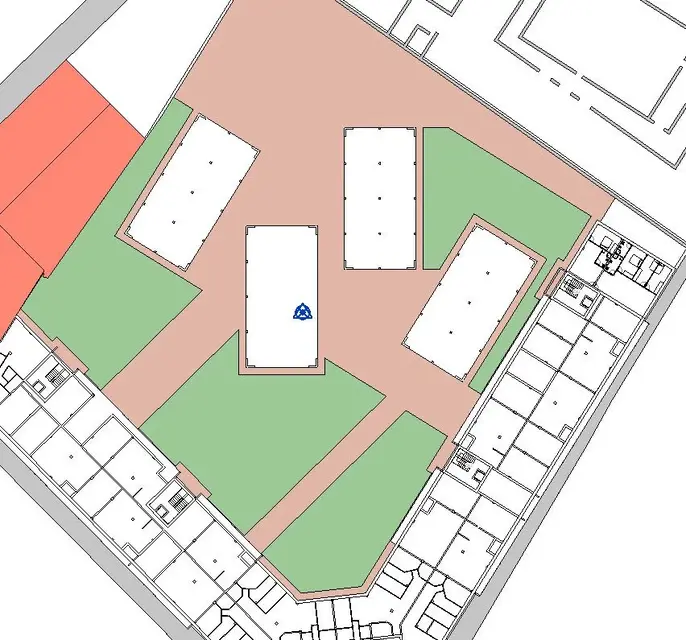
 

Attachments

  • Pavimenti.webp
    Pavimenti.webp
    86.2 KB · Views: 27
Sorry about the question maybe banal.
How can I divide the surfaces of a floor? .
select the floor >modifies floor >Add division line. . .
as from image, I need to divide the reddish floor to apply to us retinals with different directions and identify different paths, but I didn't want to create n floors for each path.. is it possible inside the same floor, create more retinals with different orientations? .
Yes. once divided as above,command change>painting floor, select the material, select the "piece" of floor (previously divided) to which to apply the specific material

Still, the retino, can I in the design direct it to my liking? ie if I have a square net flanked, align it to a default direction and align a line to a wall edge? .
Yes, from the properties of the material > surface motif (drawing recycle)> in orientation host layers : selects align to the element
Last thing. is it possible to use a texture in shading vision instead of filling? or do I have to resort to the use of rendering? I say to see instead of the green plate, an image of grassy lawn.
thanks for the advice.
I have not understood the question well, however it exists in the properties of the material, graphic section, the check to activate on the field: "use rendering composition for shading" with a "similar" color to the texture, but it is not the texture matrial
 
thanks for the gfrank answer, very clear as always.
regarding the last question I was referring to the possibility of filling the surface that corresponds to the "green" rather than with a retino, with a real texture. that is an image instead of the green "piatto".

My problem is that for the final layout it would take something less "flat" and deeper.
as you suggest the shadow command does a lot and I believe in planimetry I will settle for that.
Another problem arises rather in the prospectus.
as suggested by you in my previous post, for example, I divided a masonry surface with a retino to simulate the repetition of modular elements in coating stone.
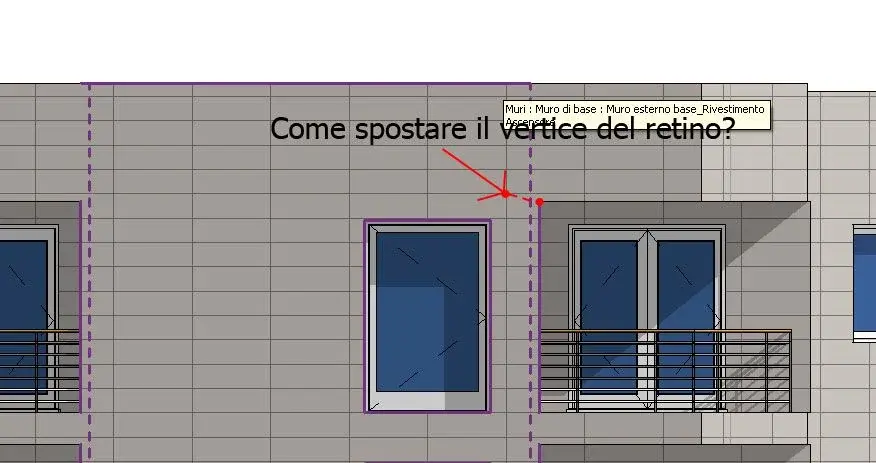
as from attached image I have the problem of "aligning" such retino with windows, but the advice you give me just above solves this problem. rather remains the problem that the image of the prospect appears a little "flat" we say, ergo I wanted to understand if there was a way to make it more "ground" even if possibly putting in place of the filling of gray surface a texture. what you can do to make it know, but I wanted to know if it was possible in "shaded visualization with edges" mode to display instead of normal surface fill colors an image. to make the idea, as sketchup does, that is a sort of "preview of rendering" without the definition that the latter could bring. this to allow me to jam the table with a slightly better rendering than that coating applied to the wall.
I hope I've been clear.
Thanks again.
 

Attachments

  • Vertice retino.webp
    Vertice retino.webp
    29.4 KB · Views: 19
You cannot apply textures in the views.
try this way:
go to a 3d view and duplicate it. from the cube (of the views) with right tx select : orient on view> prospects and select the prospective view that interests you.
frame/delimit as it was a prospective view.
Shading.
see if it suits your demands, or make a low/medium/high rendering
 

Forum statistics

Threads
44,997
Messages
339,767
Members
4
Latest member
ibt

Members online

No members online now.
Back
Top