• This forum is the machine-generated translation of www.cad3d.it/forum1 - the Italian design community. Several terms are not translated correctly.

sweeter problem. ...

  • Thread starter Thread starter PiegatoreSolidworks
  • Start date Start date

PiegatoreSolidworks

Guest
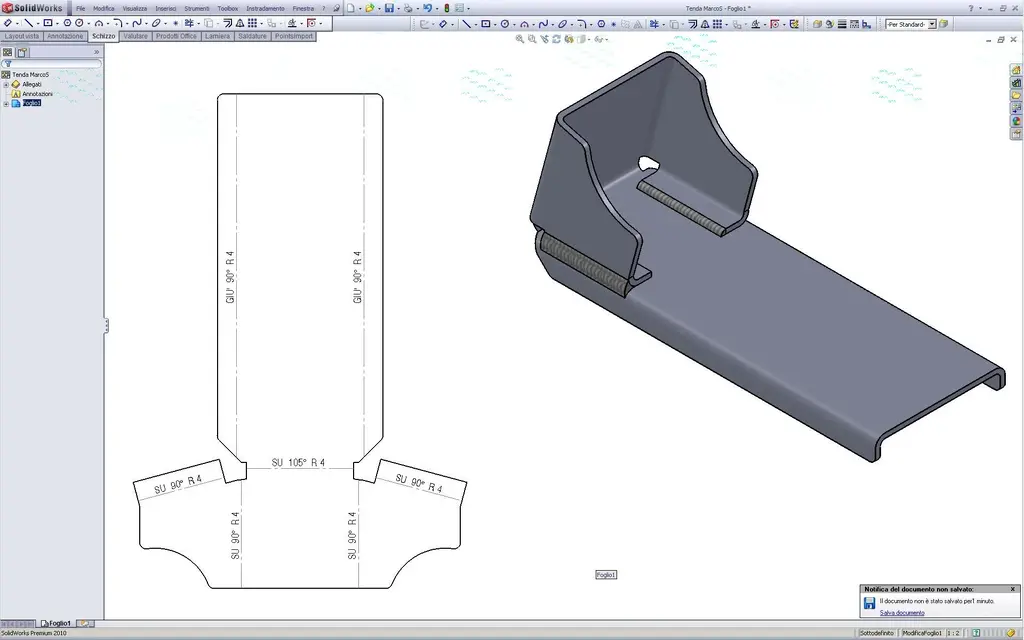
Hello guys I have to realize this bracket that I place you but I have a problem with the welding function. i.e. I would like to add a welding to a bending lip but it does not make me put it and does not even use the welded edge function that is under sheet metal. Why? (I do so much to understand and learn something new..) also did I well realize the piece? Any ideas to draw it better?

thank you all, soon.
 

Attachments

hi folder,
First of all, real welds can only be done on different bodies.

the edge welds not always come, try to look at the guide and above all to make the right discharges: the lacerations are semi-impractical. then after some welding
It works.

the edge-flangia3 is not a nice to see, especially how can you get such a profile? use oblong or rectangle discharges and above all use "accorcia folds side"... to bend there must be the unloading in the right place not to scramble all the material and not to make it take deformations weird style of 5 kg.

good modeling
 
That's what I could do in five minutes, very fast.
Hello and thank you for the help... I actually don't work like that, it's that I only had a few minutes to drop this idea and post it on the forum. In fact, as you fixed it, it's better. I still don't understand the history of welding, but I realized that I have to move towards "spigolo welded". Now I'm jumping on the guides online to see if I can!

Thank you, soon.
 
I still don't understand the history of welding, but I realized that I have to move towards "spigolo welded".
Welding cords can only be added between 2 different bodies (that bracket is a single piece). except in the plates (from 2009) the possibility to finish the edges with a "welding arrangement" (the welded edge); but this is not your case, there you have no edges and you can't.
for edges are for example those of a hopper, or simpler to understand the four corners that form the edges of an oven pan (you know:biggrin:? 4 flanges of the edge that fold "up" form the edges of the pan; the edges would remain "open" and with that feature you can "seal" them and give a finished look to the piece.

for the construction you can add final treatment ed il caterpillar on the table with the indication of the welding notes.

If you want to see it even in the 3d do an extrusion (which at the end the cords are) with "triangolconvesso" sketch to simulate the cordon's seat. then on the surface checks a welding aspect (if you look for there is between the Aspects).. and the eye is satisfied:smile:.

greetings
Mar
 
Welding cords can only be added between 2 different bodies (that bracket is a single piece). except in the plates (from 2009) the possibility to finish the edges with a "welding arrangement" (the welded edge); but this is not your case, there you have no edges and you can't.
for edges are for example those of a hopper, or simpler to understand the four corners that form the edges of an oven pan (you know:biggrin:? 4 flanges of the edge that fold "up" form the edges of the pan; the edges would remain "open" and with that feature you can "seal" them and give a finished look to the piece.

for the construction you can add final treatment ed il caterpillar on the table with the indication of the welding notes.

If you want to see it even in the 3d do an extrusion (which at the end the cords are) with "triangolconvesso" sketch to simulate the cordon's seat. then on the surface checks a welding aspect (if you look for there is between the Aspects).. and the eye is satisfied:smile:.

greetings
Mar
thanks also to you sampom, I was just doing to better understand if I could do it or not with a function... I had already tried and I was aware of it. . .

soon and thank you.
 
thanks also to you sampom, I was just doing to better understand if I could do it or not with a function... I had already tried and I was aware of it. . .

soon and thank you.
Look,
I would like more done about it (then you have to see its feasibility in the car):
PIEGHE SALDATE.webpView attachment STAFFA TENDA.rarAnd if you want to see the extrusion welds look like I told you.

ah, be careful that both your file and that of mechanicalmg put on the table give reconstruction errors and do not charge the bending notes.
in the way that I showed you instead I row everything smoothly and there are no unsighted discharges/lacerations.

and eye above all to the real development (so r and k) otherwise with the cut of the silhouette throws you everything.
I for aisi304 on sp. 4 I have 7mm radius (verified with auditions) and therefore also k different and developments are always right (for our bending machine at least). here in the example I kept your r4 and I adjusted the k to have the correct development.. It would still be a test before we cut 1000 sagomas.

greetings
Marco:smile:
 
Look,
I would like more done about it (then you have to see its feasibility in the car):
View attachment 15866View attachment 15867And if you want to see the extrusion welds look like I told you.

ah, be careful that both your file and that of mechanicalmg put on the table give reconstruction errors and do not charge the bending notes.
in the way that I showed you instead I row everything smoothly and there are no unsighted discharges/lacerations.

and eye above all to the real development (so r and k) otherwise with the cut of the silhouette throws you everything.
I for aisi304 on sp. 4 I have 7mm radius (verified with auditions) and therefore also k different and developments are always right (for our bending machine at least). here in the example I kept your r4 and I adjusted the k to have the correct development.. It would still be a test before we cut 1000 sagomas.

greetings
Marco:smile:
I'll let you know later. . .
 
I'll let you know later. . .
In fact, I think your idea sounds good to me even though a little "macchinosa" to draw. . .
in new week I make a champion. . .
I'm also working on my file to see why it gives me that explaining problem in the table.. .

Thanks again to everyone! :finger:
 
In fact, I think your idea sounds good to me even though a little "macchinosa" to draw. . .
in new week I make a champion. . .
I'm also working on my file to see why it gives me that explaining problem in the table.. .

Thanks again to everyone! :finger:
I wanted to do it this way but I don't understand why when I do cartiglio it gives me trouble and doesn't mark the lines of bending! (Do you tell me that there are functions that cannot be extended!!!? ? ? ? ).
Thank you.
 

Attachments

I press that I know little about the program,
I tried working on your file without running it.
then I saved your file in stp,imported in sw, a face was defective, auto-corrected,converted in sheet made the 2d and it seems all ok see the files "provatendamarco1"
then I always tried the same file with the recognition of the features and also the folds see file "provatendamarco2" have been recognized.
I think everything depends on that face he considers faulty

Hi.
 

Attachments

Hello, Marco, when can you take a look at me?

Thank you.
Sorry I'm late but these days I have some trouble:redface:

Anyway. .
bender I don't know what to tell you; I have remade the bracket step by step following exactly your procedure and to me everything works well, development and putting into the table included with lines and notes of fold (check the attachment). I made the table immediately to the first sketch of the sheet, so as to follow its evolution to every added function.. and trouble has not given it.

the only small things I have modified are to use the option normal cut (that for the sheet should always be active) for all cuts-extrusion, and for the holes also the alloy in thickness.
but I don't think your problem is (only)that, because even by modifying your file in that sense always remain errors in the table:confused:
the file seems irreparably "damaged", you can't correct it.

doubt and curiosity:
What do you have (I on 4.0)?

in the first versions there was some problem with the sheets (but more than anything in the multibody "new").
if you have an older one it is likely that even my file when you open it will give you the same errors (hypotizzo eh.).

this is my working (at least on my pc):View attachment Allegato tenda.rarLet me know.

greetings
Marco:smile:
 
Sorry I'm late but these days I have some trouble:redface:

Anyway. .
bender I don't know what to tell you; I have remade the bracket step by step following exactly your procedure and to me everything works well, development and putting into the table included with lines and notes of fold (check the attachment). I made the table immediately to the first sketch of the sheet, so as to follow its evolution to every added function.. and trouble has not given it.

the only small things I have modified are to use the option normal cut (that for the sheet should always be active) for all cuts-extrusion, and for the holes also the alloy in thickness.
but I don't think your problem is (only)that, because even by modifying your file in that sense always remain errors in the table:confused:
the file seems irreparably "damaged", you can't correct it.

doubt and curiosity:
What do you have (I on 4.0)?

in the first versions there was some problem with the sheets (but more than anything in the multibody "new").
if you have an older one it is likely that even my file when you open it will give you the same errors (hypotizzo eh.).

this is my working (at least on my pc):View attachment 15956Let me know.

greetings
Marco:smile:
Hello, Marco, thank you for the celery answer. Anyway I wrote you because I wanted your opinion and I thought you forgot! I never have the fury of answers, time is on my side!
then returning to the question I tell you that your file works perfectly and I would never notice the defect of mine if I had not made the table (which I do not often). the only difference that there is compared to yours is on the "language flange" function where you selected intermediate plane, while I had "cieco". I also uniformed my personal file (what is wrong) to yours, including "normal cut" and "thickness binding" but the result is the same and the table setting does not go. i.e. flattens and works but it doesn't give me the bending lines and not even the prepared food, as you could notice!
Last thing: I have swx 2010 sp 0.0 and I think the hippo is just that!
Hello and thank you for now!
 

Forum statistics

Threads
44,997
Messages
339,767
Members
4
Latest member
ibt

Members online

No members online now.
Back
Top